Specifications
Rev 4 March 2019 47 41110030
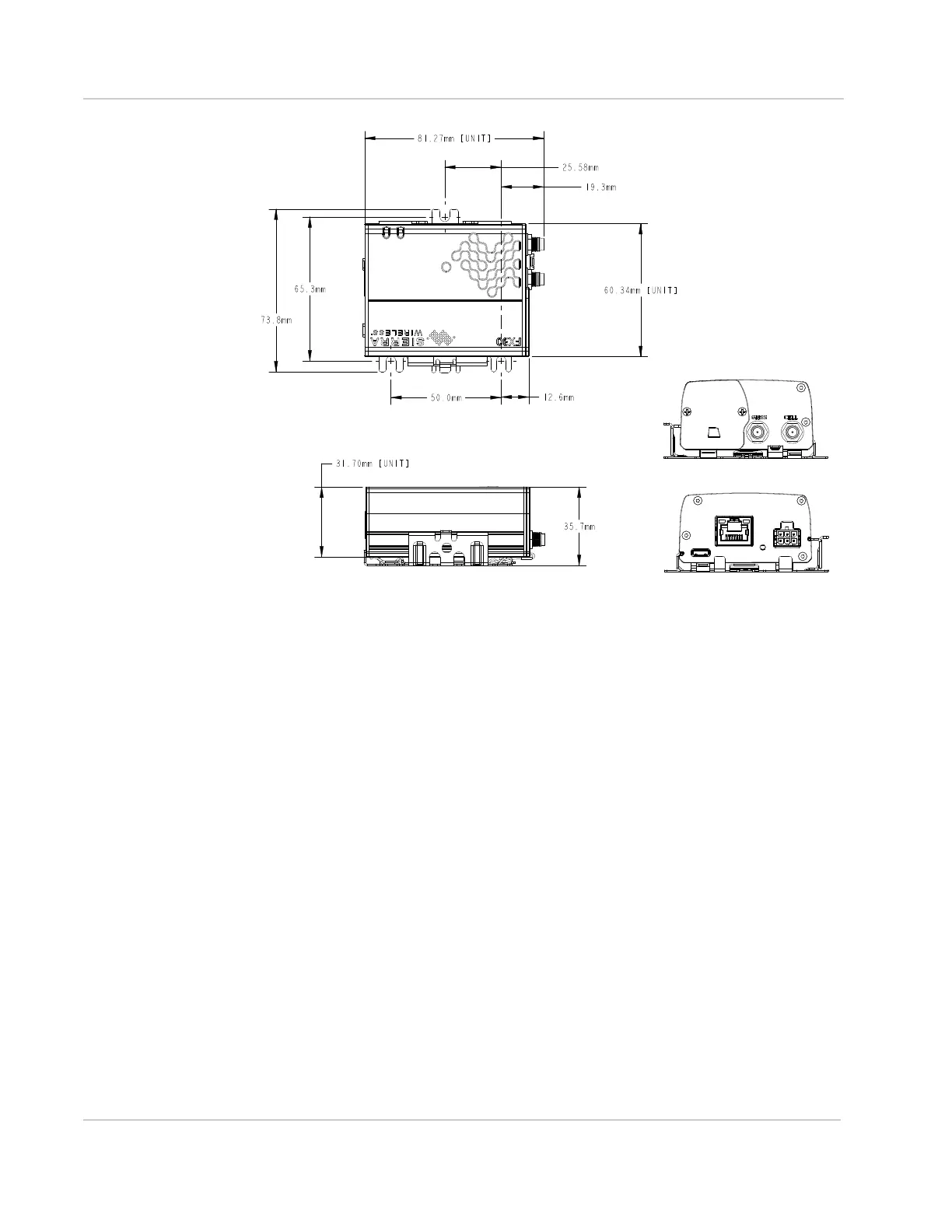
Figure 3-3: FX30 on mounting bracket
Power Modes
The FX30 is designed to handle extremely low power. It has three power modes:
• OFF Mode
• Ultra Low Power Mode on page 48
• Active Mode on page 48
OFF Mode
In Off mode the FX30 application processor, WWAN radio, and low power micro-
controller are off. On/Off is controlled by the On/Off Pin 3/GPIO24 and Power
Hold/GPIO58.
If no Legato applications are in place for GPIO58 (power hold), the gateway is off
when Pin 3 is low and on when Pin 3 is high.
However, the power line from Pin 3 is also connected to GPIO58 (power hold).
GPIO58 is low by default. If either Pin 3 or GPIO58 is high, the gateway is on.
GPIO24 monitors Pin 3. (See Figure 3-4 on page 48.) This gives you the option to
design an application that detects when Pin 3 goes low, and holds the power on
temporarily to complete the desired actions prior to the gateway turning off, for
example, a graceful shutdown process or a last-gasp type feature.
Top View
Side View
End Views
Note: “Unit” refers to the gateway itself.
FX30 with Ethernet port shown















 To Next Page