SD9K digital drum kit User manual
12
connections
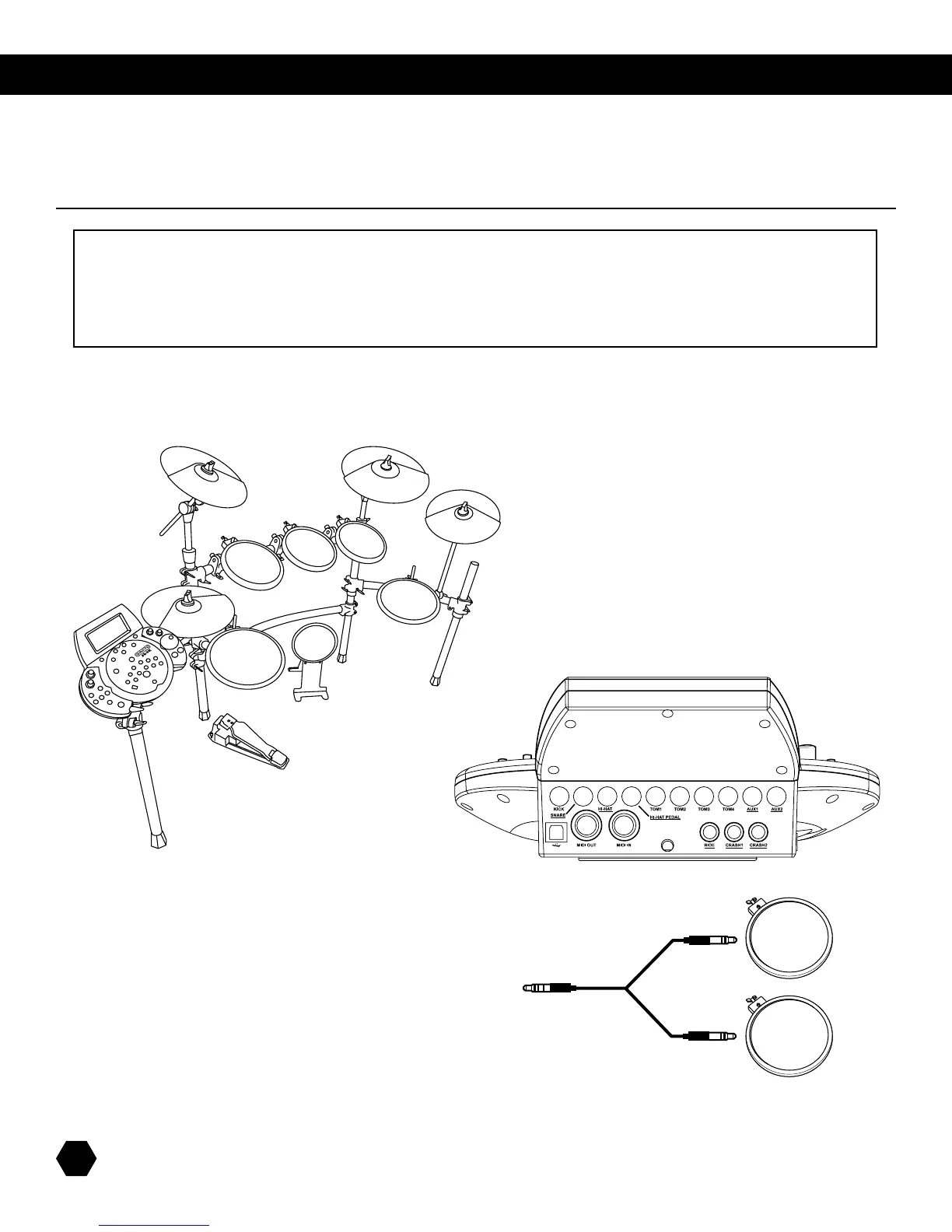
Pads and Pedal:
Usingtheprovidedcables,connecteachpadtoitscorrespondingtriggerinputjack,followingthemarkingsonthecables.The
underlinedtriggerinputnamesshowwhichinputsuseTRS(stereo)cables.Secureallthecablestothestandusingtheprovided
cable clips.
pads and pedals
CAUTION!
To avoid damage, turn the SD9K and all related devices OFF prior to connecting or
disconnecting cables.
AUX1 & AUX2 inputs
TheSD9Khastwoadditionalauxiliarytriggerinputjacks,which
letyouexpandthekitwithoptionalpads.EachAUXinputcanbe
conguredindividuallyforusewithadual-zonepad(head/rim),
ortwosingle-zonepads.ThecompatiblepadsareoneSD9K11”
dual-zonesnarepad,ortwoSD9KorSD5K/SD7Ksingle-zonetom
pads.Usea2-monoto1-stereoy-cable,asshownintheillustration,
toconnecttwosingle-zonepadstoasingleAUXinput.
NOTE:Youcanalsoconnectthe11”FloorTompadtotheAUX2inputinstead
oftheTOM4inputusingaTRScable,ifyouwanttousetheRimfunctionofthis
pad.Inthiscase,thispadwillbecontrolledwithAUX2andAUX2RIM.



 To Next Page