SD9K digital drum kit User manual
40
saving sd9k data to card
YoucansavethevariousSD9KdatatoanSDCardforbackuportoexchangedatawithotherusers.
OnoneSDcard,youcansaveupto256UserKitsand256UserSongs.
ThemaximumlenamelengthontheSDCardiseightcharacters.
NOTE:Ifyouattempttosavealewithanamethatalreadyexistsonthecard,thescreenwillbrieyshow“SameName!”and
return to the file naming screen.
To replace a file with the same name on the card, you must first delete the file from the card.
Saving Kits
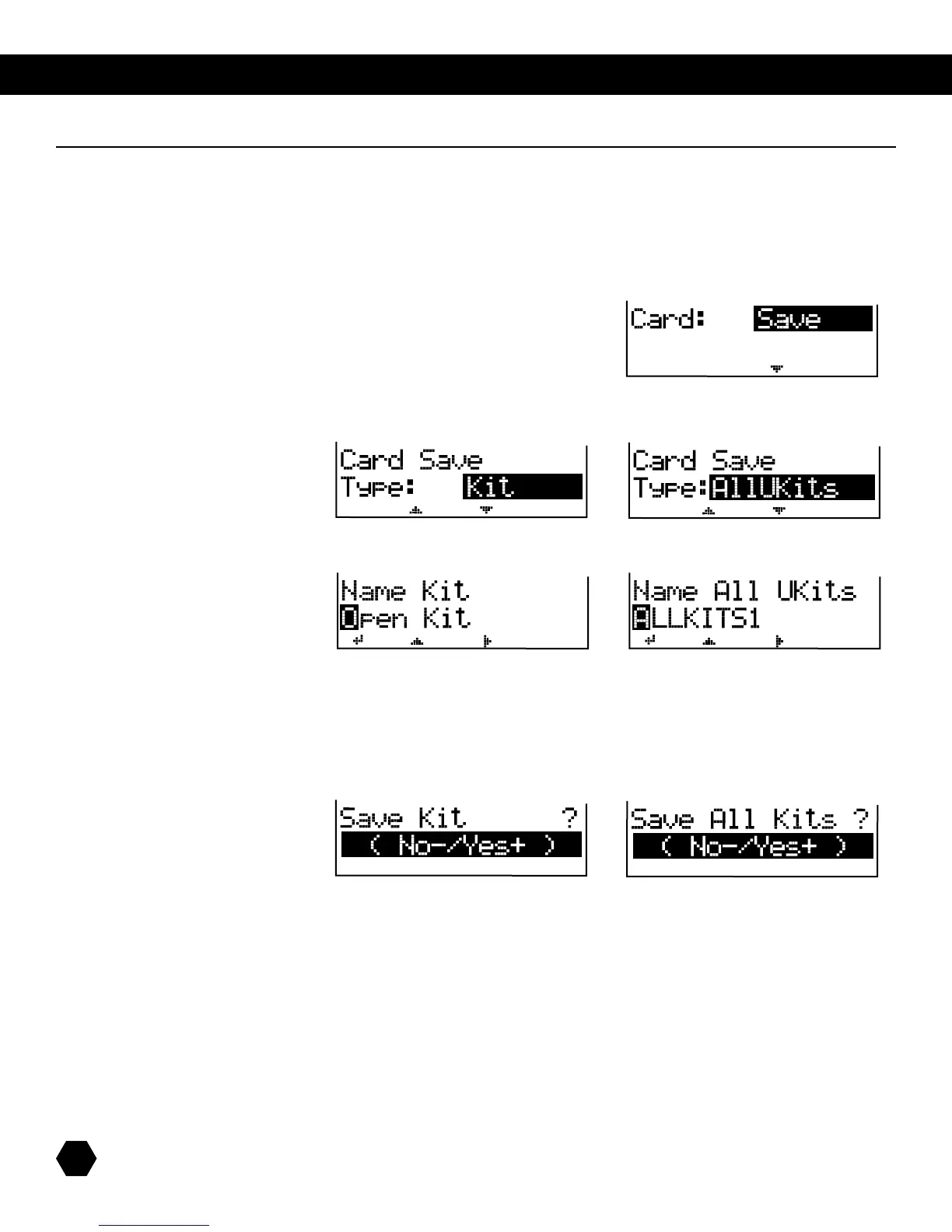
1. Select Card: Save option:
2. Press [PAGE DOWN] to select the type of file to save.
Tosaveasinglekittothecard,selectType:Kit.
TosaveallKitsasonele,selectType:AllUKits:
or
3. Press [PAGE DOWN]togototheKitlenamingpage:
or
UsetheDatawheelor[+]/[-] buttons to change characters, and the [PAGE] buttons to move the cursor.
NOTE:WhensavingasingleKit,theactiveKitisautomaticallyselected,andthelenamedefaultstotheKitname.
Press [SAVE] to access the Save confirmation page.
or
Press [+] to save or [-] to cancel.
Afterthesaveoperationiscompleted,thescreenwillbrieydisplay“SaveOK!”,thenwillreturntotheCardSaveTypepage.



 To Next Page