SD9K digital drum kit User manual
44
Loading Song Data
YoucanloadsongdatafromanSDCard,eitherfromtheSD9KsongssavedtotheSDCardorfromotherStandardMIDIles
(*.mid)createdoreditedusingothersequencers.IfyouwanttoloadyourownMIDIletoanSD9Kusersong,youmustputthele
intotheUSERSONGfolder,andthelemustmeetcertainrequirements:
• MIDIFileFormat:Type1
• Resolution:from24to1024PPQN
• Tracks:7max.
• Channels:ch10-drums,ch11-percussion,ch12-part1,ch13-part2,ch14-part3,ch15-part4,ch16-part5
NOTE:SomeMIDIinformationdatawillbeignoredwhenloadingaMIDIlefromothersequencers.Ifyousavethissongbackto
thecard,thisinformationwillbelost.PleaserefertotheMIDIImplementationsChartAppendicesfordetailsaboutrecognizedMIDI
data.
NOTE:IfyouloadanSD9Ksong,theoriginalsongnamewillbeused(nottheSDcardlename).AndifyouloadanotherMIDI
le,thelenamewillbeusedasthesongnameinSD9K.
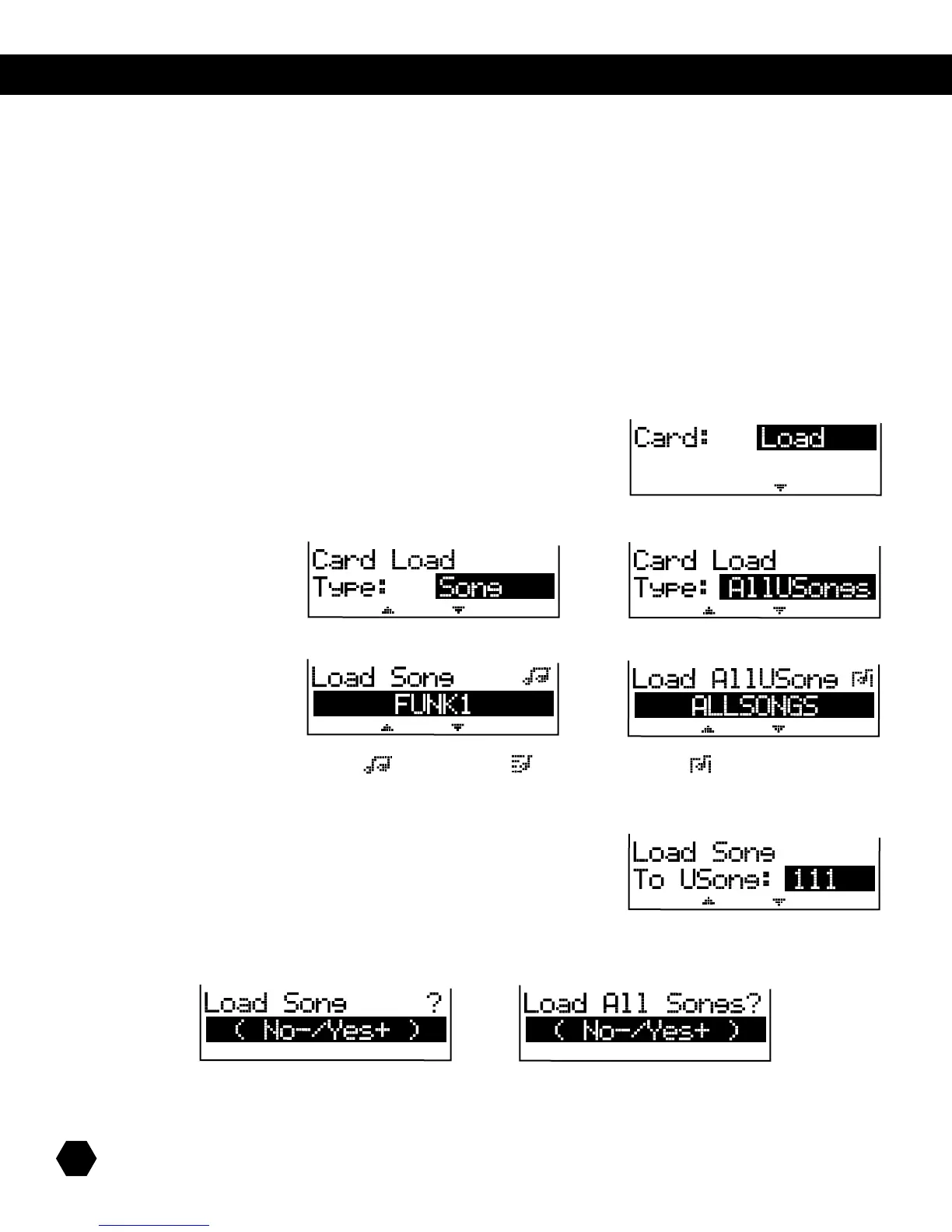
Select Card: Load option:
Press [PAGE DOWN] to select the Type of file to load.
ToloadasinglesongfromtheCardtoaUserSong,selectType:Song.ToloadallSongs,selectType:AllUSongs:
or
Press [PAGE DOWN]togototheSongleselectionpage.UsetheDatawheelor[+]/[-] buttons to scroll through Song files:
or
NOTE:AniconshowsthetypeofSongle:()InternalSong,()ExternalSong,and()AllSongs.
Press [PAGE DOWN]togototheUserSongdestinationpage(onlywhenloadingasingleSong).
UsetheDatawheelor[+]/[-]buttonstoselecttheUserSonglenumberyouwishtoload:
NOTE: If you have selected an External Song file, it can only load into Song 00.
NOTE:WhenloadinganAllSongsle,allusersongs–includingtheexternalsong–willbereplacedbynewdata.
Press [PAGE DOWN] to go to the Load confirmation page:
or
Press [+] to load or [-] to cancel.
Aftertheloadoperationiscompleted,thescreenwillbrieydisplay“LoadOK!,”thenreturntotheCardLoadTypepage.



 To Next Page