SD9K digital drum kit User manual
46
Deleting Files From Card
YoucanonlydeleteSD9KlesfromtheSDCard(i.e.Kits,Songs,Setup,MIDIFiles).Ifthereareothertypesoflesstoredonthe
card,theSD9Kwillnotdetectthemandthereforewillnotbeabletodeletethem.
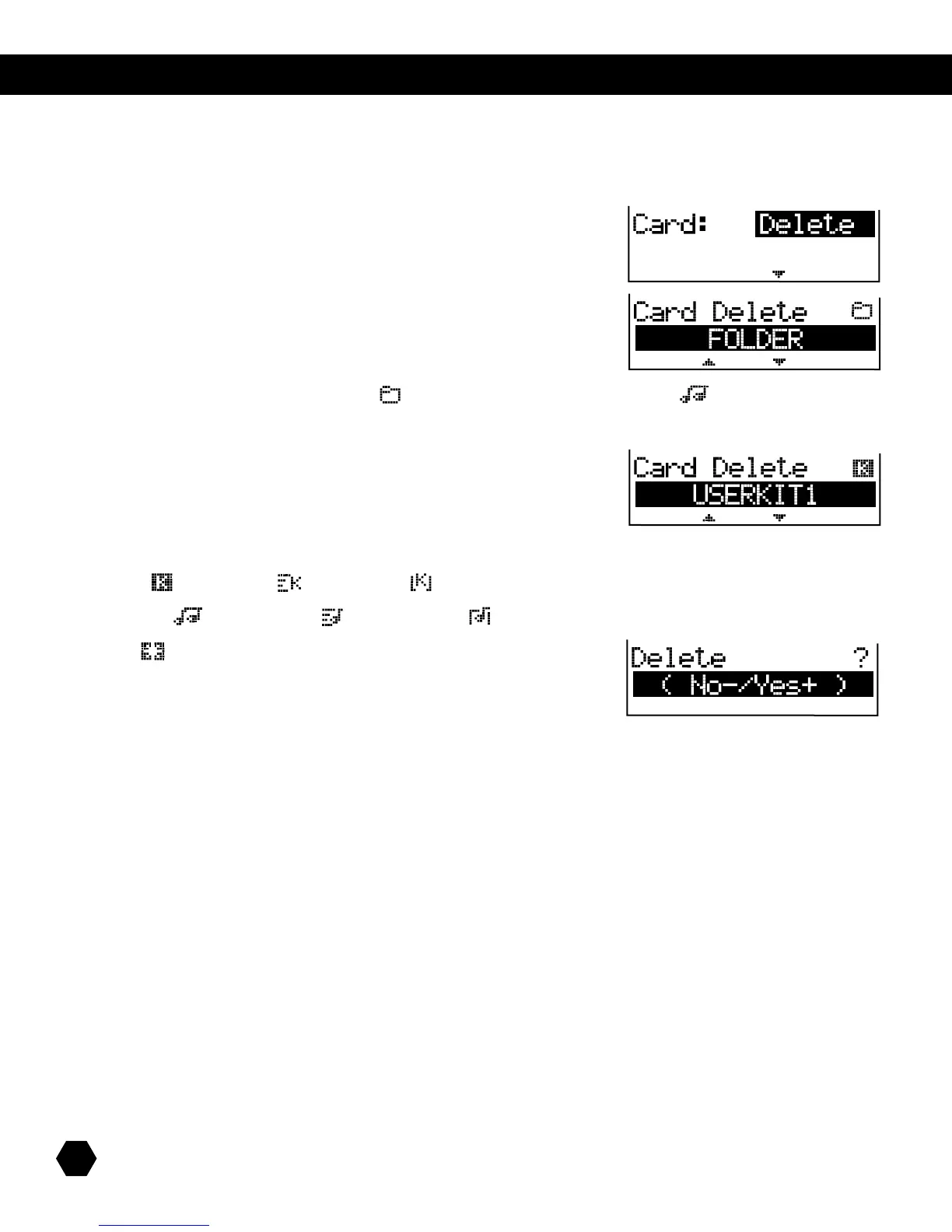
SelectCard:Deleteoption:
Press [PAGE DOWN] to open the root directory of the card.
UsetheDatawheelor[+]/[-]buttonstoscrollthroughFoldersandMIDIFiles:
NOTE:FoldersareindicatedbyaFoldericon().MIDIFilesareindicatedbyaSongicon().
If a folder is selected, press [PAGE DOWN]toopenthefolderandscrollthroughSD9Kles.[PAGE UP]isusedtogobackone
folder/directorylevel:
SD9Kletypesareindicatedbytheirrespectiveiconsandstoredinthefollowingspecicfolders:
USERKIT:()InternalKit,()ExternalKit,()AllKits,
USERSONG:()InternalSong,()ExternalSong,()AllSongs,
SETUP:()Setup
Press [PAGE DOWN]toaccesstheDeleteconrmationpage:
Press [+] to delete or [-] to cancel.
AftertheDeleteoperationiscompleted,thescreenwillbrieydisplay“DeleteOK!”thenreturntotheCardDeletepage.



 To Next Page