Operating Instructions 6
man-CH-PVF-C-V17-2 Minilab 29
6.1.2.3 Print Out
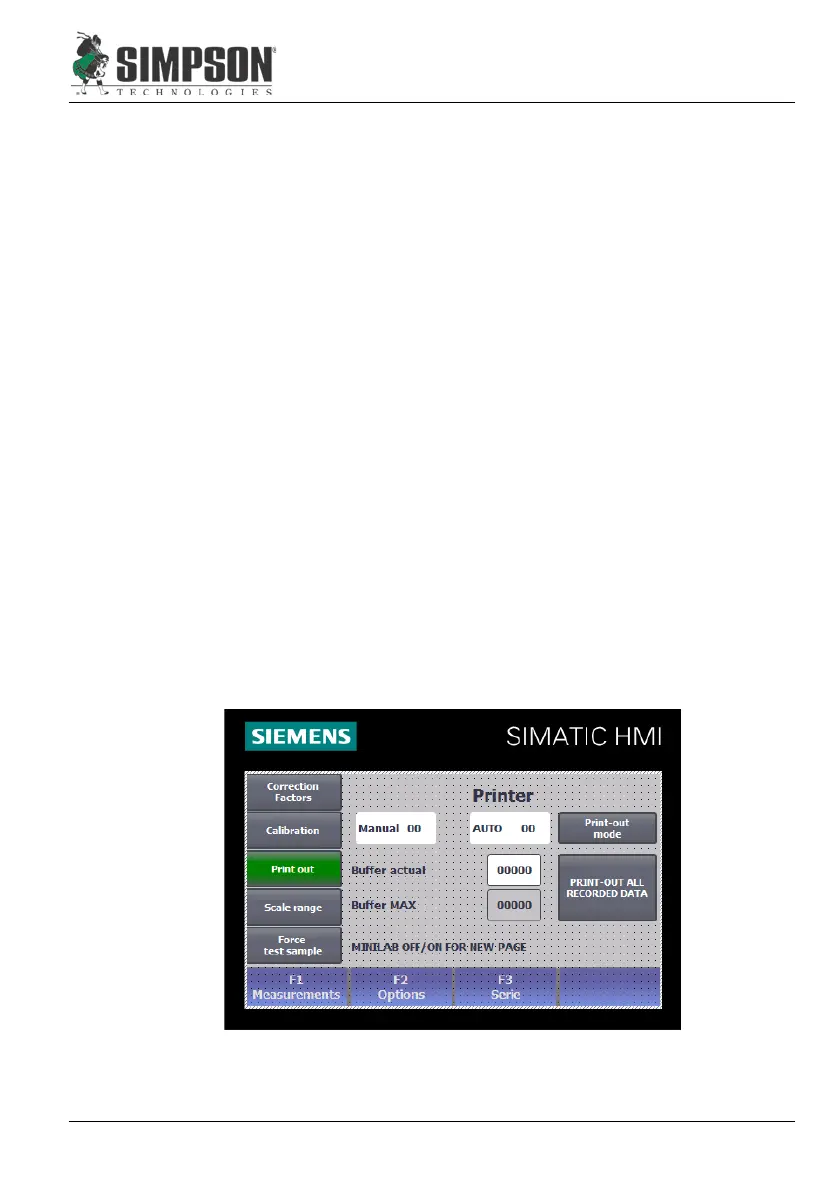
In the menu, "Print," the user can switch between "Manual" and
"Automatic” by clicking the “Print-out mode” button.
With "AUTO," the result of each measurement is sent to the serial inter-
face.
With "Manual," the complete data record can be printed at any time. A
maximum of 100 data records are stored. The memory works on the
basis of the "FIFO" principle (First-in, First-out). When the 101st. data
record is ready, the first record is deleted and all others move down one
memory place. The number of data records is displayed under "Current.”
If part of the data record must be printed on a separate sheet, the Minilab
must be switched off with the Main Switch (Figure 8.3, Item 1) and then
switched on again.
All data records can be transferred to a PC rather than printing the data if
so desired. This is done by connecting a PC to the serial interface on the
Minilab instead of a printer. The connection can be established with the
Windows standard software "Hyper Terminal.” The data transmitted by
the Minilab can only be stored as a text file. The settings on the Minilab
for the transmission of data are the same as for a printer (see Section
5.3.1 & 5.3.2).


 To Next Page