81
28
Do not forget to switch off the machine wlile
working in the bobbin area.
• Raise presser foot.
• Turn hand wheel toward you until needle is in its highest
position.
• Open slide plate and remove empty bobbin
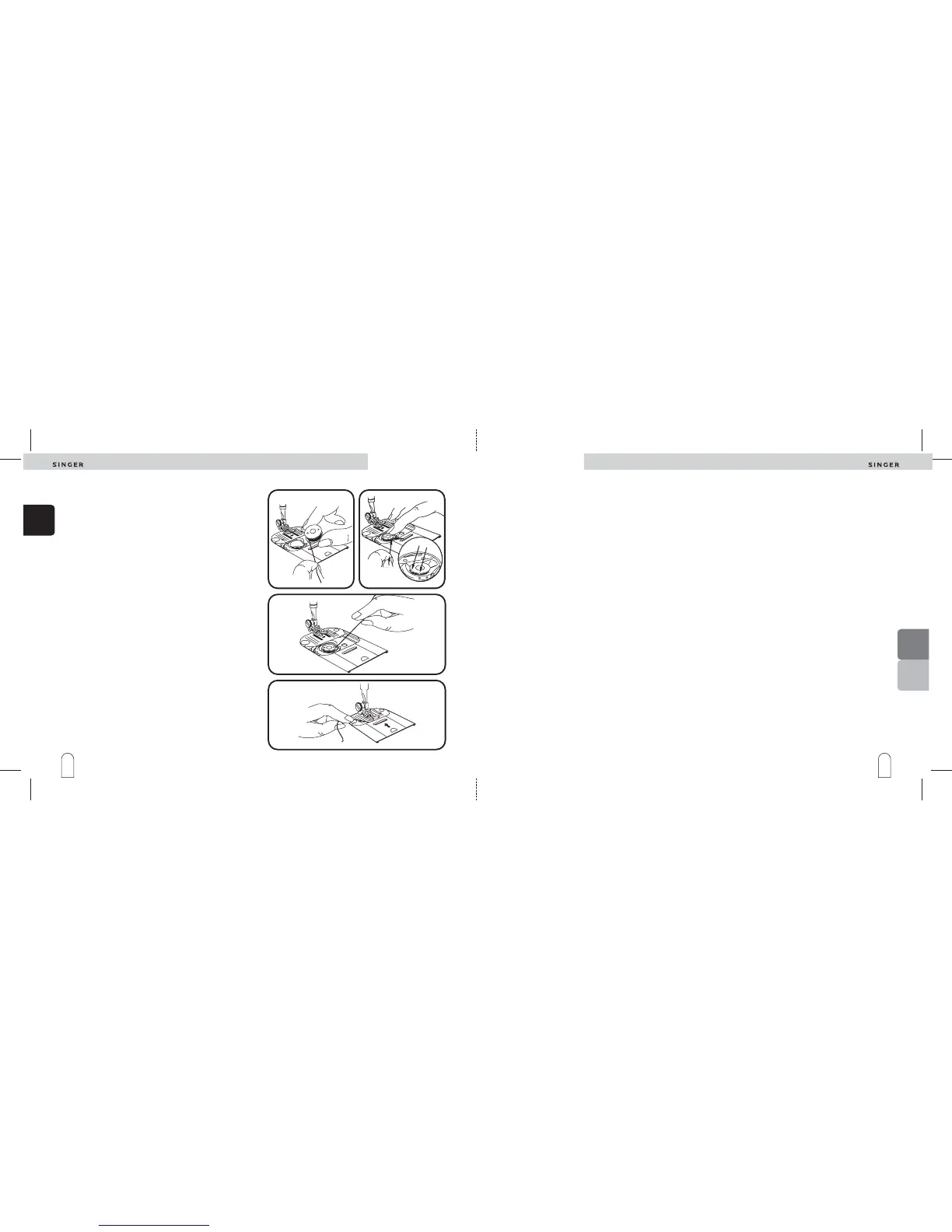
1. Pull approximately 10 cm of thread from replacement
bobbin and insert bobbin into case (illustration 1).
While unwinding, the bobbin shall turn from right
to left.
2. Holding bobbin in place, guide thread into notch ( )
) (illustration 2). It's very important to get the
thread correctly placed. If not correctly threaded your
tension will be off.
3. Draw several inches of thread diagonally across the
bobbin toward the back of the machine (illustration 3).
4. While holding thread on outside, close the slide plate,
allowing thread to extend through the slot between the
slide plate and needle plate (illustration 4).
Note:
A
B
and then down the slot to the left and guide around into
notch (
Inserting a bobbin
Preparing
the
machine
Preparing
the
machine
2
3
4
1
En algunos tipos de telas, puede producirse una diferencia
en la densidad de los puntos bien en el lado derecho o en el
izquierdo del ojal.
Esta diferencia se ajusta fácilmente girando el botón ( )
situado en el centro del selector del largo de la puntada,
para nivelar la densidad del punto.
Un giro muy ligero del botón, producirá un cambio
notable.
• Si los puntos del lado derecho del ojal están demasiado
abiertos, gire el botón ligeramente hacia la derecha,
hasta que aumente la densidad de los puntos (fig. 1).
• Si los puntos del lado izquierdo del ojal están dema-
siado abiertos, gire el nivelador ligeramente hacia la
izquierda, hasta que la densidad de los puntos aumente
(fig.2).
A
En algunos tipos de telas, puede producirse una diferencia
en la densidad de los puntos bien en el lado derecho o en el
izquierdo del ojal.
Esta diferencia se ajusta fácilmente girando el botón ( )
situado en el centro del selector del largo de la puntada,
para nivelar la densidad del punto.
Un giro muy ligero del botón, producirá un cambio
notable.
• Si los puntos del lado derecho del ojal están demasiado
abiertos, gire el botón ligeramente hacia la derecha,
hasta que aumente la densidad de los puntos (fig. 1).
• Si los puntos del lado izquierdo del ojal están dema-
siado abiertos, gire el nivelador ligeramente hacia la
izquierda, hasta que la densidad de los puntos aumente
(fig.2).
A
Dans certains tissus, il peut apparaître une différence de
densité de point entre la lèvre gauche et la lèvre droite de
la boutonnière.
Cette différence peut être aisément corrigée en tournant
le bouton ( ) situé au centre du sélecteur de longueur de
point.
Un déplacement, même très faible de ce bouton modifie la
densité.
• Si les points de la lèvre droite sont trop ouverts,
tournez le bouton poussoir vers la droite jusq'à ce que la
densité des points augmente (fig. 1).
• Si les points de la lèvre gauche sont trop ouverts,
tournez le bouton poussoir vers la gauche jusq'à ce que
la densité des points augmente (fig. 2).
A
Regulación del ojalRegulación del ojal
Equilibrage de la
boutonnière
Boutonniére
et boutons
Boutonniére
et
boutons
Ojales y
botones
Ojales y
botones
B
A


 To Next Page