© Feb. 2023
150 TB20J Plus Maintenance Manual
CONTROL SYSTEM
icon before the selected option), press and hold
for 3s to confirm the selection (there will be the
icon
before the selected option after
confirmation).
3. Press
successively to return to the main inter-
face, and power off the machine as required.
Note:
• Parameter (factory) set: used to save the current pa-
rameters as factory parameters and the original fac-
tory parameters will be overwritten. Please use this
function with caution.
• Restore parameters (factory): used to restore the
current parameters to the factory parameters and
the current parameters will be overwritten. Please
use this function with caution.
• Restore default: used to restore the current parame-
ters to the default parameters and the current pa-
rameters will be restored. This function shall be used
with caution and generally only used in the initial in-
stallation and debugging (requiring a password to re-
store the default parameters).
• Working time reset: used to clear the total working
time (after clearing, the total working time is about
36.5h). Please use this function with caution.
11.7 SYSTEM INFORMATION
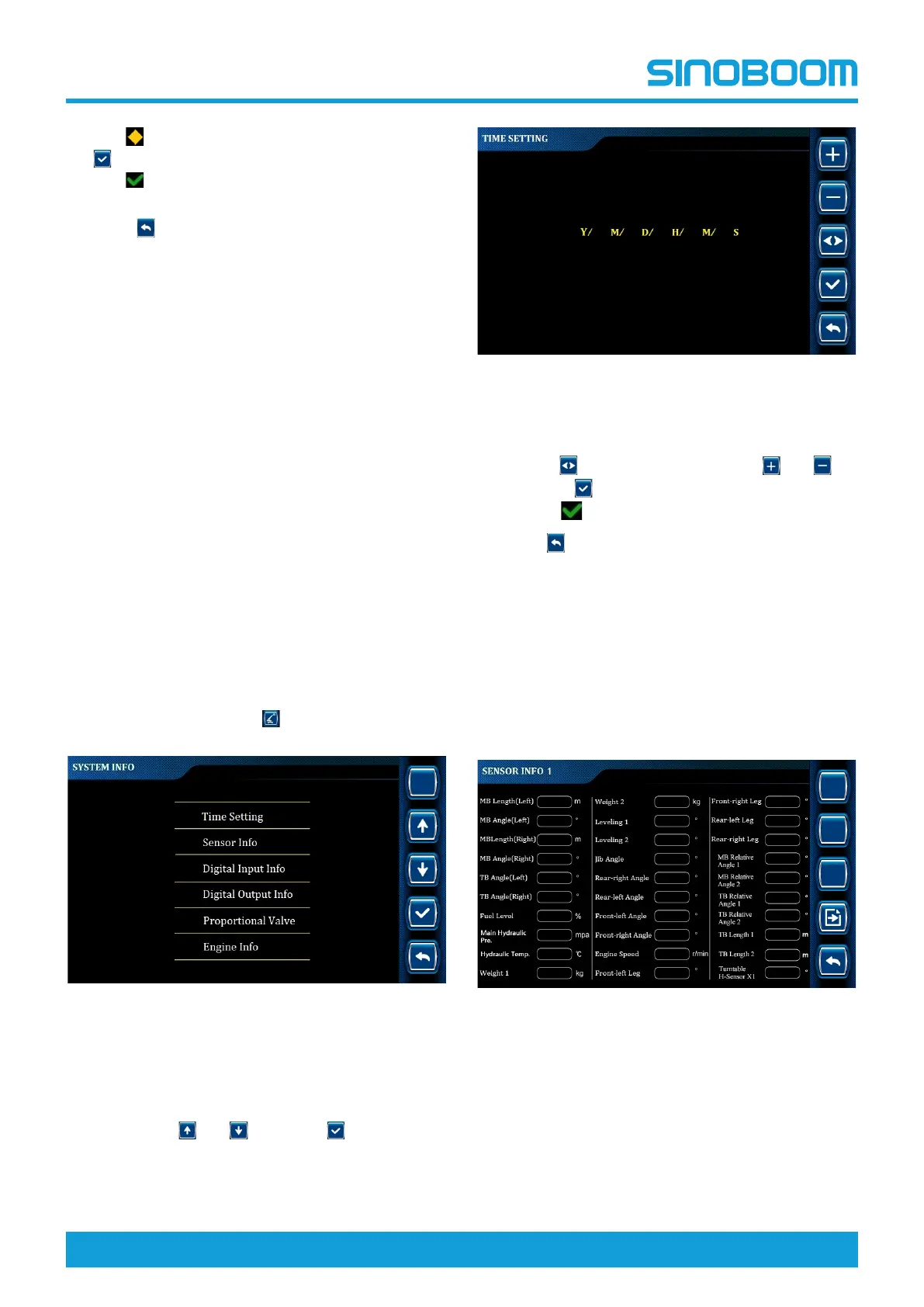
On the main interface, press to enter SYSTEM INFO
interface.
Fig 20 SYSTEM INFO interface
Time Setting
1. On the SYSTEM INFO interface, select Time Set-
ting through
and , and press to enter TIME
SETTING interface.
Fig 21 TIME SETTING interface
2. On the TIME SETTING interface, select the desired
setting option (the selected option will be flashing)
through
, change the value through and ,
and press
to confirm the changing (there will be
the icon
at the top of the interface).
3. Press
successively to return to the main inter-
face, and power off the machine as required.
Sensor Information
• The sensor information option is mainly used to
query the actual value of the sensor configured on
the machine, thus determining whether each sensor
is working normally.
• The configuration of switches is subject to the actual
machine configurations.
Fig 22 SENSOR INFO 1








 To Next Page