49
OBD-II/EOBD OBD-II/EOBD Menu
z To clear emission related Data:
1. Select Clear Emissions Related Data from the menu.
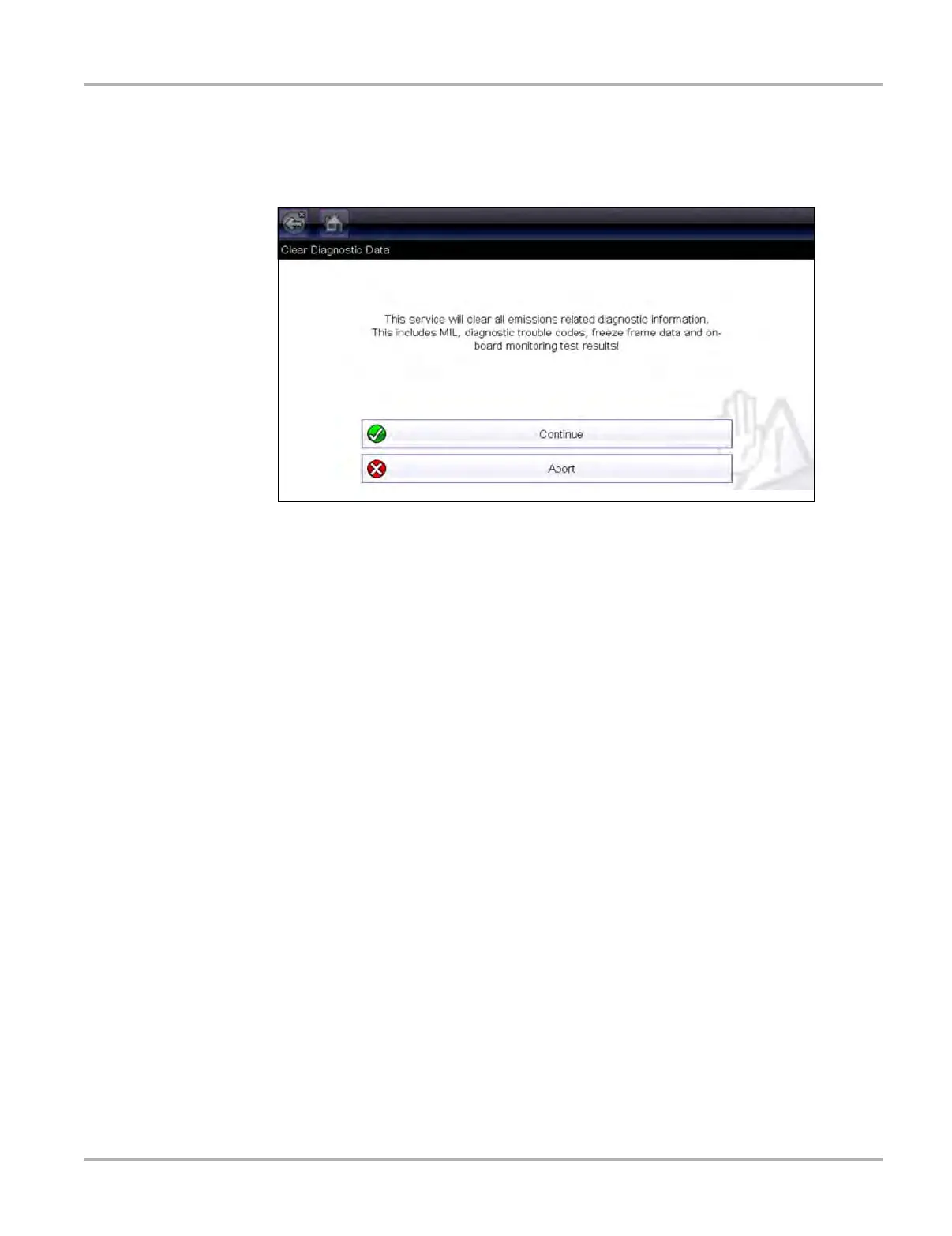
A confirmation message displays to help prevent loss of any vital data (Figure 4-7).
Figure 4-7 Clear codes confirmation message
2. Continue from the confirmation message.
The screen updates several times as ECM memory is erased, then a “data has been cleared”
message displays.
3. Select Continue to return to the Select Service menu.
($05, 06, 07) Display Test param./Results
This option opens a submenu of parameters and test results from various sensors, monitor test
results, and a record of DTC setting conditions detected during the last drive cycle. The submenu
includes:
• ($05) Oxygen Sensor Monitoring
• ($06) On-board Monitored Systems
• ($07) DTCs Detected During Last Drive
($05) Oxygen Sensor Monitoring
This option opens a menu of tests available for checking the integrity of the oxygen (O2) sensors.
Making a selection displays all of the pertinent O2 sensor parameters for the specific test. The test
identification (ID) displays at the top of the data list.
($06) On-board Monitored Systems
This option opens a menu of tests from the monitored systems. The available data is for specific
systems and components that the on-board diagnostic system monitors continuously, such as
misfire, or non-continuously, such as the catalyst system. Making a menu selection displays the
test results.


 To Next Page