11
D375 | Snom 370 User Manual Setting up the Phone
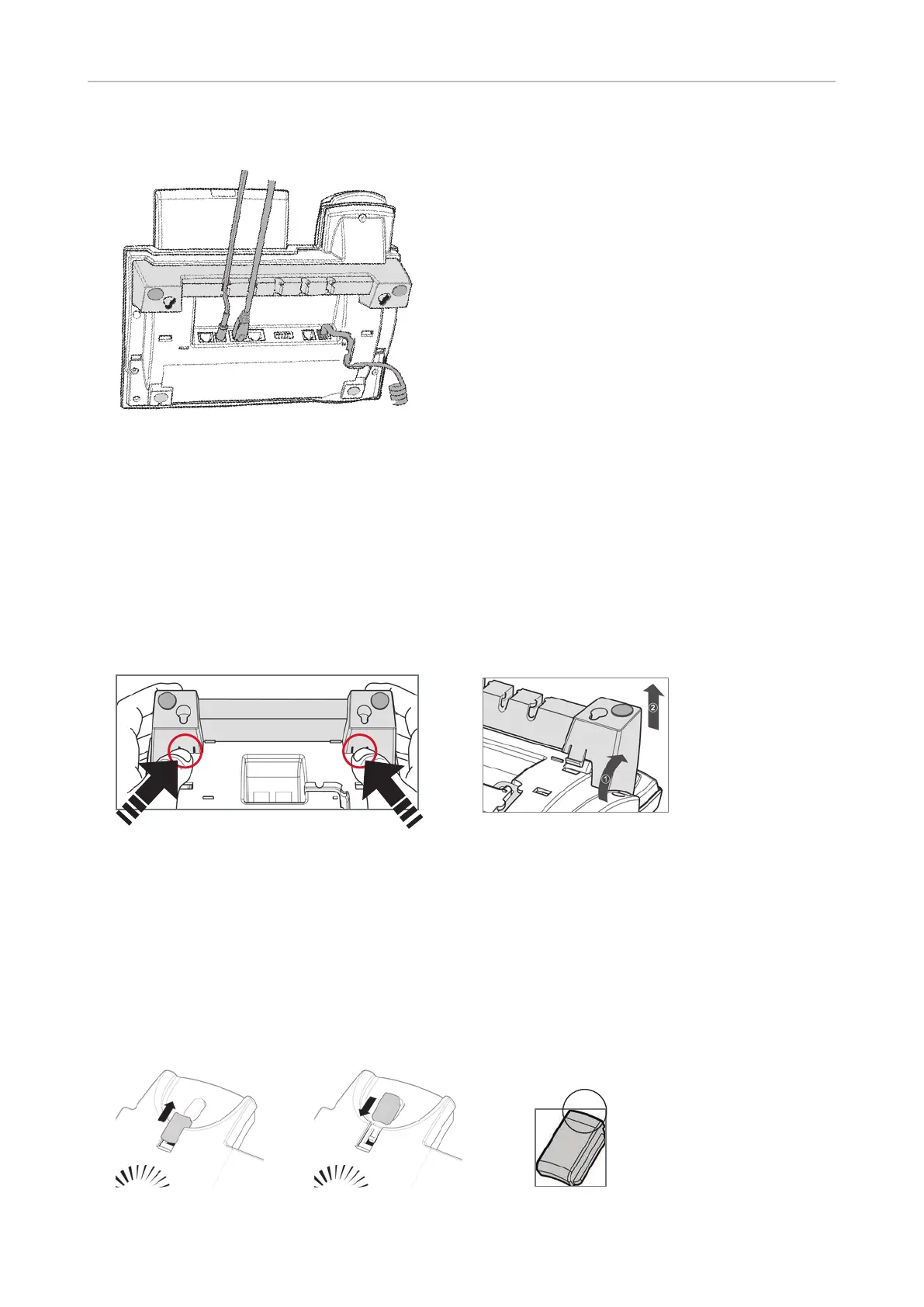
3. Place the cables (Ethernet, etc.) in the cable slots of the footstand (Fig. 3).
Fig. 3
Attaching for wall mounting
See "Appendix 4 - Wall Mounting" on page 85
Detaching
Lightly press the snap-fits of the footstand inwards (Fig. 1) and, at the same time, tilt the footstand
backwards and lift it from its anchorage in the mounting holes (Fig. 2).
Fig. 1 Fig. 2
Rotating the tab of the cradle
The phone is delivered with the tab level with the inner edge of the cradle. If you are going to mount
the phone on a wall, we recommend that you rotate the tab 180°. After rotation, the tip of the tab
(Fig. 3) will protrude slightly above the edge of the cradle. The small rectangular hole in the receiver
casing fits perfectly over the now protruding tip, holding the receiver safely in place in the upright
position on the wall.
Fig. 1 Fig. 2 Fig. 3



 To Next Page