29
D385 User Manual Getting to Know Your Phone
Page 1 Page 2 Page 3 Page 4
Page 1
P7
P8
P9
P10
P11
P1
P2
P3
P4
P5
P6
P12
P19
P20
P21
P22
P23
P13
P14
P15
P16
P17
P18
P24
P31
P31
P33
P34
P35
P25
P26
P27
P28
P29
P30
P36
P43
P44
P45
P46
P47
P37
P38
P39
P40
P41
P42
P48
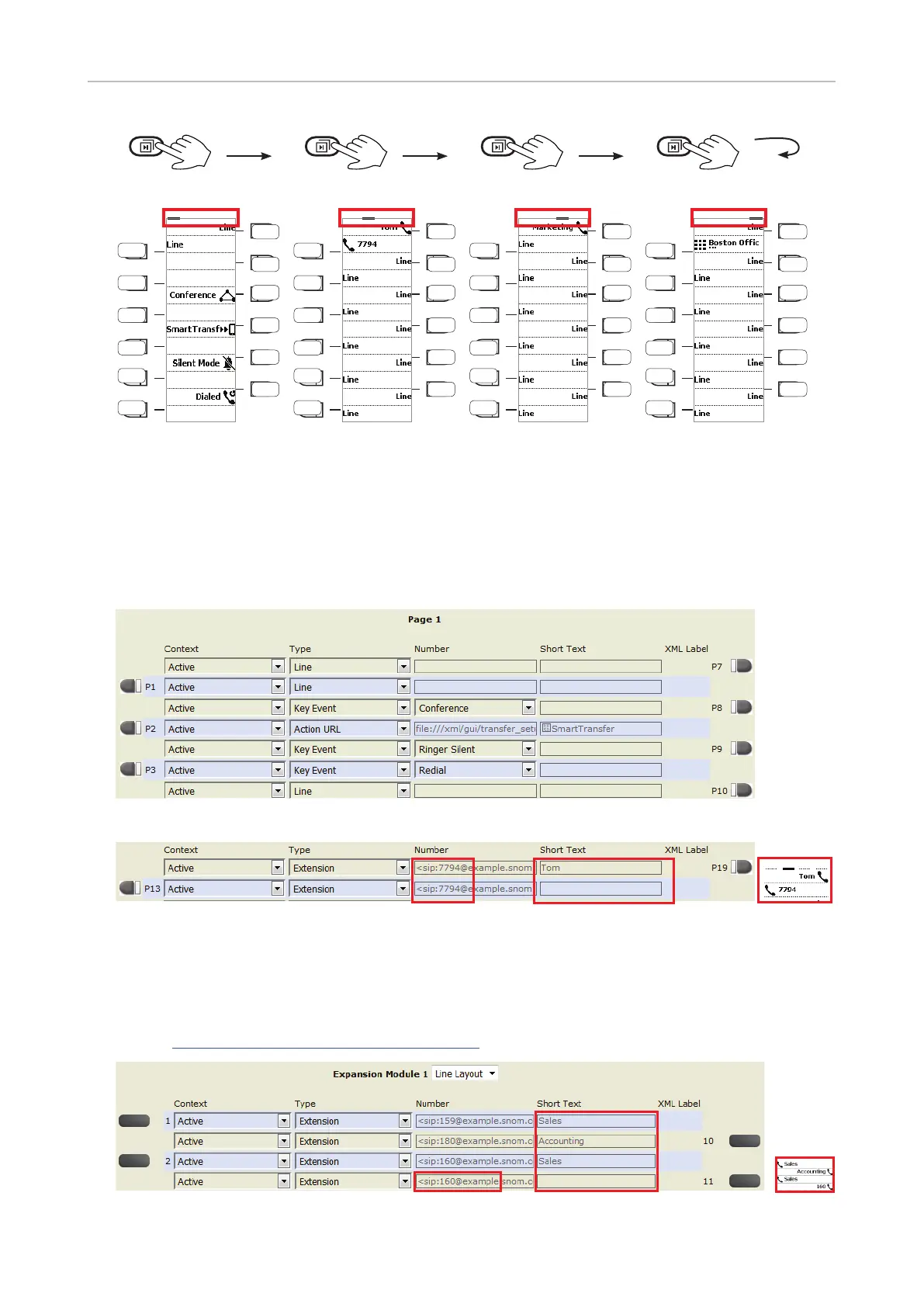
Fig. 1
Function key page of phone's web interface
For more information on opening and using the phone's web interface, see "The phone's web
interface" on page 37; for information on programming the function keys, see "Configuring the
function keys" on page 69.
Fig. 2 - Page 1 keys on phone's web interface
Fig. 3 - Settings on phone's WUI and labels shown on function key display
When expansion modules are connected to the phone, they will also be shown on the function key
page of the phone's web interface, below the phone's function keys and above the Apply button. Their
settings are stored on the phone, not on the expansion module. For more information, see "Example
2, Extension monitoring and call pick-up on D3 expansion module" on page 31 and the D3 user manual
available at http://wiki.snom.com/D3/Documentation.
Fig. 4 - Function keys of connected D7 expansion module



 To Next Page