61
D385 User Manual Using the Phone
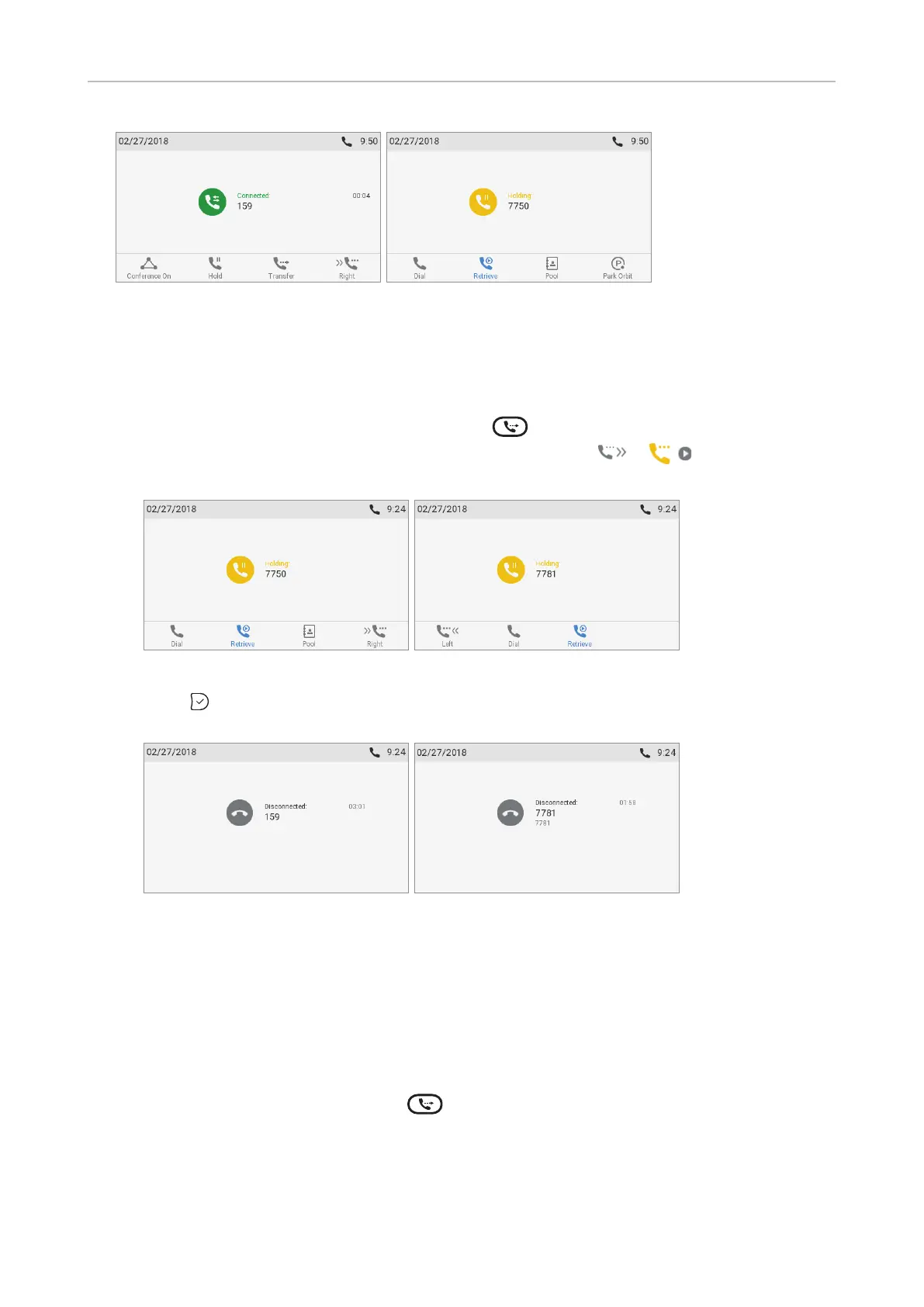
Fig. 1 Fig. 2
• With more than one call. All calls must be on hold. In the below example you have two calls from
phone numbers 7781 and 7750 on hold. You want to transfer the call from 7781 to 159.
1. Dial 159 and announce the call (Fig. 1, above).
2. If the third party wants to accept the call, press . If the "holding 7750" screen, i.e., the call
you do not want to transfer, appears on-screen (Fig. 3), press
/ to bring "holding
7781" on-screen (Fig. 4).
Fig. 3 Fig. 4
3. Press . You may briefly see the messages "Disconnected 7781" and
"Disconnected 159", indicating that the transfer was completed.
Fig. 5 Fig. 6
The remaining call on hold or the first of the remaining calls on hold will then appear on-
screen.
Blind transfer
• Blind transfer of active call
1. With a call on the line (Fig. 1), press
. The dial screen will appear.



 To Next Page