62
D385 User Manual Using the Phone
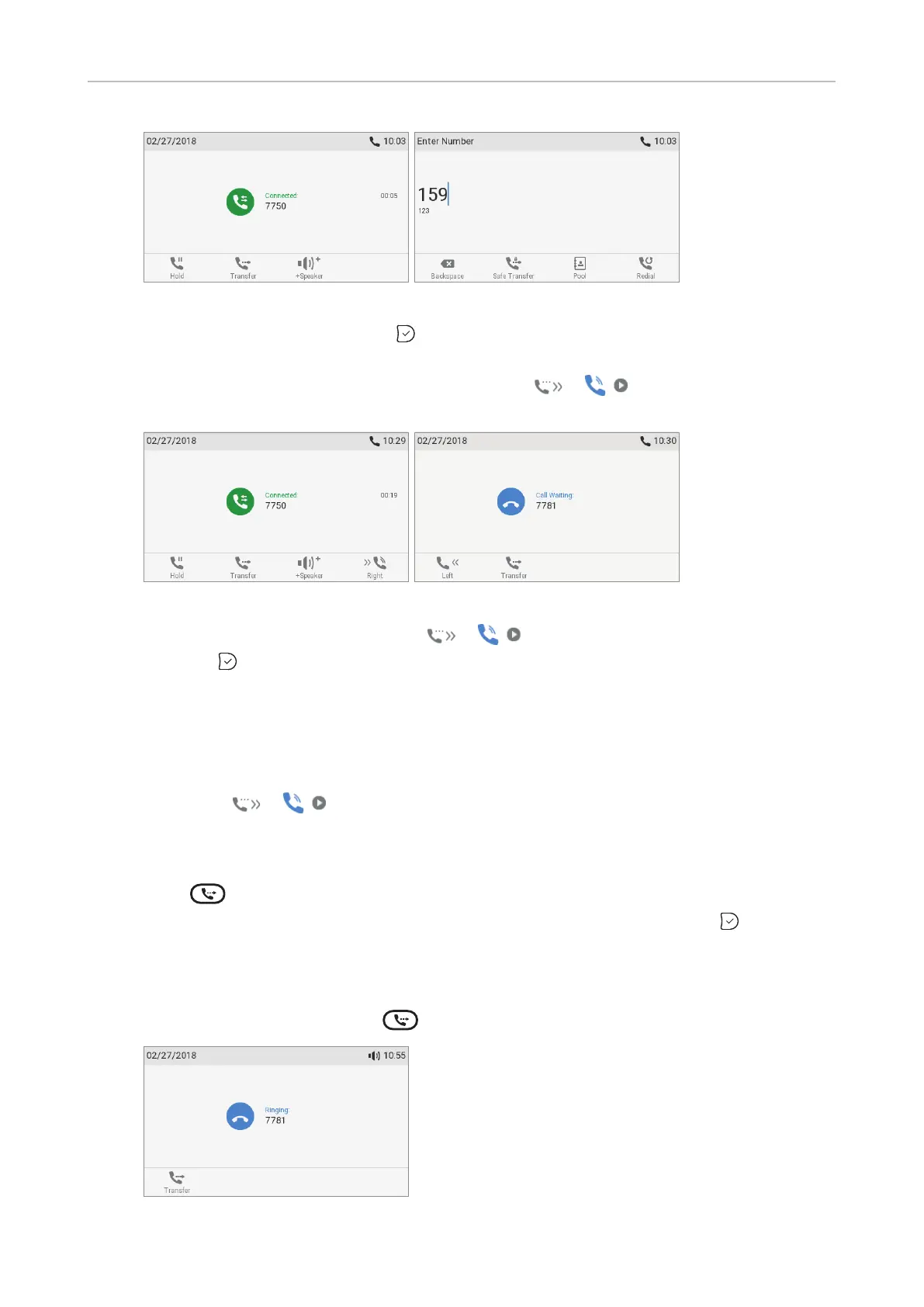
Fig. 1 Fig. 2
2. Dial the number (Fig. 2) and press . You may briefly see the message "Disconnected"
followed by the caller's name/number, indicating that the transfer was completed.
If a call is waiting (Fig. 3), as indicated by the symbol
/ in the lower right corner,
you must reject the call waiting before you can transfer your active call blindly.
Fig. 3 Fig. 4
a. Press the function key underneath / . The "Call Waiting" screen (Fig. 4) appears.
b. Press
to reject the call. The caller hears the busy signal.
Note: If you want to transfer the call waiting, see next section.
• Blind transfer of call waiting
1. If you are in a call and want to transfer a call waiting (Fig. 3, above), press the function key
underneath
/ . The "Call Waiting" screen (Fig. 4, above) appears.
Note: Your active call will remain active while you are transferring the ringing
call.
2. Press
. The dial screen (Fig. 2, above) appears.
3. Enter the number of the third party you intend to transfer the call to and press
. The
"Connected" screen (Fig. 1, above) appears.
• Blind transfer of ringing call
1. With a call ringing (Fig. 5), press
.
Fig. 5



 To Next Page