58
D385 User Manual Using the Phone
◦ By the slowly blinking line key.
◦ By the slowly blinking call indication LED.
◦ By the double beep.
You can now:
◦ transfer the held call blindly or with prior announcement - see
"Transferring calls" on page 60.
◦ receive and make calls and put other calls on hold.
Pick up the held call by pressing its line key or by pressing
again. If the other party hangs up
while on hold, the call is terminated on your phone as well and the LED indicators are turned o.
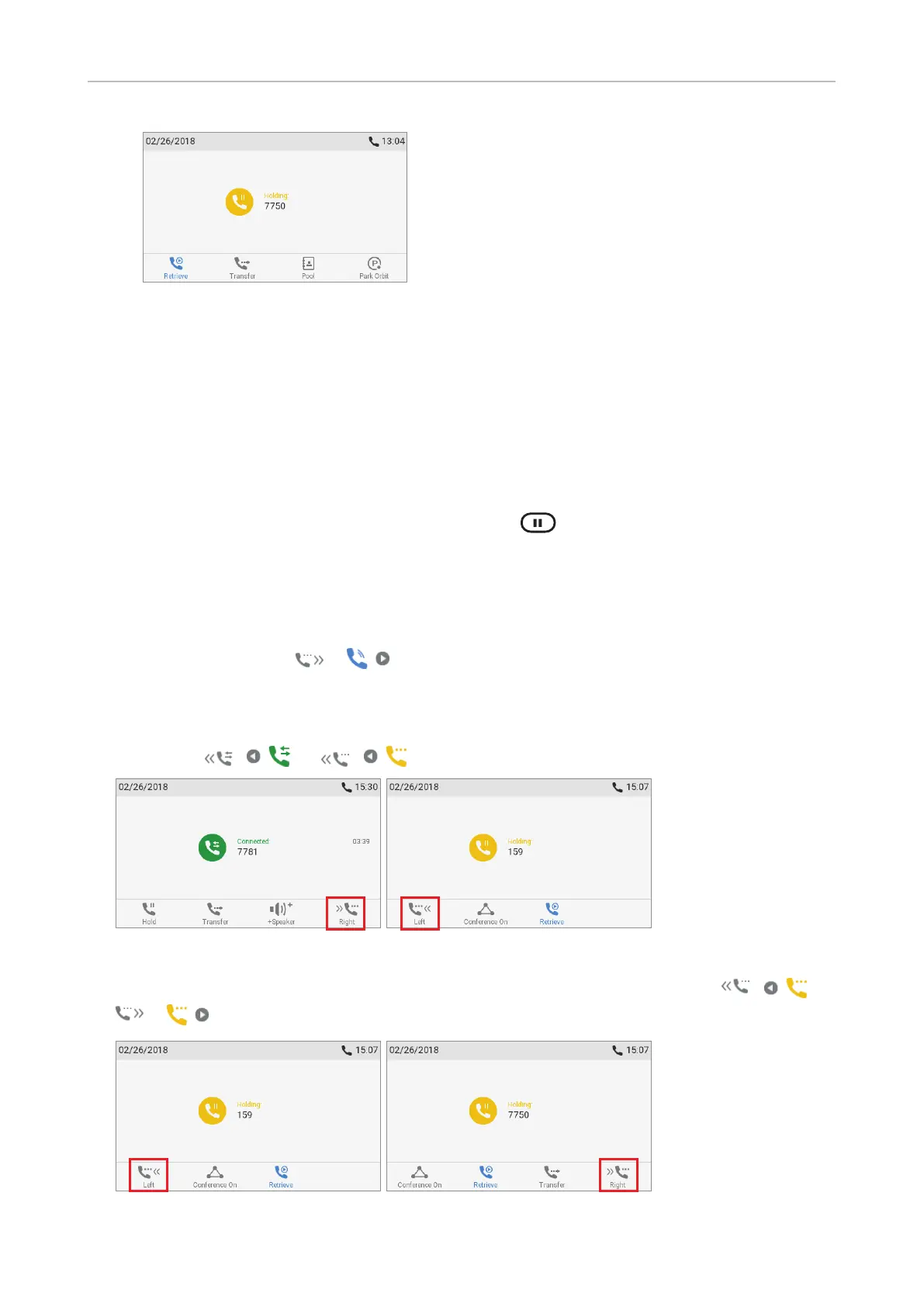
Holding multiple calls
When you are in a call with one party and have one or more calls on hold and when there is more than
one call on hold, the symbol
/ is available in the function key line. You can switch back
and forth between the active call and any call on hold. Up to 12 simultaneous calls are possible, if
supported by the PBX.
• In Fig. 1 and 2 the phone is in one active call with a second call on hold. Press the function key
underneath
/ or / to show the call not currently on screen.
Fig. 1 Fig. 2
• In Fig. 3 and 4 there are two calls are on hold. Press the function keys underneath / or
/ to show the call not currently on screen.
Fig. 3 Fig. 4
(1/2) (2/2)



 To Next Page