74
D385 User Manual Configuring the Function Keys
Example 1, Extension monitoring and call pick-up
This feature makes it possible to pick up a call ringing on another extension registered at the same
registrar, for example when the other extension is busy or when the user is absent. The prerequisites
for this function are:
◦ It must be supported by the PBX.
◦ The extensions must permit this function. Setting: Phone's web interface > Configuration
Identity (1-12) > SIP tab > "Allow incoming extension monitoring". The default is on.
◦ Restricting permission to groups of users by setting an ID: Phone's web interface >
Configuration Identity (1-12) > SIP tab > "Extension monitoring group ID": Enter an ID (any
character string) into the textfield. Note: The first character of the ID must not be a '{' curly
brace.
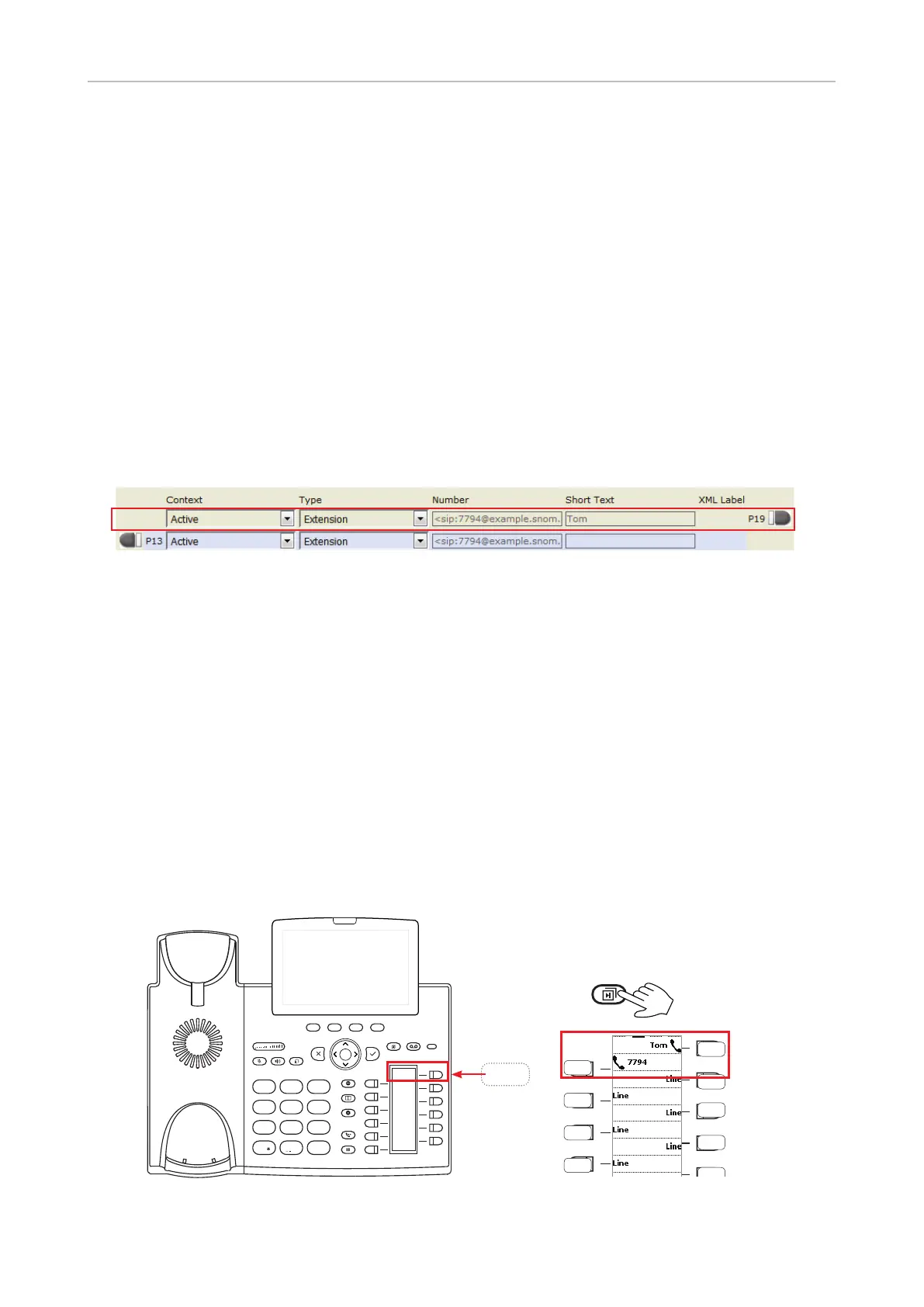
◦ The extension to be monitored must be programmed onto one of the freely programmable
function keys with LEDs. In our example we are monitoring extension 7794 on key P19 of
page 2.
1. On the phone's web interface, click on Function Keys in the menu on the left.
2. Under Context of P19, select "Active" or one of the configured identities from the drop-down list.
3. Under Type of P19, select "Extension" from the drop-down list.
4. In the Number text field of P1, enter the phone number whose calls you want to pick up. In our
example it is 7794.
5. Optional: In the Short Text text field of P19, enter a name or descriptive text. In our example, it is
"Tom". If the text field is empty, as shown for key P13, the label area will display the number.
6. Click on Apply and Save.
Note: The page with the monitored extension(s) must be on-screen in order for the key's LEDs
to show the status of the respective monitored extension.
The LED of key P19 on the phone will now flash red quickly when a call is ringing on 7794 but only if
page 2 is onscreen. If the call is not answered, you can pick it up by pressing key P19. When 7794 is
engaged in a call (and page 2 is on-screen), the key will glow red steadily.
4
7 8
0
9
#
5 6
GHI JKL MNO
PQRS
a » A
TUV WXYZ
1 2 3DEF
ABC
P19
P19
P20
P21
P22
P13
P14
P15
P16



 To Next Page