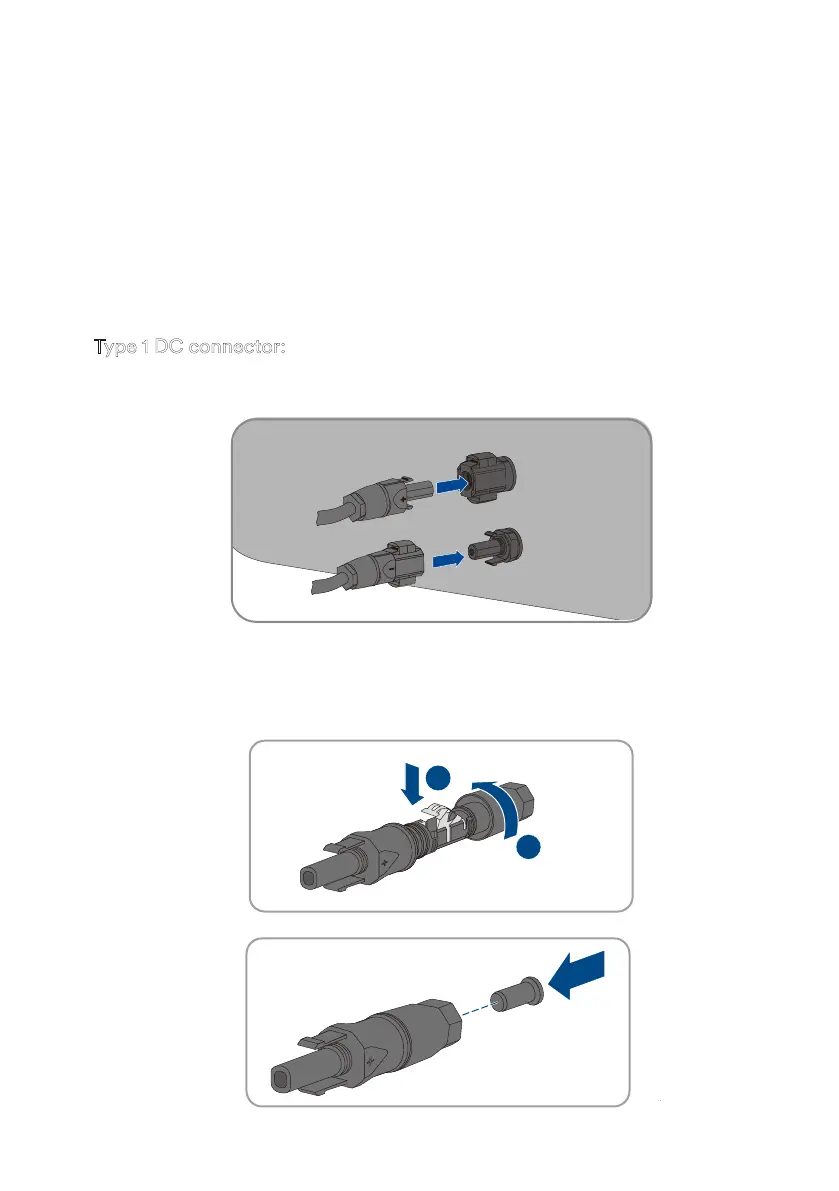
Type 1 DC connector:
+
1
2
• Connect the assembled DC connectors to the inverter.
• For unused DC connectors, push down the clamping bracket and push the swivel nut up to
the thread. Insert the DC connectors with sealing plugs into the corresponding DC inputs on
the inverter.
Step 4:
Check whether the DC connector has the correct polarity.
If the DC connector is equipped with a DC cable having the wrong polarity, the DC
connector must be reassembled. The DC cable must always have the same polarity as
the DC connector.
Step 5:
Ensure that the open-circuit voltage of the PV array does not exceed the maximum DC
input voltage of the inverter.
Step 6:
Connect the assembled DC connectors to the inverter until they audibly snap into place.
UM0035_ASW05-12kH-T2-T3_EN_V01_0523








 To Next Page