46 Picture Gallery and Picture Editor M600i
This is the Internet version of the user guide. © Print only for private use.
accompanying soundtracks and you can
choose from different transition styles to segue
between images.
Sending images using MMS
messaging
To send selected images and those in Detail
view using MMS messaging, select .
Picture Editor
Start this editor from either Picture gallery or
Messaging.
Using Picture editor, you can crop, rotate, and
resize images. You can also add fun layers,
such as clip art and frames. There are drawing
tools that use the stylus with different pen sizes
and colors, as well as a text tool for formatting
and inserting text into images. In addition,
there are a number of filters for effects and
image correction.
When you create MMS messages, use
Picture
editor
to edit inserted .jpg, .png, .gif and .bmp
images and create simple .jpg images from
scratch.
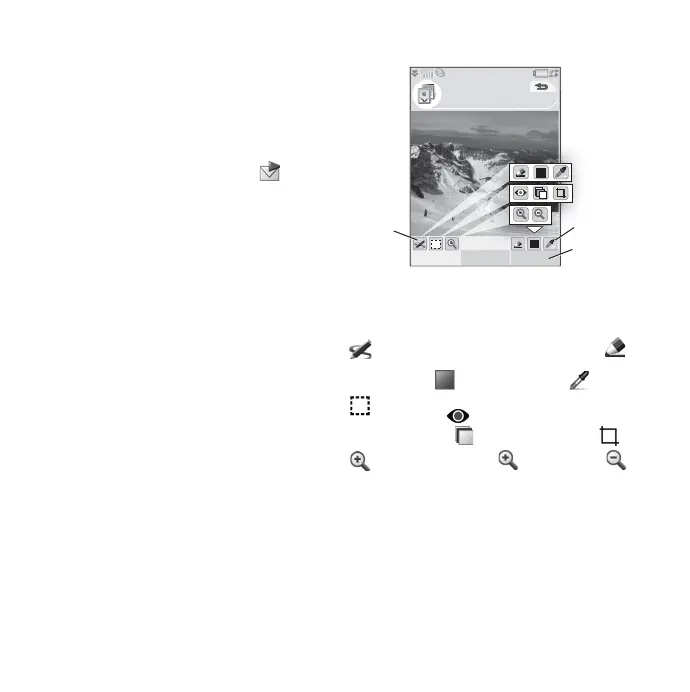
A. Selecting a mode on the toolbar changes
the set of available tools.
B. Select
More to access menu options.
C. The set of available tools changes
according to the mode:
Correcting images
Select More > Correction to adjust the
brightness, contrast, intensity, and color
balance of an image. Color balance is adjusted
automatically; use the Jog Dial to adjust the
other settings.
Scribble – set the pen width with
and choose color with the color
palette or color dropper .
Select rectangle – set red-eye
removal , copy a selected part of
the image , or crop the image .
Zoom – zoom in or zoom out .
Picture editor
B
C
Save More
Holiday.jpg











 To Next Page