Dlsp,aylil.t~e
playing
tIme,
agd,
p!~II~!e!p.~~,~~~
--
You
can
check
the title information, including
the
video
transmission
rate, etc.
Press 0 DISPLAY during playback.
The
displayed
information
differs
depending
on
the disc
type
and
system
status.
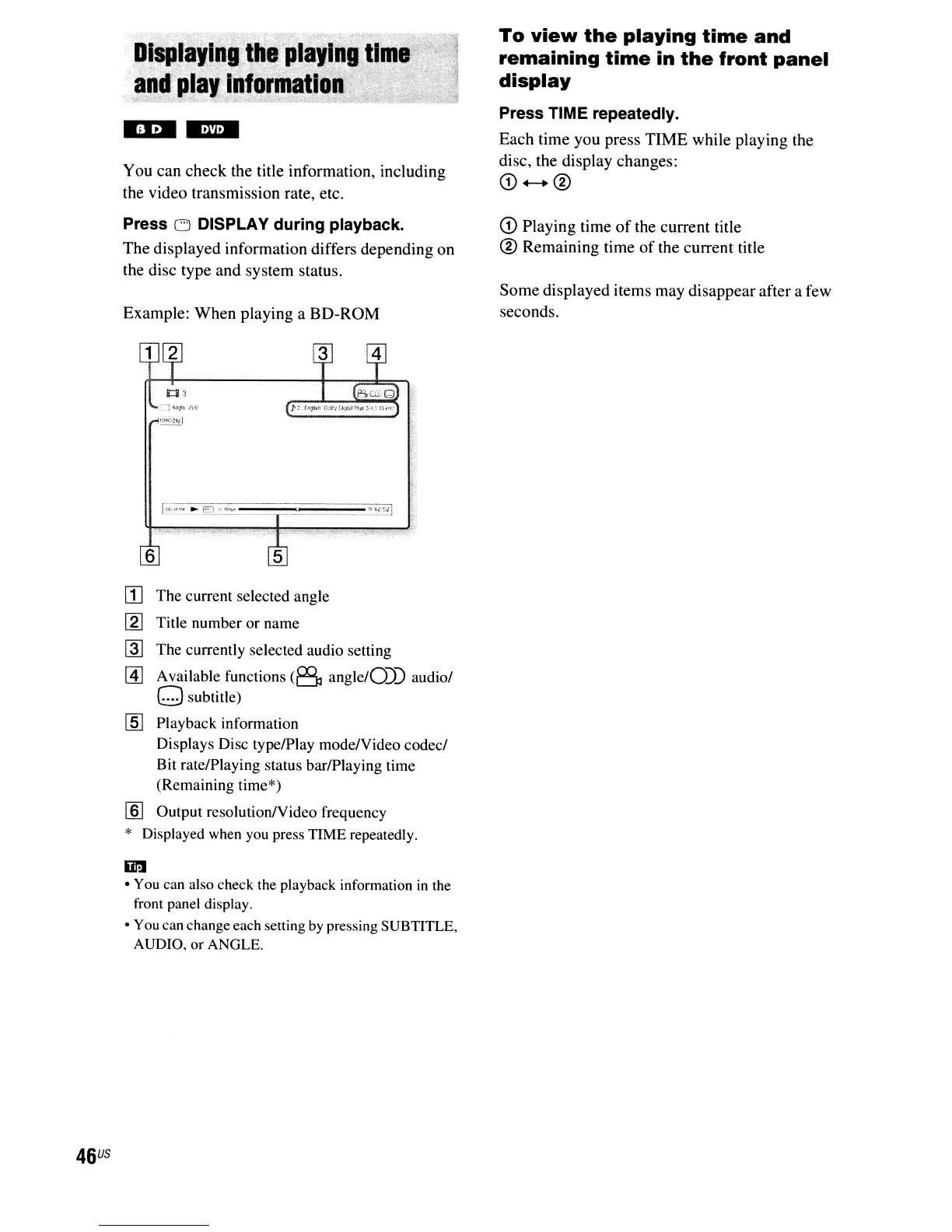
Example:
When
playing
aBO-ROM
To
view
the
playing
time
and
remaining
time
in
the
front
panel
display
Press TIME repeatedly.
Each
time
you
press
TIME
while
playing
the
disc, the
display
changes:
CD+-+®
CD
Playing
time
of
the
current
title
®
Remaining
time
of
the
current
title
Some
displayed
items
may
disappear
after a few
seconds.
6
46
US
[I]
The current selected angle
[g]
Title number or name
@]
The currently selected audio setting
[1] Available functions
(8
angle/O))
audio/
o subtitle)
[ID
Playback information
Displays Disc type/Play mode/Video codec/
Bit rate/Playing status bar/Playing time
(Remaining time*)
[ID
Output resolution/Video frequency
* Displayed when
you
press TIME repeatedly.
In
•
You
can also check the playback information
in
the
front panel display.
•
You
can change each setting
by
pressing SUBTITLE,
AUDIO,
or ANGLE.



 To Next Page