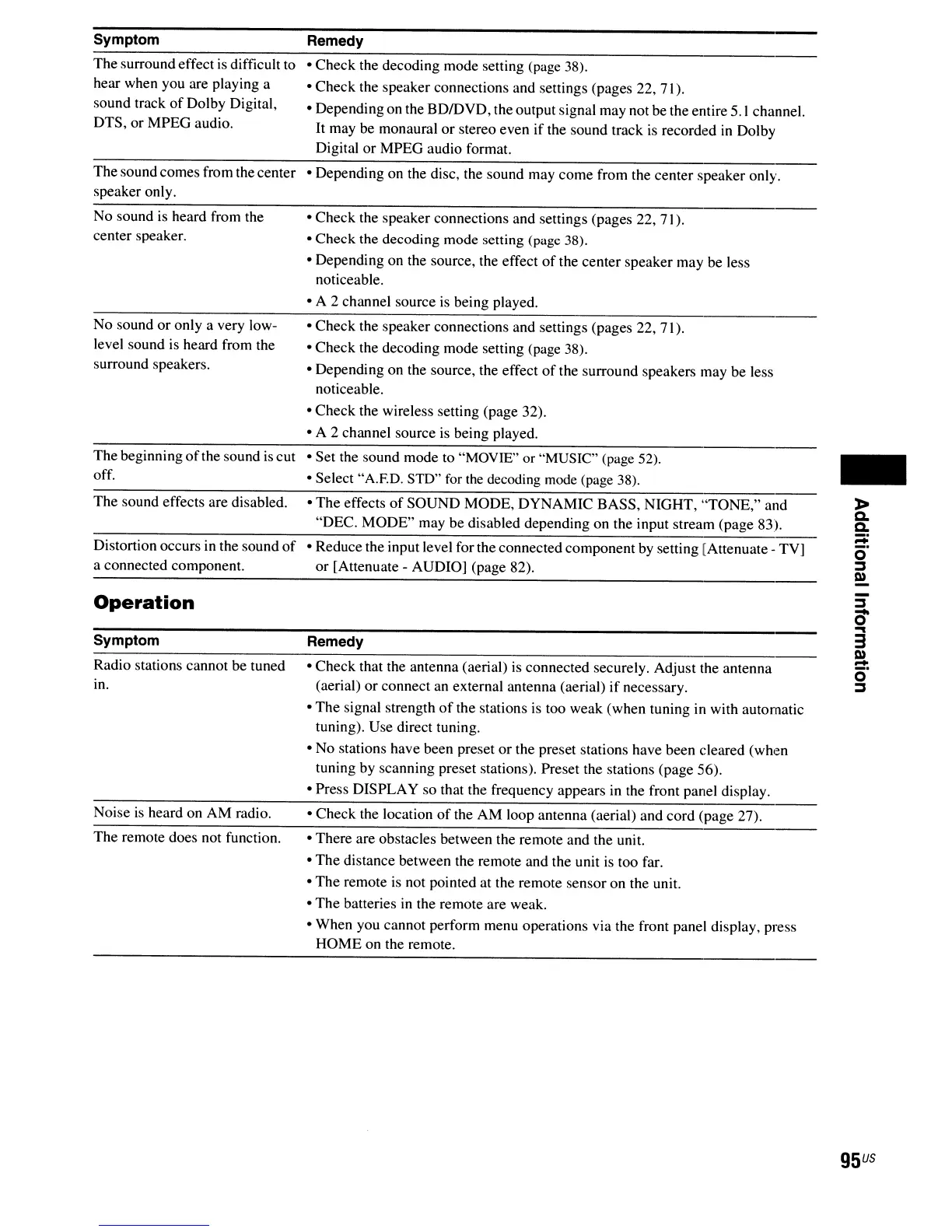
Symptom
The surround effect
is
difficult to
hear when you are playing a
sound track
of
Dolby Digital,
DTS,
or
MPEG audio.
Thesound comes from the center
speaker only.
No sound is heard from the
center speaker.
No sound
or
only a very low-
level sound is heard from the
surround speakers.
The beginning
of
the sound
is
cut
off.
The sound effects are disabled.
Distortion occurs in the sound
of
a connected component.
Operation
Symptom
Radio stations cannot be tuned
in.
Noise
is
heard on
AM
radio.
The remote does not function.
Remedy
o Check the decoding mode setting (page 38).
o Check the speaker connections and settings (pages 22, 71).
o Dependingon the BDIDYD, the output signal may not be the entire
5.1
channel.
It
may be monaural
or
stereo even if the sound track
is
recorded
in
Dolby
Digital
or
MPEG audio format.
o Depending on the disc, the sound may
come
from the center speaker only.
o Check the speaker connections and settings (pages 22, 71).
o Check the decoding mode setting (page 38).
o Depending on the source, the effect
of
the center speaker may be less
noticeable.
o A 2 channel source
is
being played.
o
Check
the speaker connections and settings (pages 22, 71).
o Check the decoding mode setting (page 38).
o Depending on the source, the effect
of
the surround speakers may be less
noticeable.
o
Check
the wireless setting (page 32).
o A 2 channel source
is
being played.
o Set the sound mode to "MOYIE" or "MUSIC" (page 52).
o Select "A.ED. STD" for the decoding mode (page 38).
o The effects
of
SOUND MODE,
DYNAMIC
BASS, NIGHT, "TONE," and
"DEC.
MODE"
may be disabled depending on the input stream (page 83).
o Reduce the input level for the connected component by setting [Attenuate - TY]
or
[Attenuate - AUDIO] (page 82).
Remedy
o Check that the antenna (aerial) is connected securely. Adjust the antenna
(aerial)
or
connect an external antenna (aerial)
if
necessary.
o
The
signal strength
of
the stations is too weak (when tuning in with automatic
tuning). Use direct tuning.
o No stations have been preset
or
the preset stations have been cleared
(wh,~n
tuning by scanning preset stations). Preset the stations (page 56).
o Press DISPLAY so that the frequency appears
in
the front panel display.
o Check the location
of
the AM loop antenna (aerial) and cord (page 27).
o There are obstacles between the remote and the unit.
o
The
distance between the remote and the unit
is
too far.
o The remote
is
not pointed at the remote sensor on the unit.
o The batteries
in
the remote are weak.
o When you cannot perform menu operations via the front panel display, press
HOME on the remote.
-
»
c.
c.
;::;:
o
~
Q)
~
0-
""I
3
Q)
-
o'
~
9S
US



 To Next Page