96
US
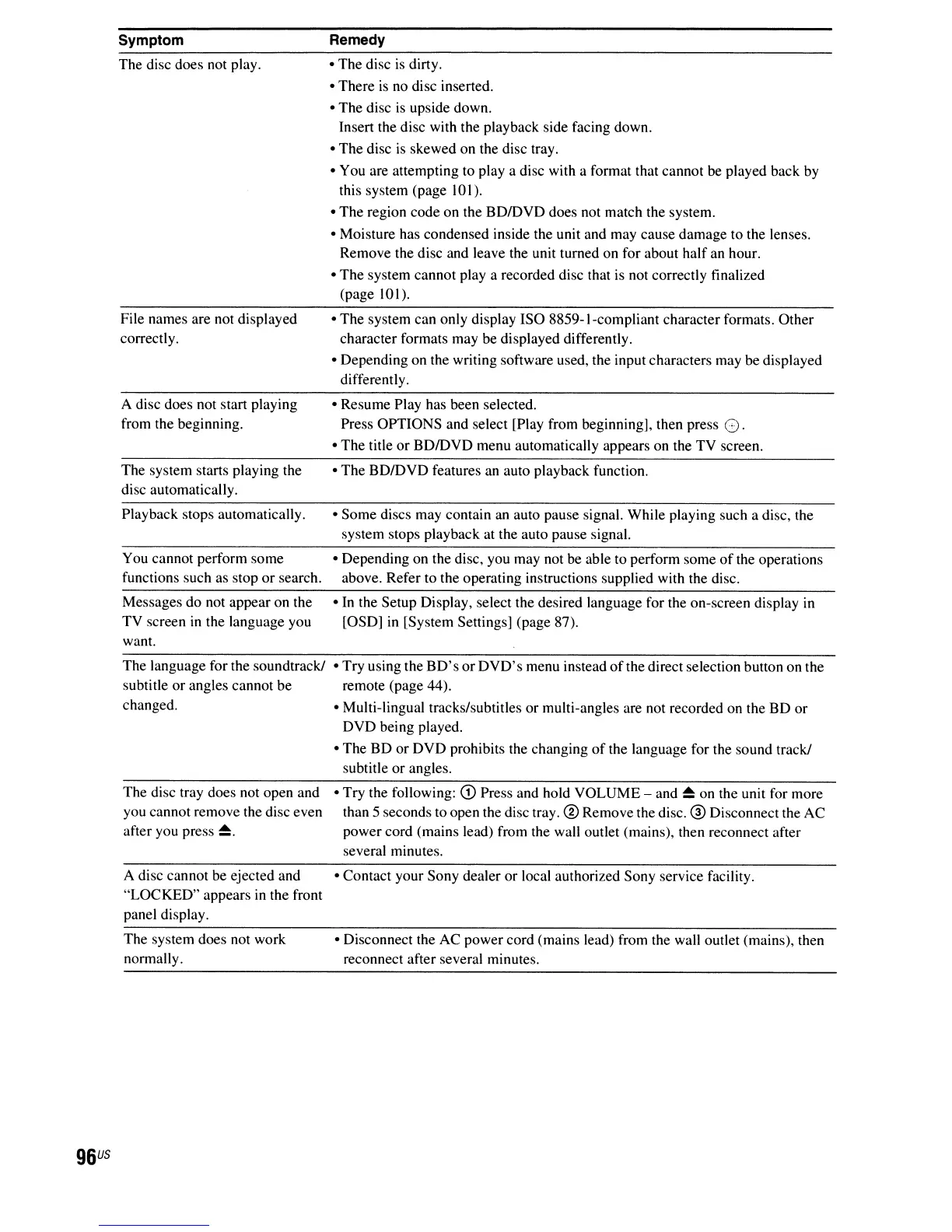
Symptom
The disc does not play.
File names are not displayed
correctly.
A disc does not start playing
from the beginning.
The system starts playing the
disc automatically.
Playback stops automatically.
You cannot perform some
functions such as stop
or
search.
Messages do not appear on the
TV screen
in
the language you
want.
The language for the soundtrack!
subtitle
or
angles cannot be
changed.
The disc tray does not open and
you cannot remove the disc even
after you press
~.
A disc cannot be ejected and
"LOCKED" appears
in
the front
panel display.
The system does not work
normally.
Remedy
• The disc
is
dirty.
• There
is
no disc inserted.
• The disc
is
upside down.
Insert the disc with the playback side facing down.
• The disc
is
skewed on the disc tray.
• You are attempting to
playa
disc with a format that cannot
be
played back
by
this system (page 101).
• The region code on the BDIDVD does not match the system.
• Moisture has condensed inside the unit and may cause damage to the lenses.
Remove the disc and leave the unit turned on for about half an hour.
• The system cannot
playa
recorded disc that is not correctly finalized
(page 101).
• The system can only display ISO 8859-I-compliant character formats. Other
character formats may be displayed differently.
• Depending on the writing software used, the input characters may be displayed
differently.
• Resume Play has been selected.
Press OPTIONS and select [Play from beginning], then press
O.
• The title
or
BDIDVD menu automatically appears on the TV screen.
• The BDIDVD features an auto playback function.
• Some discs may contain
an
auto pause signal. While playing such a disc, the
system stops playback at the auto pause signal.
• Depending on the disc, you may not be able to perform some
of
the operations
above. Refer to the operating instructions supplied with the disc.
• In the Setup Display, select the desired language for the on-screen display in
[OSD]
in
[System Settings] (page 87).
• Try using the
BD's
or
DVD's
menu instead
of
the direct selection button on the
remote (page 44).
• Multi-lingual tracks/subtitles or multi-angles are not recorded on the BD
or
DVD being played.
• The BD
or
DVD prohibits the changing
of
the language for the sound track!
subtitle
or
angles.
• Try the following:
G)
Press and hold VOLUME - and
~
on the unit for more
than 5 seconds to open the disc tray.
® Remove the disc. ® Disconnect the AC
power cord (mains lead) from the wall outlet (mains), then reconnect after
several minutes.
• Contact your Sony dealer
or
local authorized Sony service facility.
• Disconnect the AC power cord (mains lead) from the wall outlet (mains), then
reconnect after several minutes.



 To Next Page