"Handycam" User Guide
PrintSearch
Operation Search
Before use
Getting started
Recording
Playback
Playing images on a TV
Saving images with an external
device
Using the Wi-Fi function
Customizing your camcorder
Troubleshooting
Maintenance and precautions
Contents list
Top page > Customizing your camcorder > Using menu items > Setting up menu items
Setting up menu items
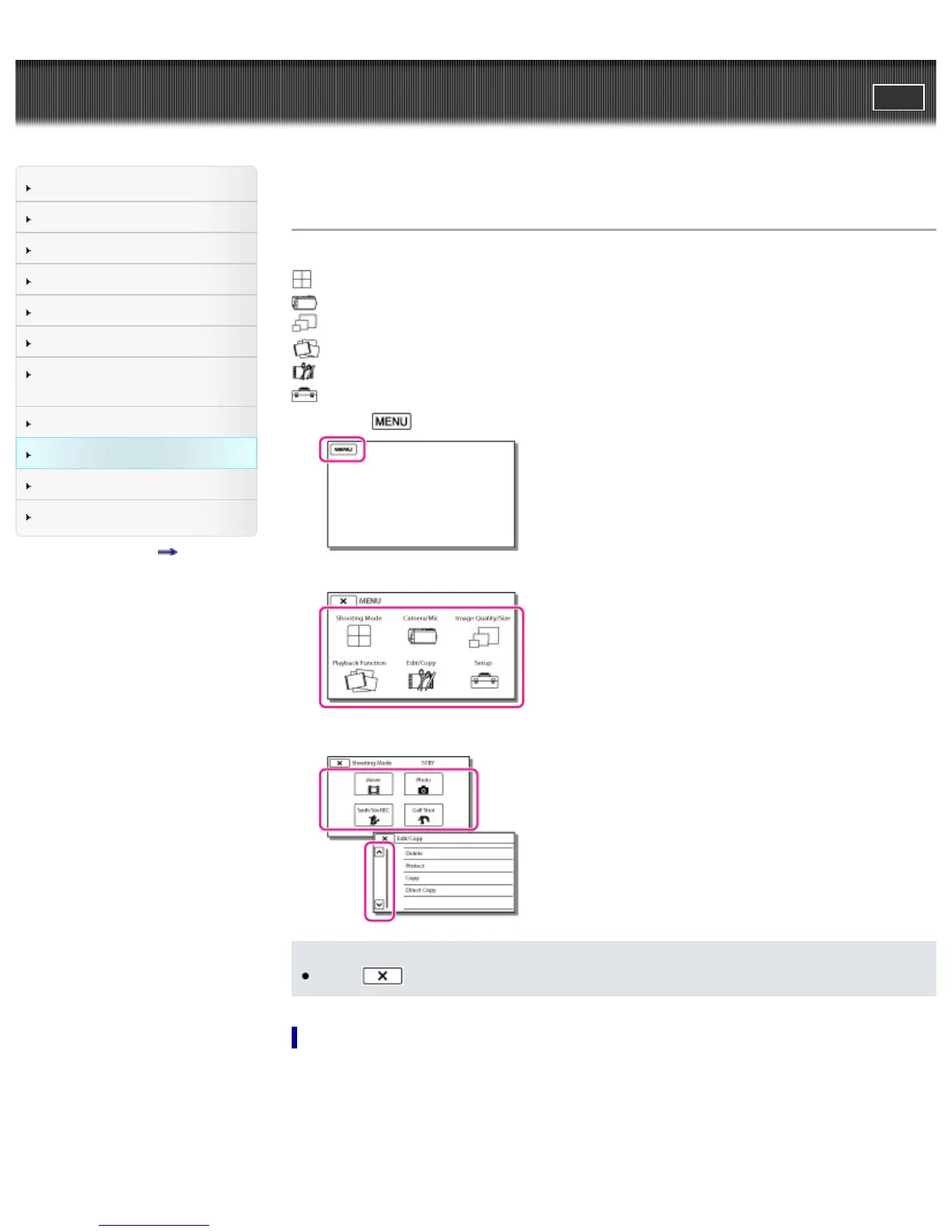
The camcorder has various menu items under each of 6 menu categories.
Shooting Mode (Items for selecting a shooting mode)
Camera/Mic (Items for customized shooting)
Image Quality/Size (Items for setting up image quality or size)
Playback Function (Items for playback)
Edit/Copy (Items for editing images such as copy or protect)
Setup (Other setup items)
1. Select
.
2. Select a category.
3. Select your desired menu item.
Notes
Select
to finish setting the menu or to return to the previous screen.
To find a menu item quickly
The [Camera/Mic] and [Setup] menus have sub-categories. Select the sub-category icon so that the
LCD screen displays the list of menus in the sub-category selected.



 To Next Page