"Handycam" User Guide
PrintSearch
Operation Search
Before use
Getting started
Recording
Playback
Playing images on a TV
Saving images with an external
device
Using the Wi-Fi function
Customizing your camcorder
Troubleshooting
Maintenance and precautions
Contents list
Top page > Recording > Recording > Screen indicators during recording
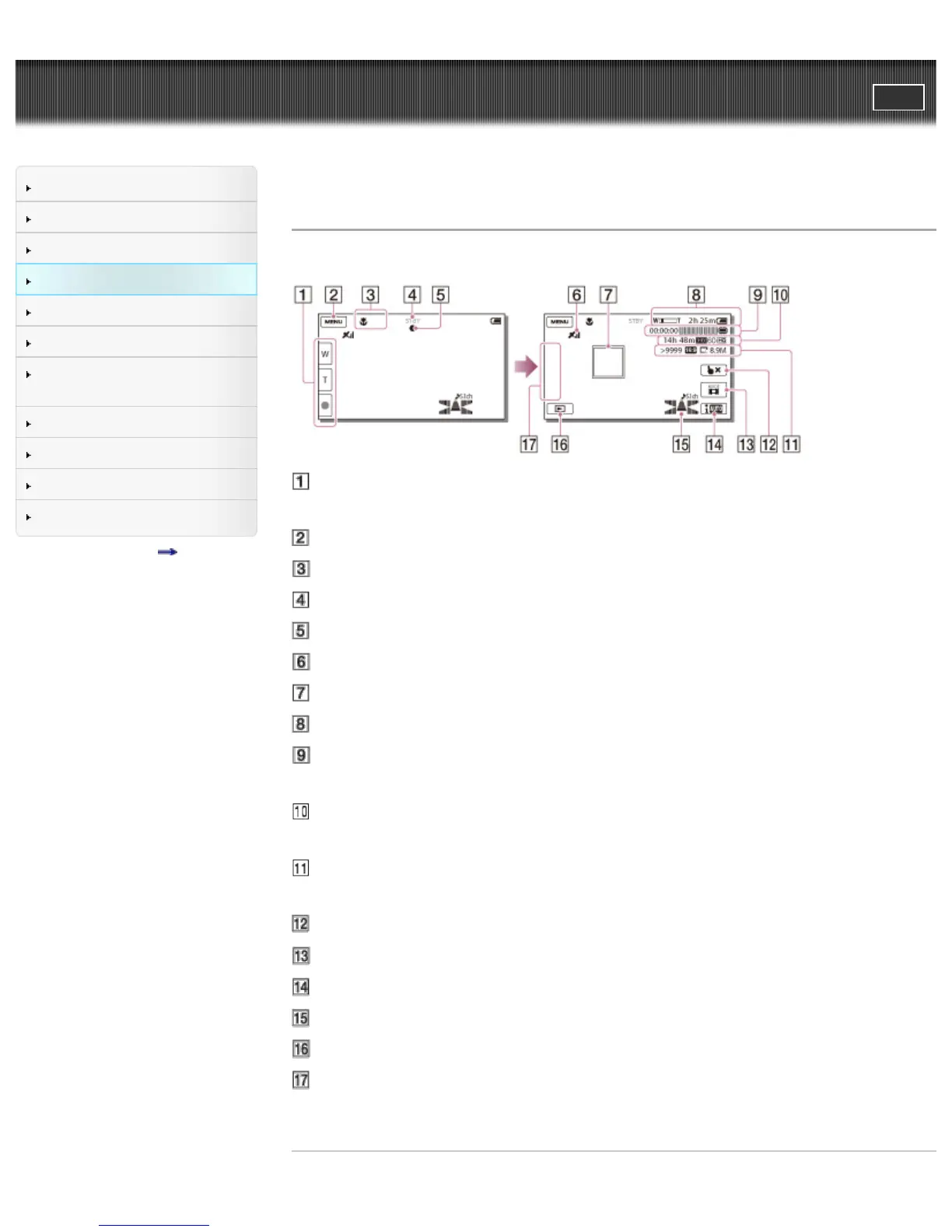
Screen indicators during recording
Described here are icons for both movie recording and photo recording modes.
Zoom button (W: Wide/T: Telephoto), START/STOP button (in movie recording
mode), PHOTO button (in photo recording mode)
MENU button
Status detected by Intelligent Auto
Recording status ([STBY]/[REC])
AE/AF (automatic exposure/automatic focus) lock
GPS triangulating status (models with GPS)
Tracking focus
Zoom, Remaining battery
Counter (hour: minute: second), Capturing a photo, Recording/playback/editing
media
Estimated recording remaining time, Recording image quality, Frame rate,
Recording mode (HD/STD), Movie size (MP4)
Approximate number of recordable photos, Aspect ratio (16:9 or 4:3), Photo
size (L/M/S)
Tracking focus cancel button
[MODE] (Shooting Mode) button
Intelligent Auto button
Audio mode, Audio Level Display
View Images button
My Button (you can assign your favorite functions to icons displayed in this
area)
Related topics



 To Next Page