"Handycam" User Guide
PrintSearch
Operation Search
Before use
Getting started
Recording
Playback
Playing images on a TV
Saving images with an external
device
Using the Wi-Fi function
Customizing your camcorder
Troubleshooting
Maintenance and precautions
Contents list
Top page > Customizing your camcorder > Setup > TV Type
TV Type
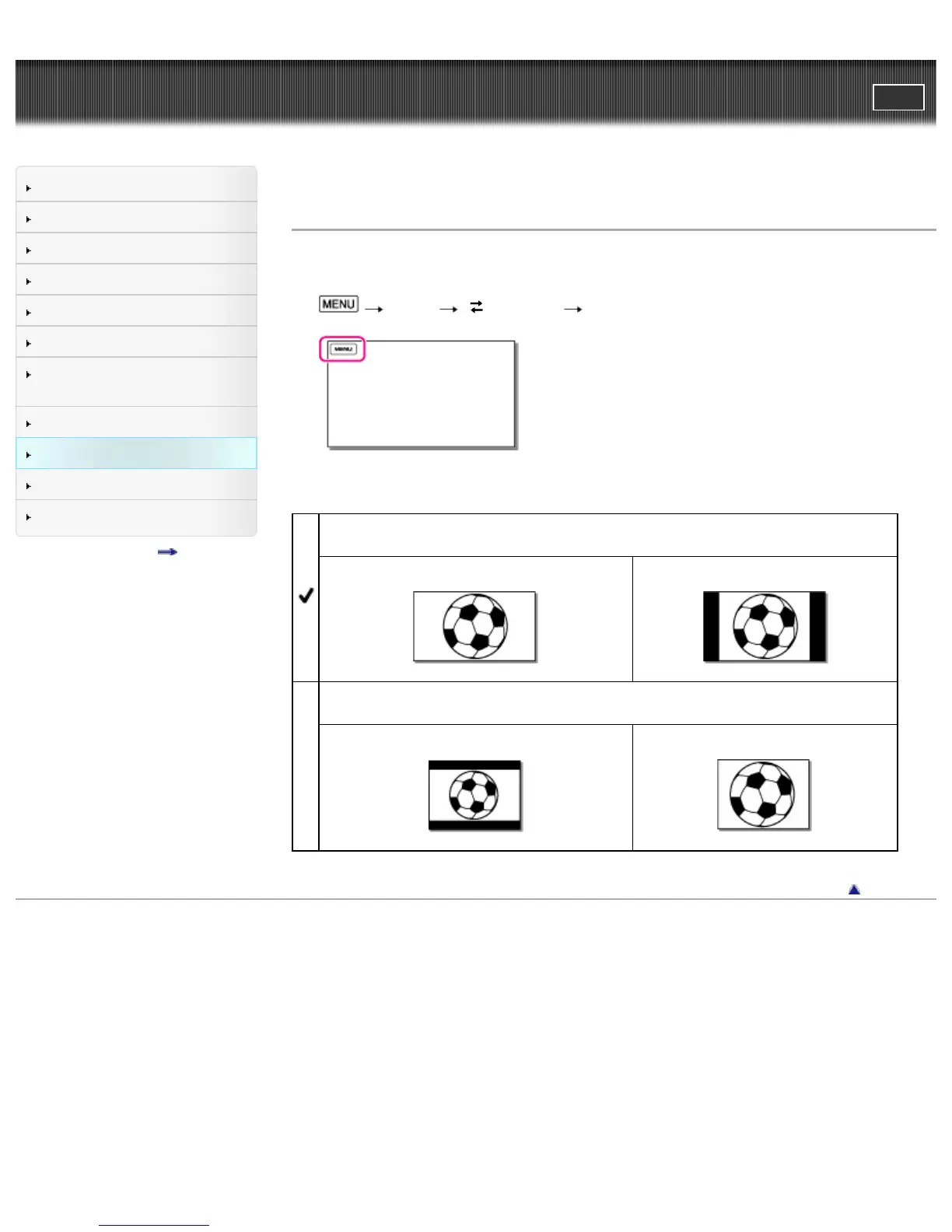
You need to convert the signal depending on the TV connected when playing back movies and photos.
The recorded movies and photos are played back as following illustrations.
1.
[Setup] [ Connection] [TV Type].
2. Select the desired item.
16:9
Select this to view your movies on a 16:9 (wide) TV.
Movies and photos recorded in 16:9 (wide) mode
Movies and photos recorded in 4:3 mode
4:3
Select this to view your movies and photos on a 4:3 standard TV.
Movies and photos recorded in 16:9 (wide) mode
Movies and photos recorded in 4:3 mode
Back to top
Copyright 2013 Sony Corporation



 To Next Page