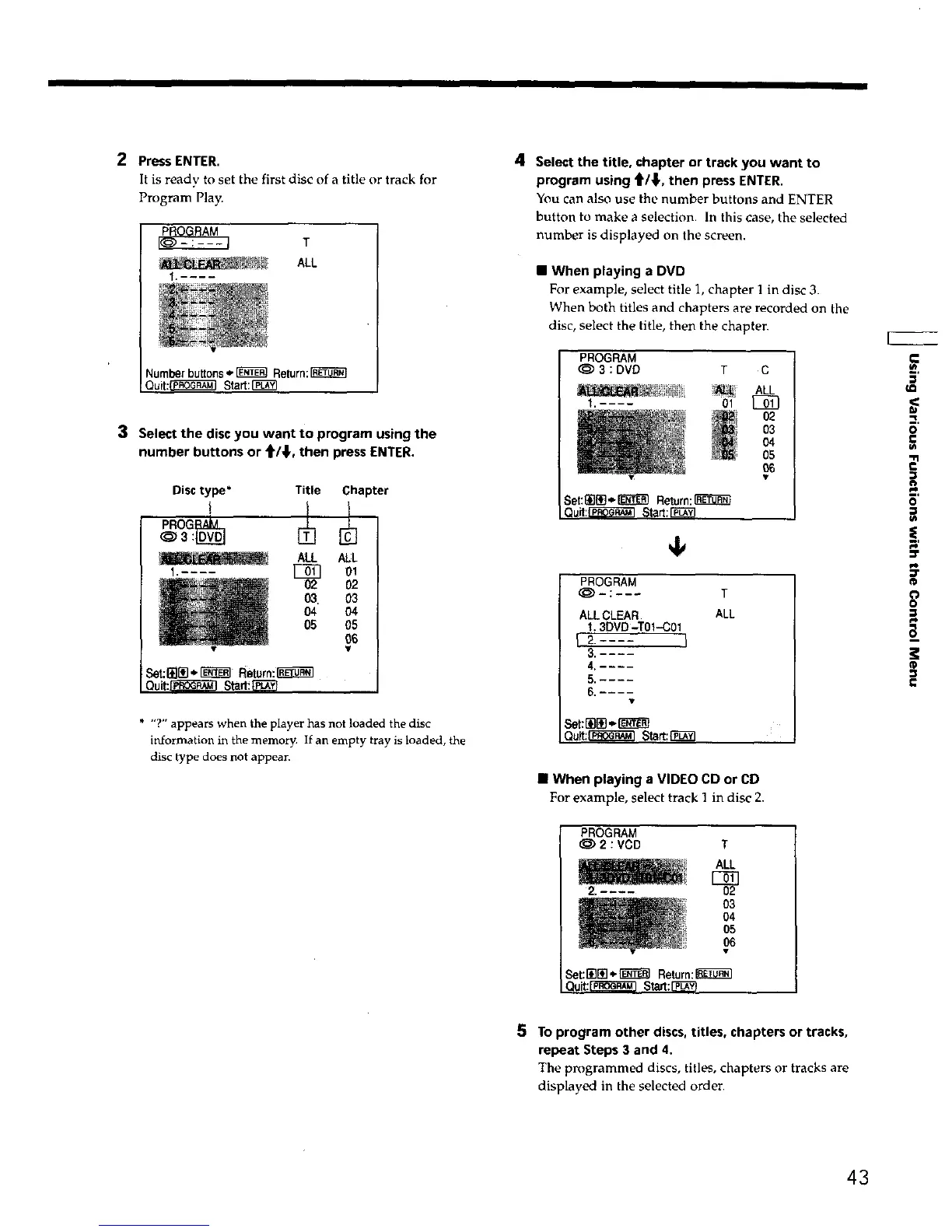
2 Press ENTER.
It is ready to set the first disc of a title or track for
Program Play.
T
ALL
Number buttons,__ Return:
Quit:_ Start:[_
3 Select the disc you want to program using the
number buttons or _/_,, then press ENTER.
Title Chapter
ALL ALL
01
02
O3
IN
O5
_S
Set:_l_],_I'_t_ Return:I_-_'1
Ouit:_] Start!F_-'_
* "?" appears when the player has not loaded the disc
information in the memory. If an empty tray is loaded, the
disc type does not appear.
4 Select the title, chapter or track you want to
program using _/_1., then press ENTER,
You can also use the number buttons and ENTER
button to make a selection. In this case, the selected
number is displayed on the screen.
• When playing a DVD
For example, select title 1, chapter 1 in disc 3.
When both titles and chapters are recorded on the
disc, select the title, then the chapten
PROGRAM
@3:DVD T C
Set:_]{i]'=-_ Return:_
Quit:1_'1 Start:[_
4,
PROGRAM
@-:--- T
ALL CLEAR ALL
t.3DVO-TOI-C0t
f2..... l
5,----
6 _---
Qult;_ Start:r'_
• When playing a VIDEO CD or CD
For example, select track 1 in disc 2.
PROGRAM
@2:VCD T
2. ....
ALL
I)2
03
04
05
O6
Set:_[i] _ [_1_] Return:[_]_
Quit:[_ Start:[_;_
'R,
0
£
_t
"11
=,.
1=
B'
=ff
o
o
P
5 To program other discs, titles, chapters or tracks,
repeat Steps 3 and 4.
The programmed discs, titles, chapters or tracks are
displayed in the selected order,
43











 To Next Page