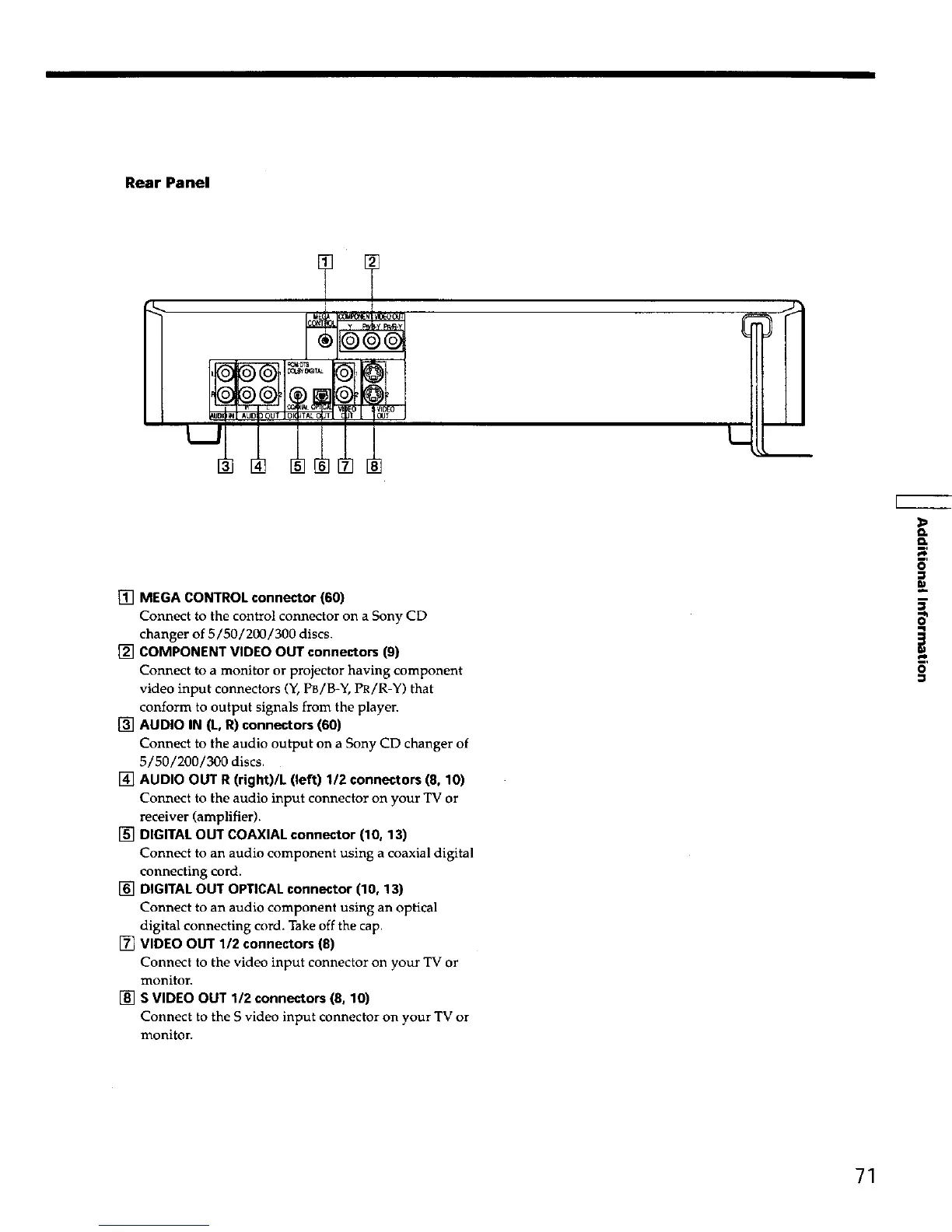
Rear Panel
[] MEGA CONTROL connector (60)
Connect to the control connector on a Sony CD
changer of 5/50/200/300 discs.
[] COMPONENT VIDEO OUT connectors (9)
Connect to a monitor or projector having component
video input connectors (Y, PB/B-Y, PR/R-Y) that
conform to output signals from the player.
[] AUDIO IN (L, R) connectors (60)
Connect to the audio output on a Sony CD changer of
5/50/200/300 discs.
[] AUDIO OUT R (right)/L (left) 112 connectors (8, 10)
Connect to the audio input connector on your TV or
receiver (amplifier).
[] DIGITAL OUT COAXIAL connector (10, 13)
Connect to an audio component using a coaxial digital
connecting cord.
[] DIGITAL OUT OPTICAL connector (10, 13)
Connect to an audio component using an optical
digital connecting cord. Take off the cap.
[] VIDEO OUT 1/2 connectors (8)
Connect to the video input connector on your TV or
monitor.
[] S VIDEO OUT 112 connectors (8, 10)
Connect to the S video input connector on your TV or
monitor.
Q.
m
i
71











 To Next Page