Index to Parts and Controls
,-i
3
w
m,$
5'
Remote
[]
[]
[]
[]
[]
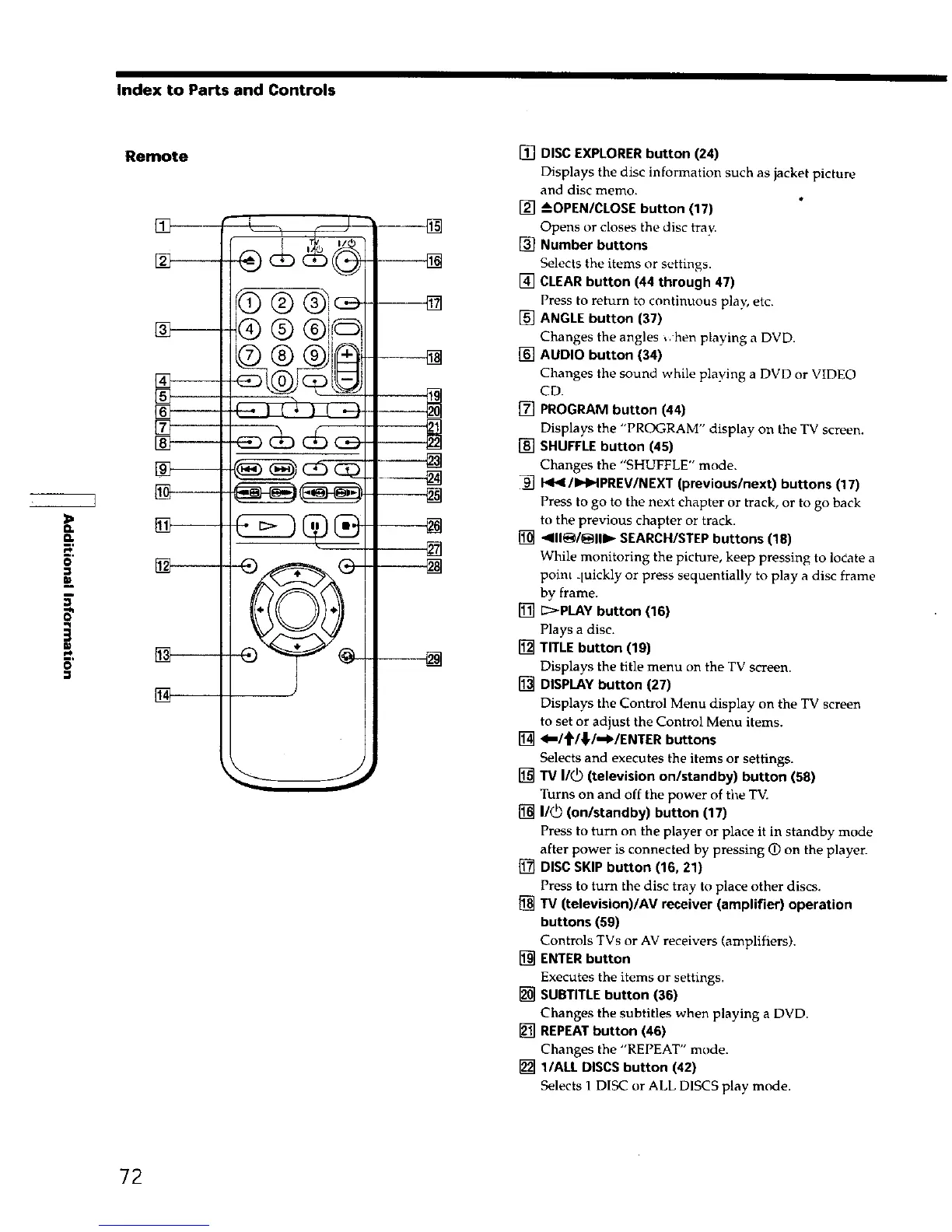
[] DISC EXPLORER button (24)
Displays the disc information such as jacket picture
and disc memo.
[] --_OPEN/CLOSEbutton (17)
Opens or closes the disc tray.
[] Number buttons
Selects the items or settings.
[] CLEAR button (44 through 47)
Press to return to continuous play, etc.
[] ANGLE button (37)
Changes the angles ,. hen playing a DVD.
[] AUDIO button (34)
Changes the sound while playing a DVD or VIDEO
CD.
[] PROGRAM button (44)
Displays the "PROGRAM" display on the TV screen.
[] SHUFFLE button (45)
Changes the "SHUFFLE" mode.
_/I_HPREV/NEXT (previous/next) buttons (17)
Press to go to the next chapter or track, or to go back
to the previous chapter or track.
[] 411_/_111_ SEARCH/STEP buttons (18)
While monitoring the picture, keep pressing to locate a
point quickly or press sequentially to play a disc frame
by frame.
[] E:_PLAYbutton (16)
Plays a disc.
[] TITLE button (19)
Displays the title menu on the TV screen.
[] DISPLAY button 127)
Displays the Control Menu display on the TV screen
to set or adjust the Control Menu items.
[] <m/t/¢/*'WENTER buttons
Selects and executes the items or settings.
[] TV I/_) (television on/standby) button (58)
Turns on and off the power of tl_e TV.
[] I1_ (on/standby) button (17)
Press to turn on the player or place it in standby mode
after power is connected by pressing O on the playen
[] DISC SKIP button (16, 21)
Press to turn the disc tray to place other discs.
[] TV (television)/AV receiver (amplifier) operation
buttons (59)
Controls TVs or AV receivers (amplifiers).
[] ENTERbutton
Executes the items or settings.
[] SUBTITLEbutton (36)
Changes the subtitles when playing a DVD.
[] REPEATbutton (46)
Changes the "REPEAT" mode.
[] l/ALL DISCS button (42)
Selects 1 DISC or ALL DISCS play mode.
72











 To Next Page