EasyManua.ls Logo

Sony EVO-720P - Page 41

Sony EVO-720P
287 pages
Print Icon
To Next Page IconTo Next Page
To Previous Page IconTo Previous Page
Loading...
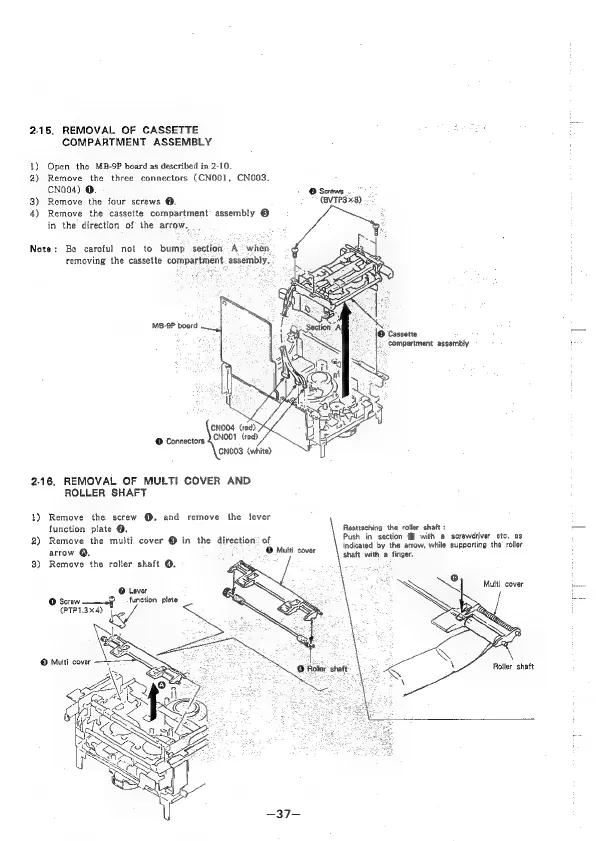
2-18.
REMOVAL
OF
CASSETTE
1)
2)
3)
4)
Note:
Be
careful
not
to
bump
section.
A
when
COMPARTMENT
ASSEMBLY
Open
the
MB-9P
board
as
described
in
2-10.
Remove
the
three
connectors
(CNOO1,
CN003,
CNo04)
@.
-
@
Screws
.
Remove
the
four
screws
@.
(BVTP3x8)
Remove
the
cassette
compartment
assembly
@
in
the
direction
of
the
arrow,
removing
the
cassette
compartment
assembly,
MB-9P
board
Cassette
(y
Compartment
assembly
CNO04
(red)
NOO1
(red)
CNOO3
(white)
@
Connectors
2-16,
REMOVAL
OF
MULTI
COVER
AND
4)
2)
3)
ROLLER
SHAFT
Remove
the
screw
@,
and
remove
the
lever
function
plate
@.
Remove
the
multi
cover
@
in
the
direction:
of
arrow
@,
©
Muiti
cover
Remove
the
roller
shaft
Q.
:
Reattaching
the
roller
shaft:
Push
in
section
@
with
@
screwdriver
etc.
as
indicated
by
the
arrow,
while
supporting
the
roller
shaft
with
a
finger.
©
Lever
et
sien
Multl
cover
@
Screw
function
plate
:
7
(PTP1.3x4)
Roiler
shatt

Table of Contents

Related product manuals