24
GB
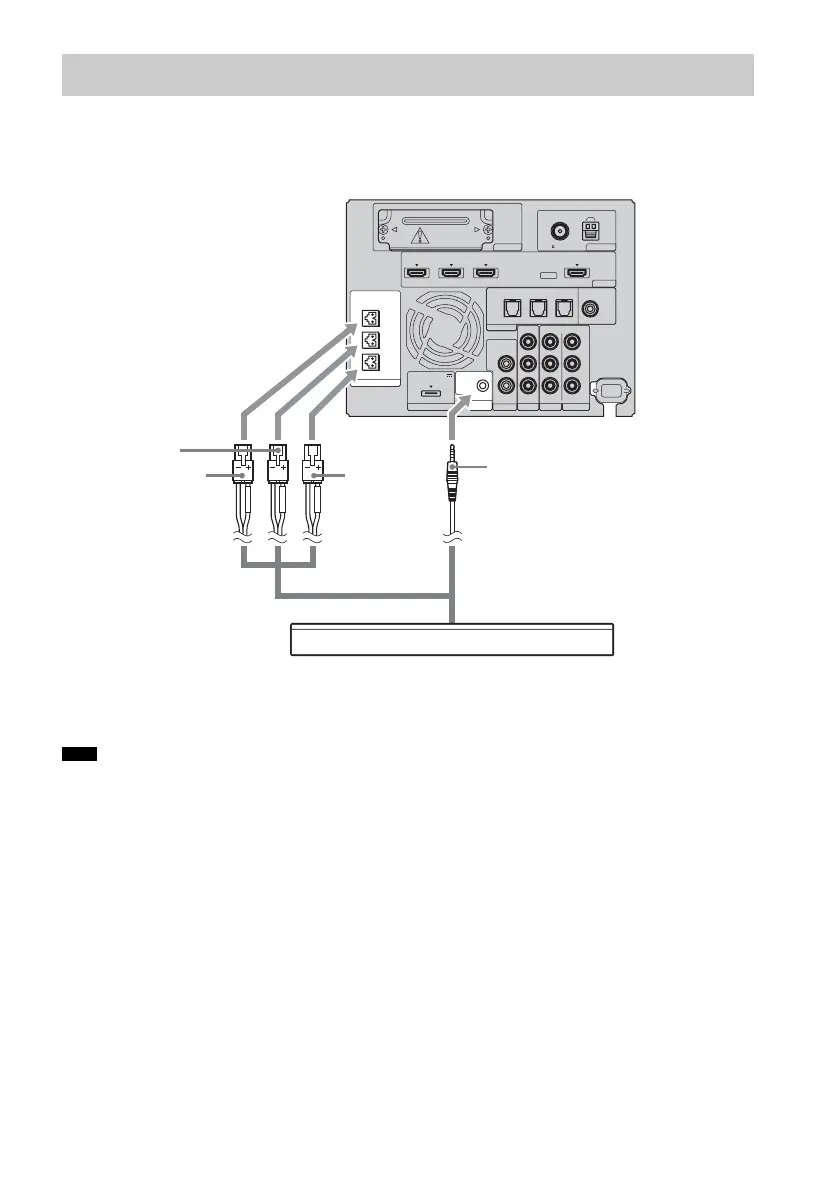
The connector of the speaker cords and the color tube are color-coded depending on the type of speaker.
Connect the speaker cords to match the color of the SPEAKER jacks.
Connect the connector for the remote control to the REMOTE CTRL jack.
• You can use the remote by pointing it toward either the speaker or the subwoofer when the connector for the remote
is inserted into the REMOTE CTRL jack. When the connector for the remote is not connected, the speaker does not
receive signals from the remote.
Step 2: Connecting the speaker
Note
EZW-T100 ANTENNA
HDMI
SPEAKER
TV OUTSAT/CATV INDVD IN
CENTER
ONLY FOR SS-CT500
ASSIGNABLE
AUDI O IN
L
R
AUDI O IN
VIDEO IN COMPONENT VIDEO IN
R
L
Y
R
L
BD IN
AM
FM
75 COAXIAL
DMPORT TV
REMOTE
CTRL
VIDEO 1
DC 5V
0.7A MAX
ONLY FOR
SS-CT500
VIDEO 2 VIDEO 3
PB/
C
B
PR/
C
R
OPTICAL
TV IN
COAXIAL
VIDEO 2 IN VIDEO 3 IN VIDEO 3 IN
DIGITAL
Green
RedWhite
Speaker
Rear of the
subwoofer
Connector for the
remote control
A
A Speaker cord (supplied)



 To Next Page