48
GB
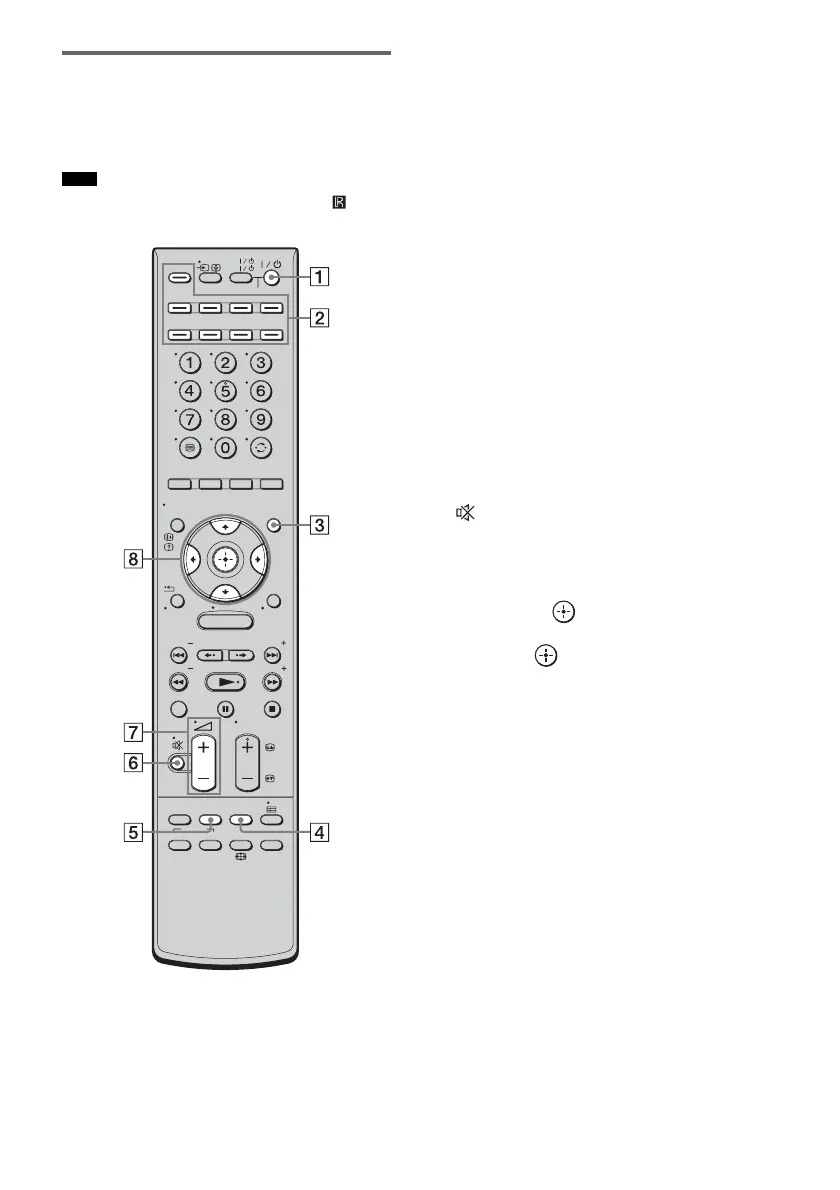
Remote control
This section describes subwoofer and speaker
button operation. See page 72 for details on the
button operation of connected components.
• Point the remote towards the remote sensor ( ) of the
subwoofer or the speaker.
* The 5, N, and PROG + buttons have a tactile dot.
Use it as a guide during operation.
A ?/1 (on/standby)
Press to turn the system on or off.
B Input buttons
Press one of the buttons to select the
component you want to use.
The buttons are factory assigned to control
Sony components. You can change the
factory settings of the input buttons to suit
the components in your system. For details,
see “Changing the input button assignments
of the remote” (page 75).
C GUI MENU
Press to display the GUI menu. For details,
see “Step 6: Operating the system using the
GUI” (page 38).
D SYSTEM MENU
Press to display the system menu in the front
panel display of the subwoofer (page 95).
E SOUND FIELD
Press to select the sound field (page 56).
F (muting)
Press to turn off the sound.
G 2 +/–
Press to adjust the volume.
H C, X, x, c or
Press C, X, x or c to select the menu items.
Then press to enter the selection.
Note
MENU
TV
AV
TV
BD
VIDEO1 VIDEO2 VIDEO3
TUNER/
BAND
/ENTER/CLEAR
GUI MENU
TOOLS/
OPTIONS
RETURN/
EXIT
PRESET
TUNING
PRESET
TUNING
THEATRE
TOP MENU
DIGITAL ANALOG
AUDIO
BD/DVD
MENU F1 F2
SOUND
FIELD
SYSTEM
MENU
TV
PROG
HOME
DISPLAY
DVD
SAT/CATV
DMPORT
SYSTEM STANDBY



 To Next Page