72
GB
You can control connected Sony components
with the remote of this system.
Some functions may not be selectable depending
on the equipment. In that case, select them using
the remote control supplied with the equipment.
* The 5, N, and PROG + buttons have a tactile dot.
Use it as a guide during operation.
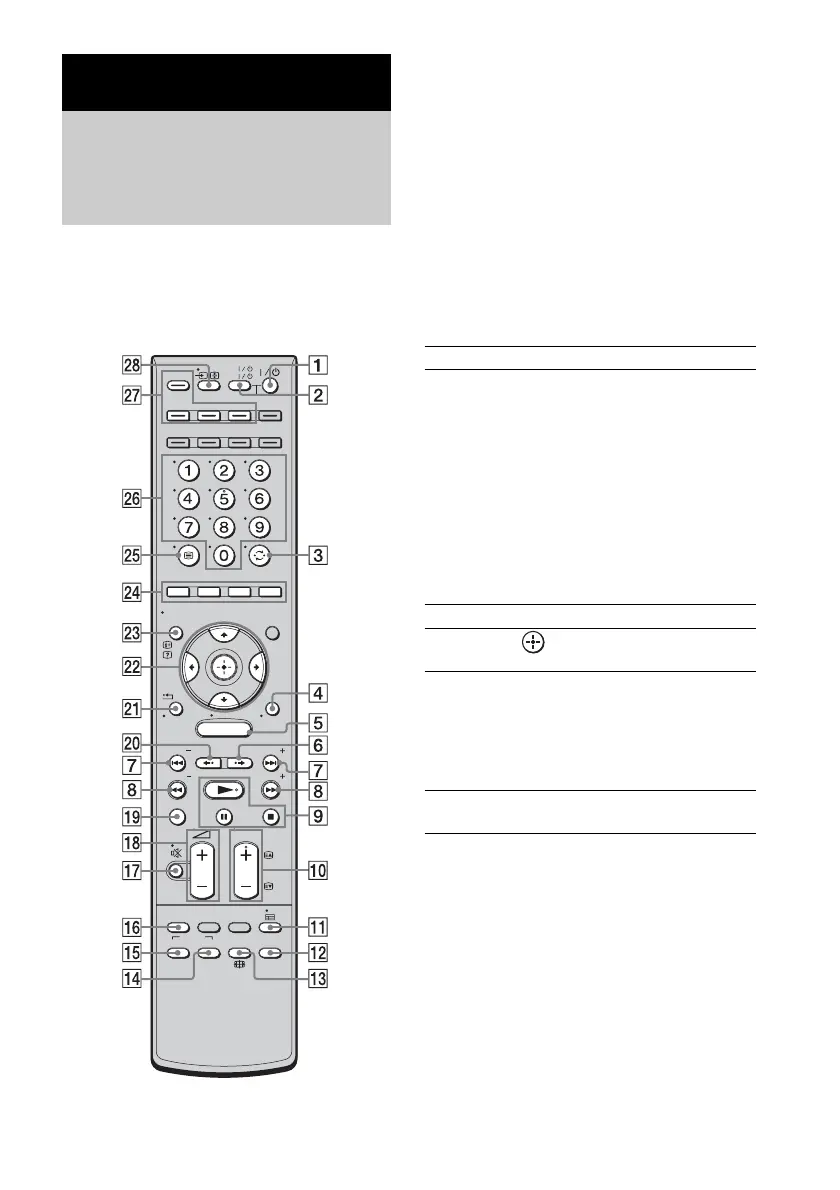
To control the component
1 Press one of the input buttons wj (TV,
BD, DVD, or SAT/CATV) to select the
component you want to operate.
The component assigned to the selected
input button becomes operable.
2 Referring to the following table, press
the corresponding button for the
operation.
Common operations
To control a TV
1 Press ql TV (yellow) to control the TV.
The ql TV (yellow) button lights up for a
moment. The remote is in TV operation
mode.
Advanced Settings
Controlling connected
Sony components with the
remote
MENU
TV
AV
TV
BD
VIDEO1 VIDEO2 VIDEO3
TUNER/
BAND
/ENTER/CLEAR
GUI MENU
TOOLS/
OPTIONS
RETURN/
EXIT
PRESET
TUNING
PRESET
TUNING
THEATRE
TOP MENU
DIGITAL ANALOG
AUDIO
BD/DVD
MENU F1 F2
SOUND
FIELD
SYSTEM
MENU
TV
PROG
HOME
DISPLAY
DVD
SAT/CATV
DMPORT
SYSTEM STANDBY
Remote Button Function
2 TV ?/1
AV ?/1
(on/standby)
Turns on or off the Sony
TV or audio/video
components that the
remote is assigned to
operate.
Press 1
?/1 and 2 TV
?/1/AV ?/1 at the same
time to turn off the system
and all other components
that the remote is assigned
to operate (SYSTEM
STANDBY).
3 ENTER Enters the selection.
ws C, X, x, c, Selects a menu item and
enters the selection.
wf Color buttons Displays an operation
guide on the TV screen
when the color buttons are
available. Follow the
operation guide to perform
a selected operation.
wh Number buttons Selects channels and tracks
directly.



 To Next Page