37
GB
Getting Started
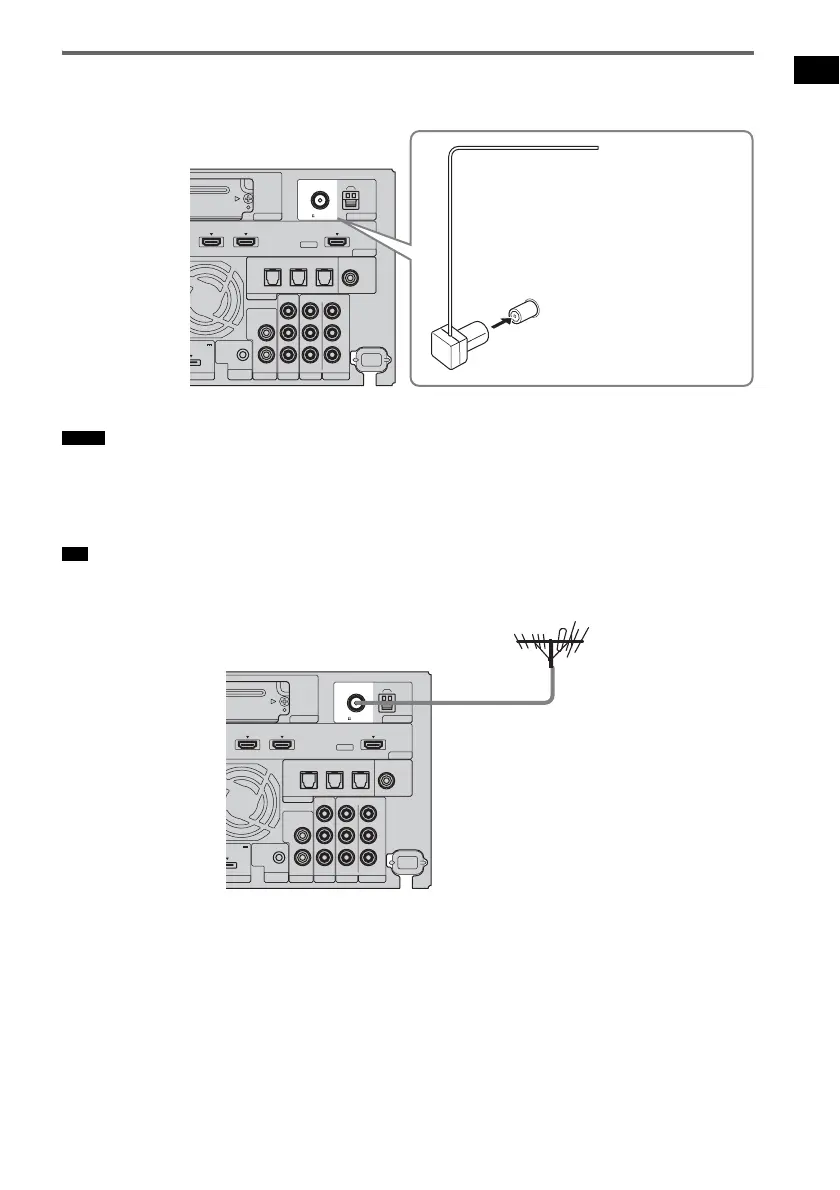
Connecting the FM wire antenna (aerial)
Connect the FM wire antenna (aerial) to the FM 75 Ω COAXIAL jack.
• Be sure to fully extend the FM wire antenna (aerial).
• After connecting the FM wire antenna (aerial), keep it as horizontal as possible.
• Do not use the FM wire antenna (aerial) while it is bundled up.
• Insert the FM wire antenna (aerial) fully and firmly to the terminal.
• If you have poor FM reception, use a 75-ohm coaxial cable (not supplied) to connect the subwoofer to an outdoor
FM antenna (aerial) as shown below.
Notes
Tip
EZW-T100
HDMI
TV OUTSAT/CATV INDVD IN
ASSIGNABLE
AUDI O IN
L
R
AUDI O IN
VIDEO IN COMPONENT VIDEO IN
R
L
Y
ORT TV
REMOTE
CTRL
VIDEO 1
DC 5V
0.7A MAX
ONLY FOR
SS-CT500
VIDEO 2 VIDEO 3
PB/
C
B
PR/
C
R
OPTICAL
TV IN
COAXIAL
VIDEO 2 IN VIDEO 3 IN VIDEO 3 IN
DIGITAL
ANTENNA
AM
FM
75 COAXIAL
FM wire antenna (aerial)
(supplied)
FM 75 Ω COAXIAL jack
Rear of the
subwoofer
EZW-T100
HDMI
TV OUTSAT/CATV INDVD IN
ASSIGNABLE
AUDI O IN
L
R
AUDI O IN
VIDEO IN COMPONENT VIDEO IN
R
L
Y
ORT TV
REMOTE
CTRL
VIDEO 1
DC 5V
0.7A MAX
ONLY FOR
SS-CT500
VIDEO 2 VIDEO 3
PB/
C
B
PR/
C
R
OPTICAL
TV IN
COAXIAL
VIDEO 2 IN VIDEO 3 IN VIDEO 3 IN
DIGITAL
ANTENNA
AM
FM
75 COAXIAL
Outdoor FM antenna
(aerial)
Rear of the
subwoofer



 To Next Page