36
GB
Connecting the AM loop antenna (aerial)
The shape and the length of the antenna (aerial) is designed to receive AM signals. Do not dismantle
or roll up the antenna (aerial).
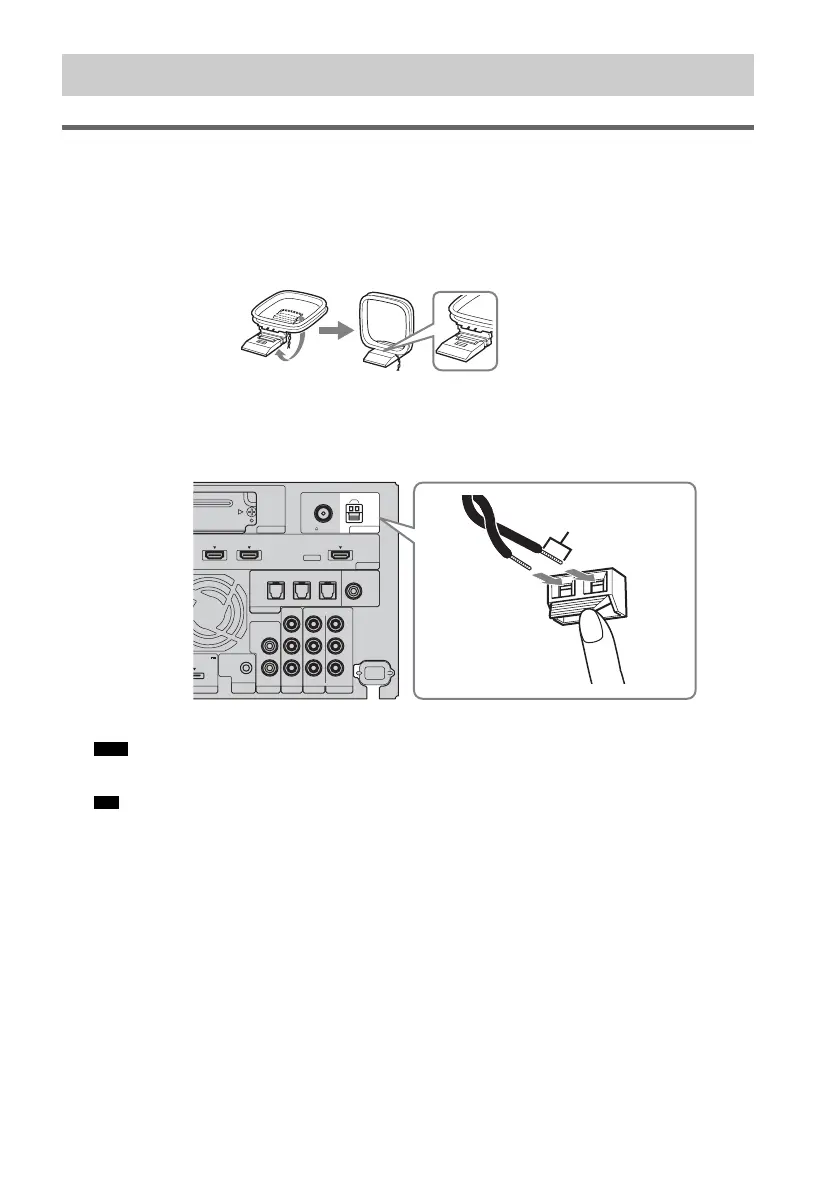
1 Remove only the loop part from the plastic stand.
2 Set up the AM loop antenna (aerial).
3 Connect the cords to the AM antenna (aerial) terminals.
While pushing down the terminal clamp, insert the (*) part of the cords.
The cords can be connected to either terminal.
• Do not place the AM loop antenna (aerial) near the system or other AV component, as noise may result.
• Adjust the direction of the AM loop antenna (aerial) for best AM broadcast sound.
4 Make sure the AM loop antenna (aerial) is connected firmly by pulling softly on the cord.
Step 4: Connecting the antenna (aerial)
Note
Tip
EZW-T100
HDMI
TV OUTSAT/CATV INDVD IN
ASSIGNABLE
AUDI O IN
L
R
AUDI O IN
VIDEO IN COMPONENT VIDEO IN
R
L
Y
ORT TV
REMOTE
CTRL
VIDEO 1
DC 5V
0.7A MAX
ONLY FOR
SS-CT500
VIDEO 2 VIDEO 3
PB/
C
B
PR/
C
R
OPTICAL
TV IN
COAXIAL
VIDEO 2 IN VIDEO 3 IN VIDEO 3 IN
DIGITAL
ANTENNA
AM
FM
75 COAXIAL
Rear of the
subwoofer
*



 To Next Page