85
GB
Advanced Settings
The system is compatible with the S-AIR
function (page 102), which allows sound
transmission between the system and an S-AIR
receiver (not supplied).
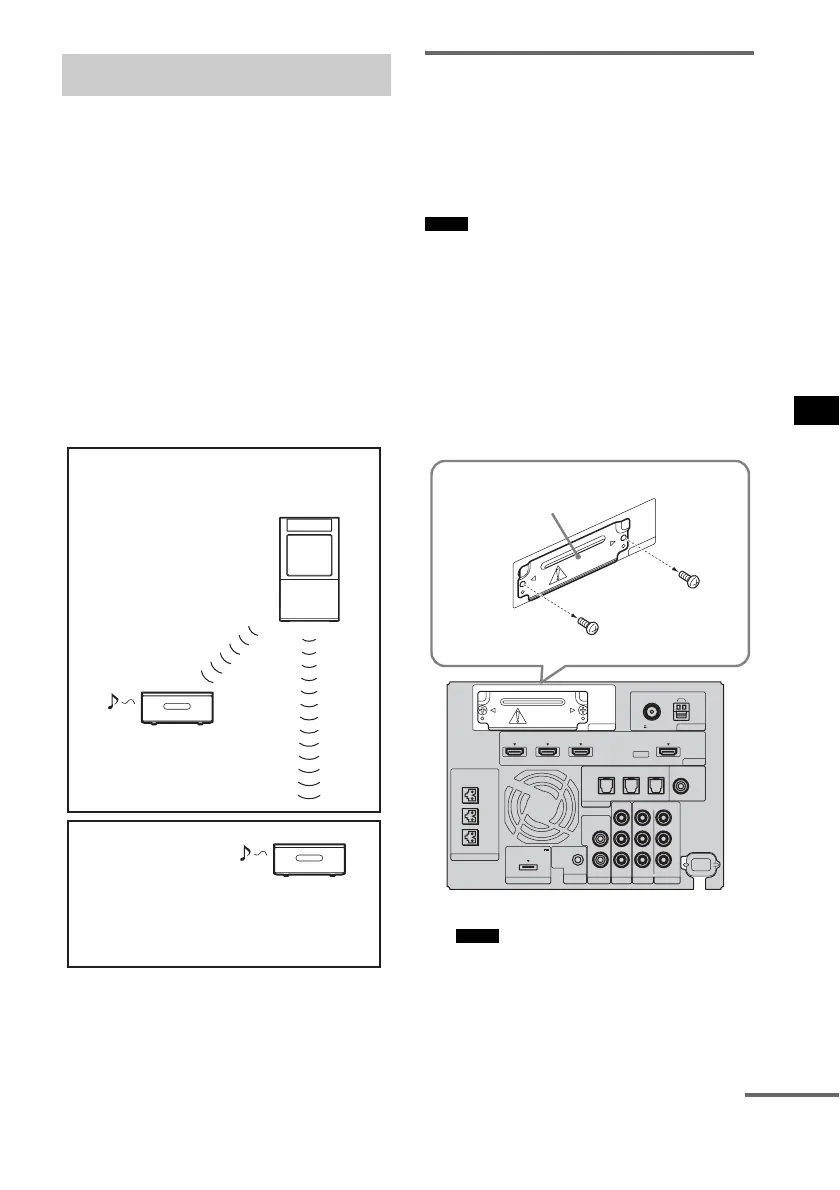
About S-AIR products
There are two types of S-AIR products.
• S-AIR main unit (this subwoofer): This is for
transmitting sound. You can use up to three
S-AIR main units. (The number of usable
S-AIR main units depends on the use
environment.)
• S-AIR sub unit (S-AIR receiver) (not
supplied): This is for receiving sound. You can
enjoy system sound in another room.
Inserting the wireless
transmitter/transceiver
To make use of the S-AIR function, you need to
insert the wireless transmitter into the subwoofer
and the wireless transceiver into the S-AIR sub
unit.
• When you insert the wireless transmitter/transceiver,
make sure that the AC power cord (mains lead) is not
connected to a wall outlet (mains).
• Do not touch the terminals of the wireless transmitter/
transceiver.
To insert the wireless transmitter
into the subwoofer
1 Remove the screws and detach the slot
cover.
• Remove the screws from the slot cover bearing
the caution mark. Do not remove other screws.
• The slot cover is no longer necessary; however,
keep it after detaching.
Using an S-AIR product
S-AIR sub unit
(S-AIR receiver)
S-AIR main unit
S-AIR sub unit
(S-AIR receiver)
Room A
Room B
Notes
Notes
EZW-T100 ANTENNA
HDMI
SPEAKER
TV OUTSAT/CATV INDVD IN
CENTER
ONLY FOR SS-CT500
ASSIGNABLE
AUDI O IN
L
R
AUDI O IN
VIDEO IN COMPONENT VIDEO IN
R
L
Y
R
L
BD IN
AM
FM
75 COAXIAL
DMPORT TV
REMOTE
CTRL
VIDEO 1
DC 5V
0.7A MAX
ONLY FOR
SS-CT500
VIDEO 2 VIDEO 3
PB/
C
B
PR/
C
R
OPTICAL
TV IN
COAXIAL
VIDEO 2 IN VIDEO 3 IN VIDEO 3 IN
DIGITAL
E
Z
W
-T
10
0
Slot cover
Rear of the subwoofer
continued



 To Next Page