86
GB
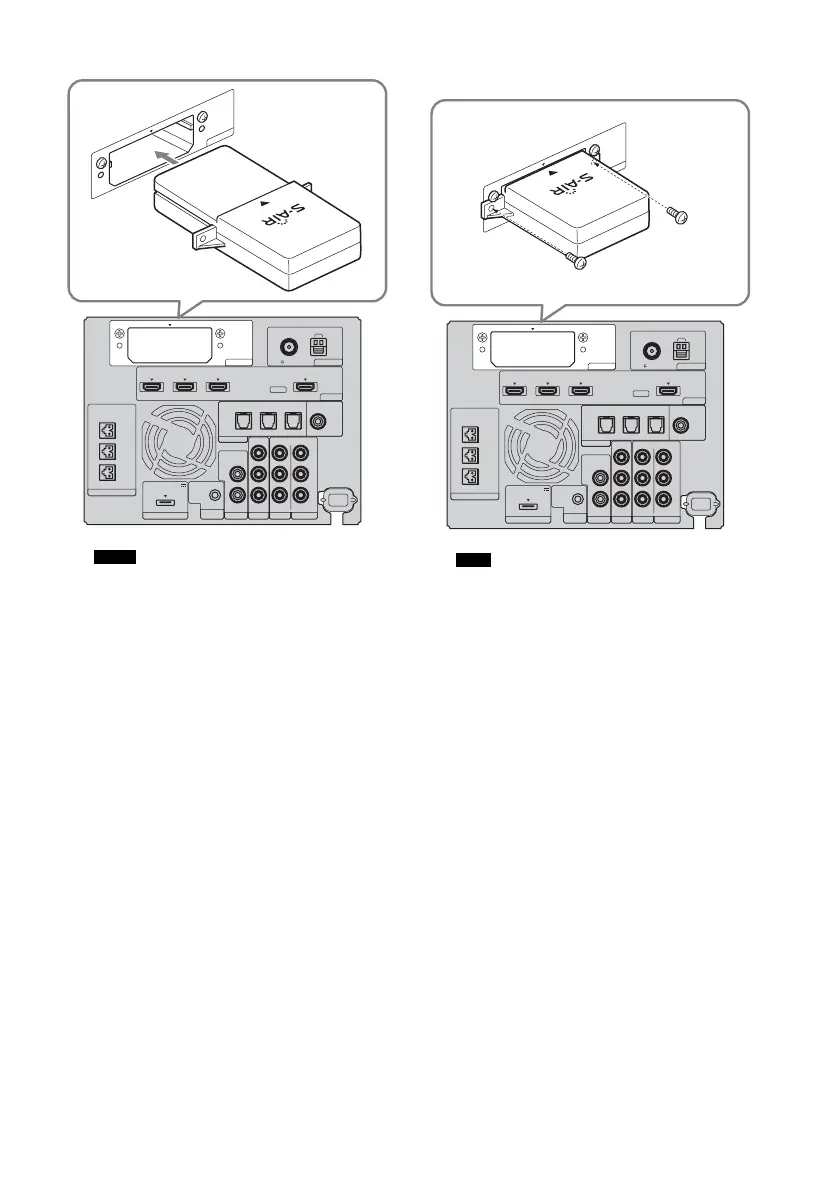
2 Insert the wireless transmitter.
• Insert the wireless transmitter with the S-AIR
logo facing up.
• Insert the wireless transmitter so that the
V
marks are aligned.
• Do not insert anything other than the wireless
transmitter into the EZW-T100 slot.
3 Make sure to use the same screws to
secure the wireless transmitter.
• Do not use other screws to fasten the wireless
transmitter.
To insert the wireless transceiver
into the S-AIR sub unit
For details on installing the wireless transceiver
into the S-AIR sub unit, refer to the operating
instructions of the S-AIR sub unit.
Notes
EZW-T100 ANTENNA
HDMI
SPEAKER
TV OUTSAT/CATV INDVD IN
CENTER
ONLY FOR SS-CT500
ASSIGNABLE
AUDI O IN
L
R
AUDI O IN
VIDEO IN COMPONENT VIDEO IN
R
L
Y
R
L
BD IN
AM
FM
75 COAXIAL
DMPORT TV
REMOTE
CTRL
VIDEO 1
DC 5V
0.7A MAX
ONLY FOR
SS-CT500
VIDEO 2 VIDEO 3
PB/
C
B
PR/
C
R
OPTICAL
TV IN
COAXIAL
VIDEO 2 IN VIDEO 3 IN VIDEO 3 IN
DIGITAL
E
ZW
-T
1
0
0
Note
EZW-T100 ANTENNA
HDMI
SPEAKER
TV OUTSAT/CATV INDVD IN
CENTER
ONLY FOR SS-CT500
ASSIGNABLE
AUDI O IN
L
R
AUDI O IN
VIDEO IN COMPONENT VIDEO IN
R
L
Y
R
L
BD IN
AM
FM
75 COAXIAL
DMPORT TV
REMOTE
CTRL
VIDEO 1
DC 5V
0.7A MAX
ONLY FOR
SS-CT500
VIDEO 2 VIDEO 3
PB/
C
B
PR/
C
R
OPTICAL
TV IN
COAXIAL
VIDEO 2 IN VIDEO 3 IN VIDEO 3 IN
DIGITAL
E
Z
W
-T
1
0
0



 To Next Page