73
GB
Advanced Settings
2 Press the buttons with a yellow dot or
yellow printing.
To cancel TV operation mode, press ql TV
(yellow) again. After it flashes four times
quickly, remote TV operation mode is
canceled.
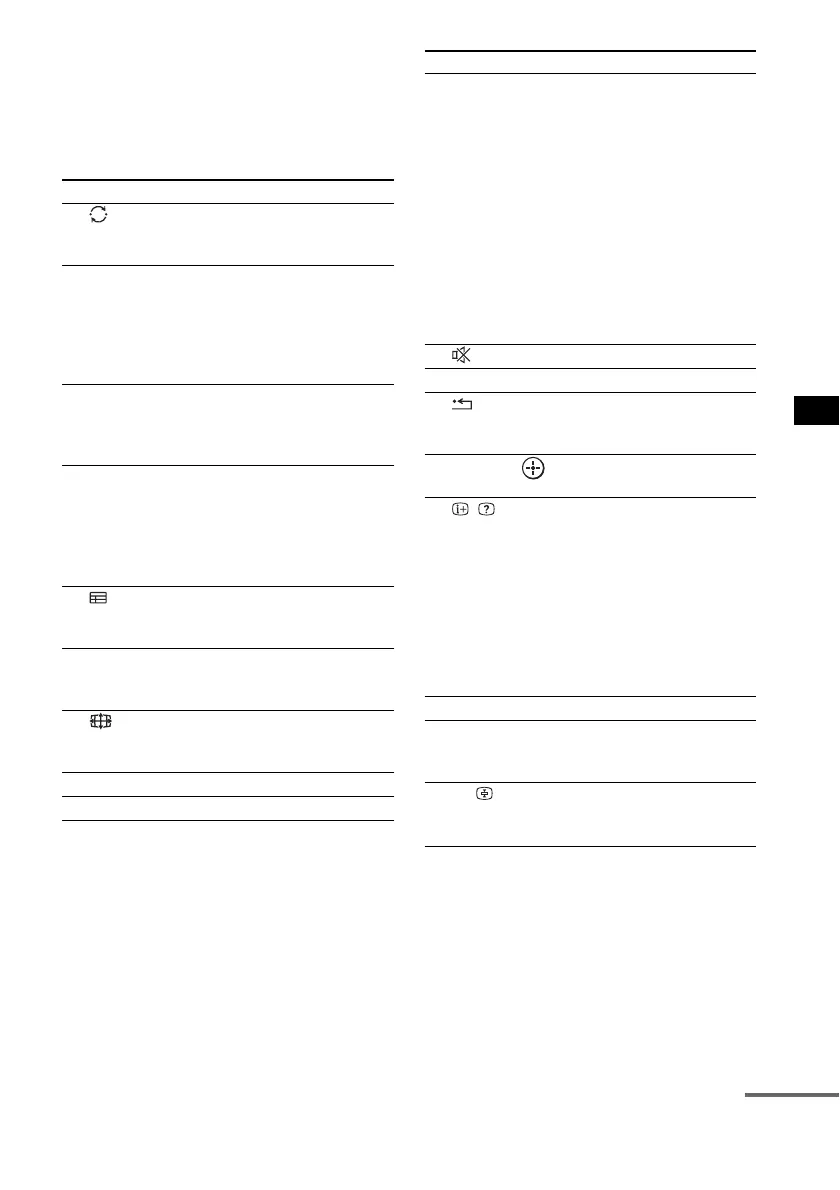
Remote Button Function
3
(Previous channel)
Returns to the channel
previously watched (for at
least five seconds).
4 TOOLS/
OPTIONS
Enables you to access
various viewing options
and change/make
adjustments according to
the source and screen
format.
5 MENU/HOME Allows you to select
channels or input sources
and change the settings for
your TV.
0 PROG +/–/c/C In TV mode: Selects the
next (+) or previous (-)
channel.
In text mode: Selects the
next (c) or previous (C)
page.
qa (Guide) Displays the guide when
you are watching analog or
digital channels.
qs AUDIO Selects the sound from the
speaker for a stereo or
bilingual broadcast.
qd (Screen mode) Changes the screen format
manually to suit the
broadcast.
qf ANALOG Changes to analog mode.
qg DIGITAL Changes to digital mode.
qh THEATRE Automatically sets the
optimal picture settings for
watching movies, when
you connect a Sony TV
that is compatible with the
THEATRE button
function. Also, audio is
automatically switched to
the audio output of this
system when you connect
the TV and the system with
HDMI connection, and the
Control for HDMI function
is set to on.
qj (Muting) Turns off the sound.
qk 2 +/– Adjusts the volume.
wa RETURN/EXIT Returns to the previous
screen of any displayed
menu.
ws C, X, x, c, Selects a menu item and
enters the selection.
wd / (Info/Text
reveal)
In digital mode: Displays
brief details of the program
currently being watched.
In analog mode: Displays
information such as current
channel number and screen
format.
In text mode: Reveals
hidden information (e.g.
answers to a quiz).
wg / (Text) Displays text.
wh Number buttons Selects channels. Press 3
ENTER to change
channels immediately.
wk t/ (Input select/
Text hold)
In TV mode: Selects input.
In analog text mode: Holds
the current page.
Remote Button Function
continued



 To Next Page