47
GB
Playback Options
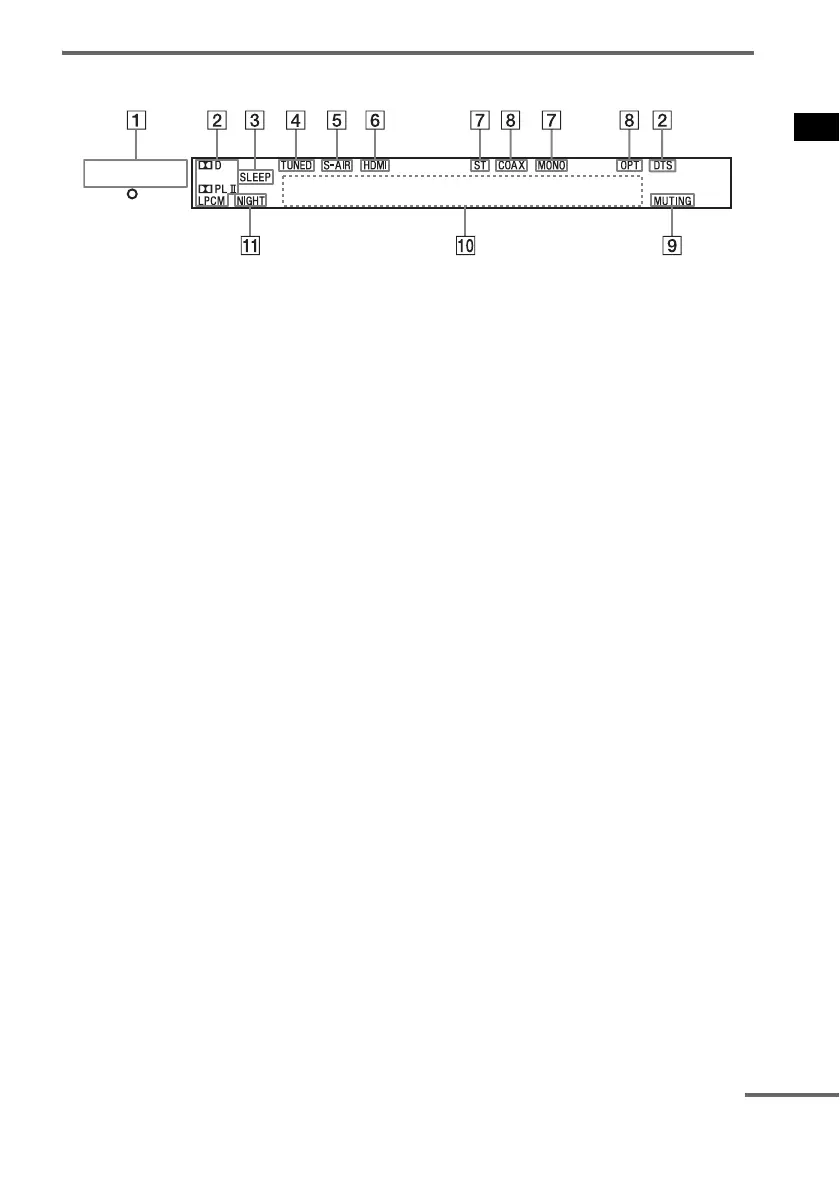
Front panel display (subwoofer)
A POWER / ACTIVE STANDBY indicator
Lights as follows:
Green: the system is turned on.
No light: the system is turned off.
Amber: the system is turned off, and either [HDMI Pass Through] in the [HDMI] menu is set to
[ON] or [AUTO], or [S-AIR Standby] in the [S-AIR] menu is set to [ON].
B Audio decoding indicators
Lights up according to the audio input signals.
C SLEEP (96)
Flashes when the Sleep Timer function is active.
D TUNED (67)
Lights up when a radio station is received.
E S-AIR (85)
Lights up when the S-AIR transmitter (not supplied) is inserted in the subwoofer and the system
transmits the sound.
F HDMI (26, 98)
Lights up when HDMI equipment is in use.
G ST/MONO (67)
Lights up according to the stereo or monaural status of the radio.
H COAX/OPT
Lights up according to the cable that you are using.
I MUTING
Lights up when the sound is turned off.
J Message display area
Displays volume, selected input source, audio input signal, etc.
K NIGHT (58)
Lights up in NIGHT mode.
POWER /
ACTIVE STANDBY
continued



 To Next Page