25
GB
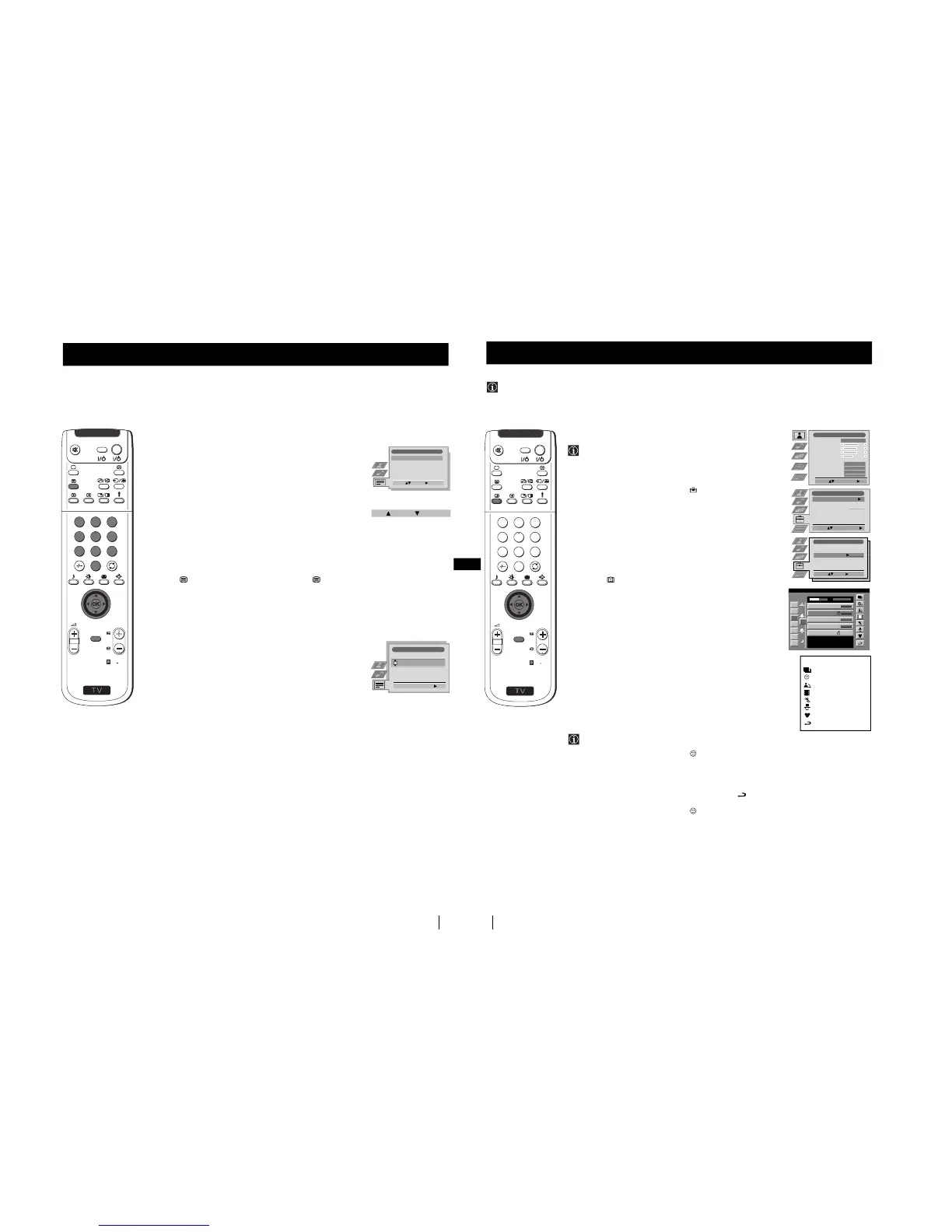
Using the Teletext menu
1
With Teletext switched on, press the MENU button on the remote
control to display the teletext menu on the TV screen.
2
Push the joystick 4 or $ to select your chosen item, then push to z
to display the relevant sub menu.
3
To remove the teletext menu from the screen, press the MENU
button.
Top / Bottom / Full
The Top/Bottom/Full sub menu allows you to enlarge different
sections of the Teletext page. Push the joystick 4 to enlarge the
upper half of the screen, push $ to enlarge the lower half. Press
the OK button to restore the page to normal size.
Text Clear
After having selected this function, you can watch a TV channel while
waiting for a requested Teletext page. As soon as the page is available,
the symbol changes colour. To view the page, press .
Reveal
Some teletext pages contain hidden information (eg for a quiz),
which you can reveal. The hidden information appears on screen.
Time Page
(depending on availability of teletext service)
You can call up a time-coded page such as an alarm page at a time
specified by you. After you have displayed the Time Page sub menu:
1
Press the numbered buttons on the remote control to enter the
three digits of the desired page.
2
Press the numbered buttons again to enter the four digits of the
desired time.
3
Press the OK button to store the desired time. The time is displayed
in the top left corner of the screen. At the requested time the page is
displayed.
Page Overview
(depending on availability of teletext service)
In the Page Overview menu the block and group pages of TOP- Text
are sorted into two columns, so that the customer can easily select this
page. For each block page in the first column, the corresponding
group pages are shown in the second column. Push the joystick 4 or $
to select the desired block page, then push z to enter to the group pages
column. Push 4 or $ to select the desired group page .
Finally, press the OK button to display the page.
Teletext
Teletext
S
RM
903
PROGR
MENU
1
4
7
2
5
8
0
3
6
9
TV
V
I
D
E
O
Teletext
Top / Bottom / Full
Text Clear
Reveal
Time Page
Page Overview
Select: Enter:
Top: Bottom: Full: OK
Time Page
PAGE TIME
Select Page: 0-9 Next:
- - : - -
– – –
26
NexTView
NexTView
* (depending on availability of service)
NexTView is an on-screen electronic programme guide (EPG), providing you with programme information for different
broadcasters.
NexTView *
Selecting your NexTView provider
The set automatically selects the best NexTView provider for you.
This provider is available about 30 minutes after the channel tuning.
You can however change this selection of provider if you wish.
1
Press the MENU button on the remote control to display the menu
on the screen.
2
Push the joystick 4 or $ to select the symbol, then push z
to enter the Set Up menu.
3
Push 4 or $ to highlight Select NexTView then push z to enter. A list
is displayed containing all available NexTView providers.
4
Push 4 or $ to select the desired provider then press the OK
button to store.
5
Press the MENU button to remove the menu from the screen.
Displaying NexTView
1
Press the button repeatedly on the remote control to switch
NexTView on and off.
* In some cases, you may also need to push the joystick Z to
display the Sony electronic programme guide.
2
Push the joystick 4, $, Z or z to move the cursor around the screen.
3
Press the OK button to confirm a selection.
a) If you press the OK button in the date, time or icon (themes)
columns, you change the programme list according to the
selection.
b) If you press the OK button in the programme list, you directly
display the channel if the broadcast is currently running, or,
you display the "Long Info" menu if the broadcast is running at
some future time.
Using the "Individual Setting" menu
You can make a personal list of the types of programmes you
wish to view on the programme guide.
1
Push the joystick 4 or $ to select the icon then push to z to
display the "Individual Setting" menu.
2
Push the joystick 4 or $ to select your chosen item on the screen
then press the OK button to confirm your choice.
3
Repeat step 2 for all the items you wish to have in your list.
4
When you have finished the list, push z to select the icon.
5
Press the OK button to return to the previous menu.
6
Push the joystick 4 or $ to select the icon then press the OK
button again to activate your "Individual Setting" filter.
S
RM
903
PROGR
MENU
1
4
7
2
5
8
0
3
6
9
TV
V
I
D
E
O
Picture Adjustment
Select: Enter Menu:
Picture Mode
Contrast
Brightness
Colour
Sharpness
Reset
AI
Noise Detection
Digital Mode
Colour Tone
Personal
On
On
DRC 50
Normal
Set Up
Auto Tuning
Programme Sorting
Select NexTView
AV Preset
Manual Set Up
Select:
Start Auto Tuning
Start
- - - - - - -
7
Tue
07 Tue
12:38
8
Wed
10
Fri
11
Sat
12
Sun
13
Mon
9
Thu
12
SWISS
Star Wars
Super RTL
Hat der alte Hexenmeister sich doch
einmal fortbegeben, und nun sollen
seine Geister auch nach meinem Willen
leben.
Werner - Beinhart
Pro 7
Flui grüsst den Rest der Welt
Kabel 1
Once upon a time in the West
Euronews
International News
RTL Plus
10:35 - 12:45
10:20 - 12:00
10:45 - 10:50
11:00 - 11:20
11:45 - 12:50
TXT TPS / RINGIER
Tue 07. 04 .98
Index
full selection list
personal selection
news broadcasts
movies
sports
entertainment
children
return to last menu
Enter:
Set Up
Auto Tuning
Programme Sorting
Select NexTView
AV Preset
Manual Set Up
Select:
- - - - - - -
continued...



 To Next Page