English
(E) 7
3-2-1. Setting resolution
The resolution denotes the difference in phase between the
A and B phase edges.
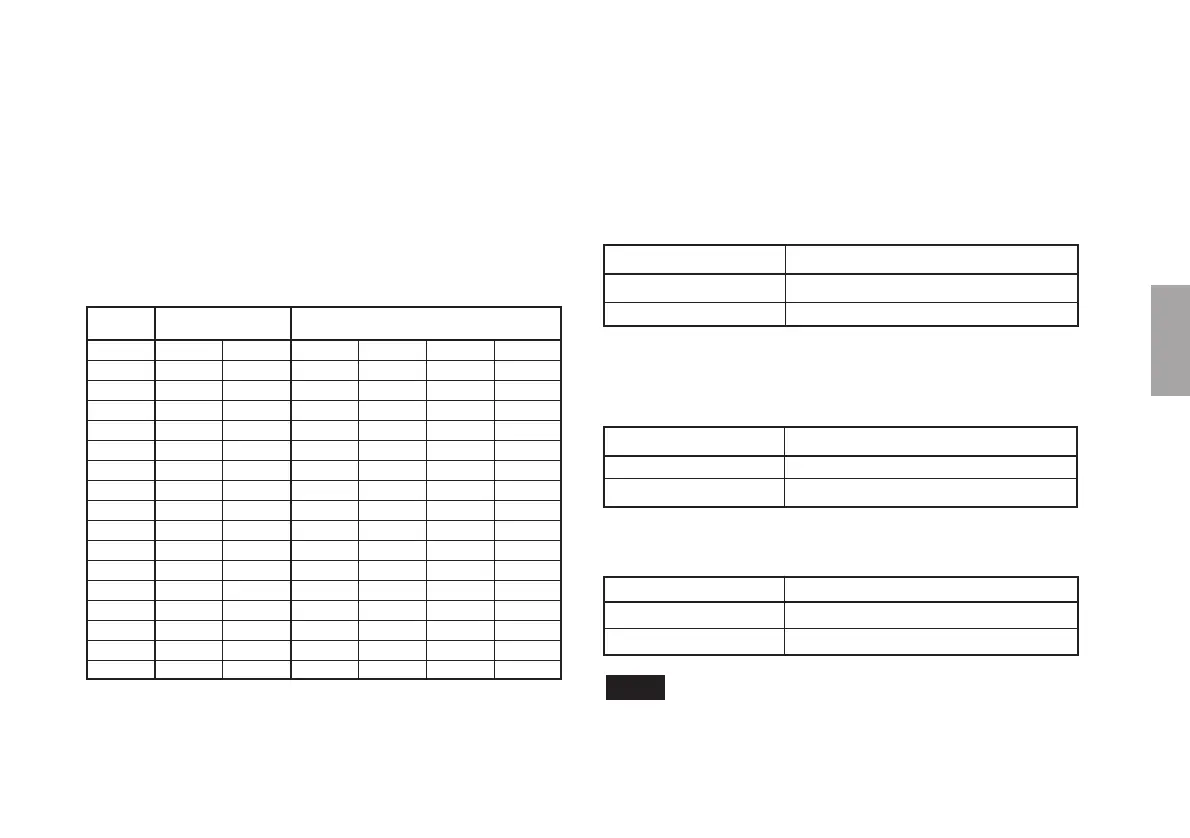
The MJ100/110 can split scale signals from the detection
head into 40 to 1000 divisions. The default setting is 500
divisions (PL25: 10 um; PL60: 4 um). To change the
resolution, set MODE switches 6 through 9 as given in
Table 1.
Number of
Resolution (
uu
uu
um) MODE Switch
Divisions
PL25 PL60 6 7 8 9
1000 5 2 ON ON ON ON
960 OFF ON ON ON
800 2.5 ON OFF ON ON
512 OFF OFF ON ON
500 10 4 ON ON OFF ON
480 OFF ON OFF ON
400 12.5 5 ON OFF OFF ON
256 OFF OFF OFF ON
240 ON ON ON OFF
200 25 10 OFF ON ON OFF
128 ON OFF ON OFF
120 OFF OFF ON OFF
100 50 20 ON ON OFF OFF
80 OFF ON OFF OFF
64 ON OFF OFF OFF
40 125 50 OFF OFF OFF OFF
Table 1
3-2-2. Setting the 1/2 division function
By using the 1/2 division function, it is possible to halve the
number of divisions (double the resolution) given in Table 1.
The 1/2 division function setting is made using MODE
switch 10.
MODE Switch 10 1/2 division function
ON Do not halve the number of divisions
OFF Halve the number of divisions
The default setting is ON (do not halve the number of
divisions).
Example: Resolution when the number of divisions is 100 at PL25
MODE Switch 10 Number of Divisions/Resolution
ON 100/50 um
OFF 50/100 um
Example: Resolution when the number of divisions is 500
at PL25
MODE Switch 10 Number of Divisions/Resolution
ON 500/10 um
OFF 250/20 um
Note
The 1/2 division function (MODE switch 10) is not related to
the reference point synchronized with the A/B phase. For
more information, see the section “3-3. Using the reference
point.”






 To Next Page