14
STR-DA3300ES/DG1100
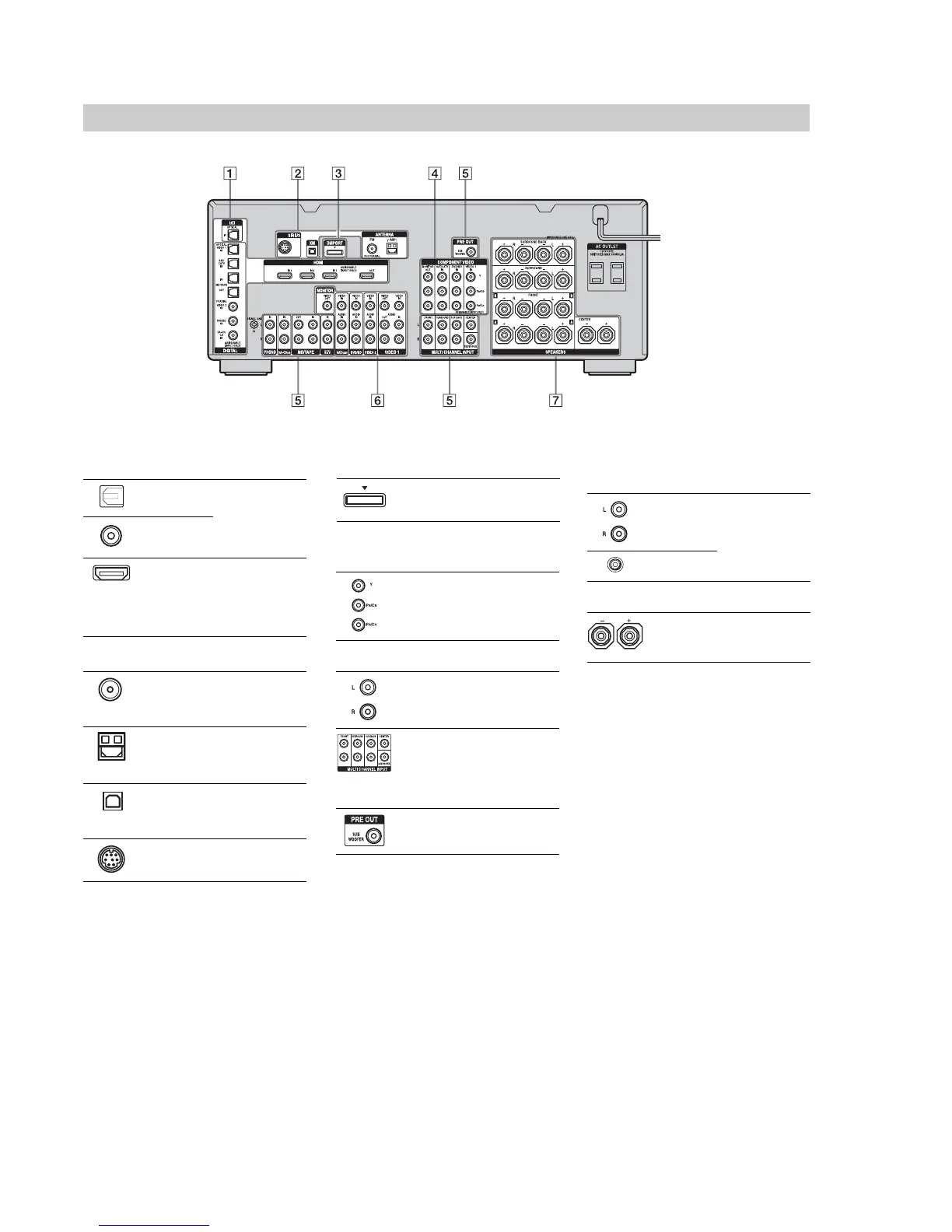
Rear panel
A DIGITAL INPUT/OUTPUT section
OPTICAL IN/
OUT jacks
Connect to a DVD
player, Super Audio
CD player, etc. The
COAXIAL jack
provides a better
quality sound.
COAXIAL IN
jacks
HDMI IN/
OUT* jacks
Connect to a DVD
player, Blu-ray Disc
Player, or a satellite
tuner. An image and
the sound are output
to TV or a projector.
B ANTENNA section
FM ANTENNA
jack
Connects to the FM
wire antenna (aerial)
supplied with this
receiver.
AM
ANTENNA
jack
Connects to the AM
loop antenna (aerial)
supplied with this
receiver.
XM jack Connects to the XM
Mini Tuner and
Home Dock (not
supplied).
SIRIUS jack Connects to a
SiriusConnect Home
tuner (not supplied).
C DMPORT
Connects to a Sony
DIGITAL MEDIA
PORT adapter.
*You can watch the selected input image when you
connect the MONITOR VIDEO OUT jack to a TV.
You can operate this receiver using a GUI (Graphi
cal User Interface).
D COMPONENT VIDEO INPUT/
OUTPUT section
Y, P
B
/C
B
, P
R
/
C
R
IN/OUT*
jacks
Connect to a DVD
player, TV, or a
satellite tuner.
E AUDIO INPUT/OUTPUT section
AUDIO IN/
OUT jacks
Connect to a tape
deck or MD deck, etc.
MULTI
CHANNEL
INPUT jacks
Connect to a Super
Audio CD player or
DVD player with an
analog audio jack for
7.1 channel or 5.1
channel sound.
PRE OUT jack Connects to an active
sub woofer.
F VIDEO/AUDIO INPUT/OUTPUT
section
AUDIO IN/
OUT jacks
Connect to a VCR or
a DVD player etc.
VIDEO IN/
OUT* jacks
G SPEAKERS section
Connects to speakers.

















 To Next Page