STR-DA3300ES/DG1100
99
STR-DA3300ES/DG1100
SECTION 2
GENERAL
This section is extracted from
instruction manual.
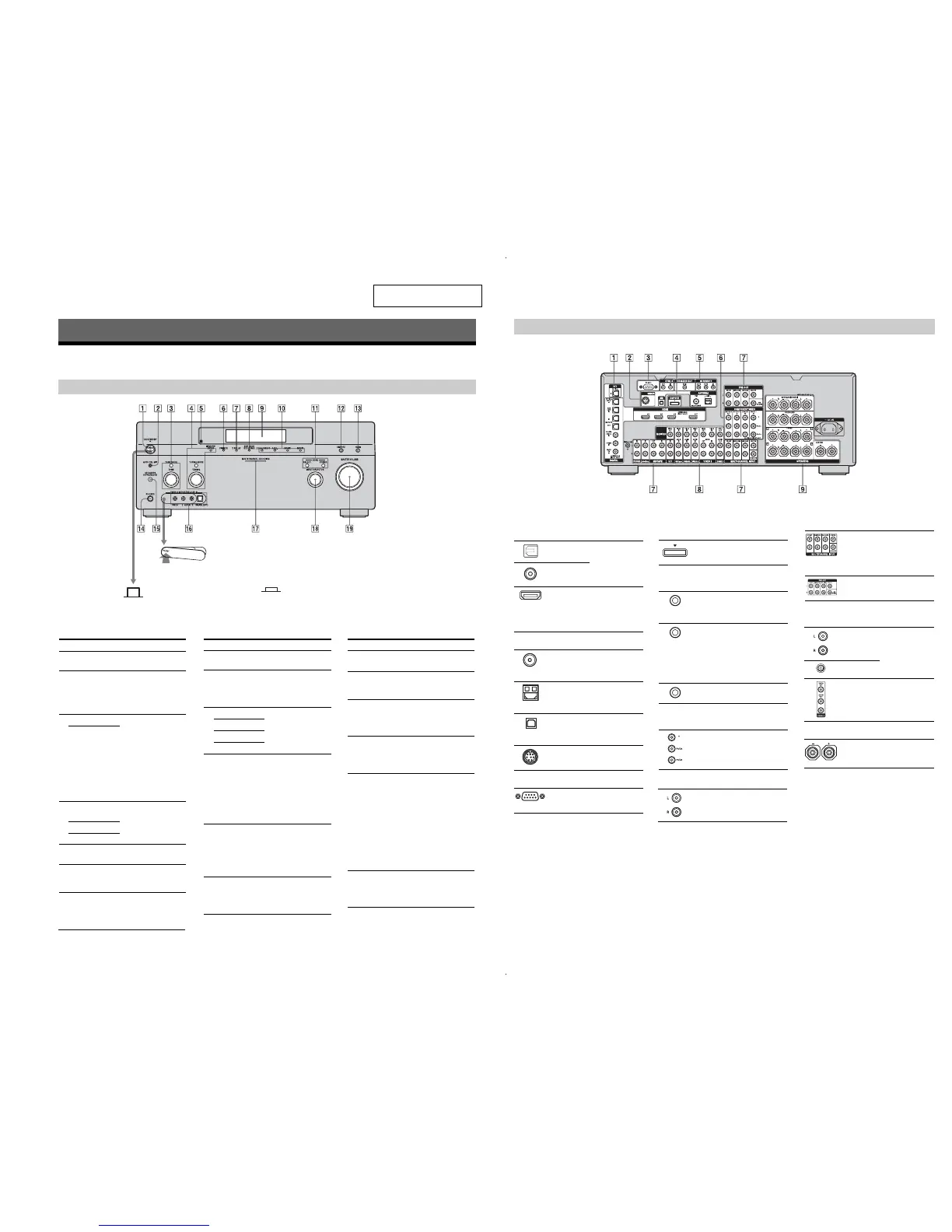
Description and location of parts
(DA3300ES: US and Canadian models)
Getting Started
Front panel
To remove the cover
Press PUSH.
When you remove the cover, keep it out
of reach from children.
Status of the POWER button
Off
The receiver is turned off (initial
setting).
Press POWER to turn the receiver on.
Yo u cannot turn the receiver on using
the remote.
On/Standby
Press ?/1 on the remote to turn the
receiver on or set it to the standby mode.
When you press POWER on the
receiver, the receiver will be turned off.
Name Function
A POWER Press to turn the
receiver on or off.
B AUTO CAL MIC
jack
Connects to the
supplied optimizer
microphone for the
Digital Cinema Auto
Calibration function.
C TONE MODE Adjusts FRONT/
CENTER/
SURROUND/
SURROUND BACK
BASS and TREBLE.
Press TONE MODE
repeatedly to select
BASS or TREBLE,
then turn TONE to
adjust the level.
TONE
D MEMORY/
ENTER
Press to operate a tuner
(FM/AM) and satellite
radio (XM/SIRIUS).
TUNING MODE
TUNING
E Remote sensor Receives signals from
remote commander.
F DIMMER Press repeatedly to
adjust brightness of the
display.
Name Function Name Function
N PHONES jack Connects to
headphones.
O SPEAKERS
(OFF/A/B/A+B)
Switch to OFF, A, B,
A+B of the front
speakers.
P VIDEO 3 IN/
PORTABLE AV
IN jacks
Connect to a portable
audio/video component
such as a camcorder or
video game.
Q MULTI
CHANNEL
DECODING
lamp
Lights up when multi-
channel audio signals
are decoded.
R INPUT
SELECTOR
Turn to select the input
source to play back.
To select the input
source for zone 2, press
ZONE/SELECT (
qa
)
to select zone 2 first
(“ZONE 2 INPUT”
appears on the display),
then turn INPUT
SELECTOR to select
the input source.
S MASTER
VOLUME
Turn to adjust the
volume level of all
speakers at the same
time.
H SUR BACK
DECODING
Press to activate SB
DECODING.
I Display
window
The current status of
the selected component
or a list of selectable
items appears here.
J 2CH/A.DIRECT Press to select sound
field.
A.F.D.
MOVIE
MUSIC
K ZONE/
POWER,
SELECT
Press SELECT
repeatedly to select
zone 2 or main zone.
Each time you press
POWER, the output
signals for the selected
zone will be turned on
or off.
L DMPORT Press to select the
audio/video input
signal from the
component connected
to the DIGITAL
MEDIA PORT adapter.
G DISPLAY Press repeatedly to
select information
displayed on the
display.
M HDMI Press to select input
source from the
component connected
to the HDMI IN jack.
Rear panel
A DIGITAL INPUT/OUTPUT section
OPTICAL IN/
OUT jacks
Connect to a DVD
player, Super Audio
CD player, etc. The
COAXIAL jack
provides a better
quality sound.
COAXIAL IN
jacks
HDMI IN/
OUT* jacks
Connect to a DVD
player, Blu-ray Disc
Player, or a satellite
tuner. An image and
the sound are output
to TV or a projector.
B ANTENNA section
FM ANTENNA
jack
Connects to the FM
wire antenna (aerial)
supplied with this
receiver.
AM
ANTENNA
jack
Connects to the AM
loop antenna (aerial)
supplied with this
receiver.
XM jack Connects to the XM
Mini Tuner and
Home Dock (not
supplied).
SIRIUS jack Connects to a
SiriusConnect Home
tuner (not supplied).
C RS-232C port
Used for
maintenance and
service.
*You can watch the selected input image when you
connect the MONITOR VIDEO OUT jack to a TV.
Yo u can operate this receiver using a GUI (Graphi
cal User Interface).
D DMPORT
Connects to a Sony
DIGITAL MEDIA
PORT adapter.
E Control jack for Sony equipment
and other external components
CTRL S IN/
OUT jacks
Connect to Sony TV,
DVD player or VCR
with CONTROL S
jack.
TRIGGER
OUT jack
Connects to interlock
on/off of the power
supply of other 12V
TRIGGER
compliant
components, or the
amplifier/receiver of
zone 2.
IR REMOTE
IN/OUT jacks
Connect an IR
repeater.
F COMPONENT VIDEO INPUT/
OUTPUT section
Y, P
B
/C
B
, P
R
/
C
R
IN/OUT*
jacks
Connect to a DVD
player, TV, or a
satellite tuner.
MULTI
CHANNEL
INPUT jacks
Connect to a Super
Audio CD player or
DVD player with an
analog audio jack for
7.1 channel or 5.1
channel sound.
PRE OUT jacks Connect to an
external power
amplifier.
H VIDEO/AUDIO INPUT/OUTPUT
section
AUDIO IN/
OUT jacks
Connect to a VCR or
a DVD player etc.
VIDEO IN/
OUT* jacks
AUDIO OUT
jacks
VIDEO OUT
jack
Connect to the
component in zone 2.
I SPEAKERS section
Connects to speakers.
G AUDIO INPUT/OUTPUT section
AUDIO IN/
OUT jacks
Connect to a tape
deck or MD deck, etc.
Ver. 1.1

















 To Next Page