STR-DA3300ES/DG1100
1010
STR-DA3300ES/DG1100
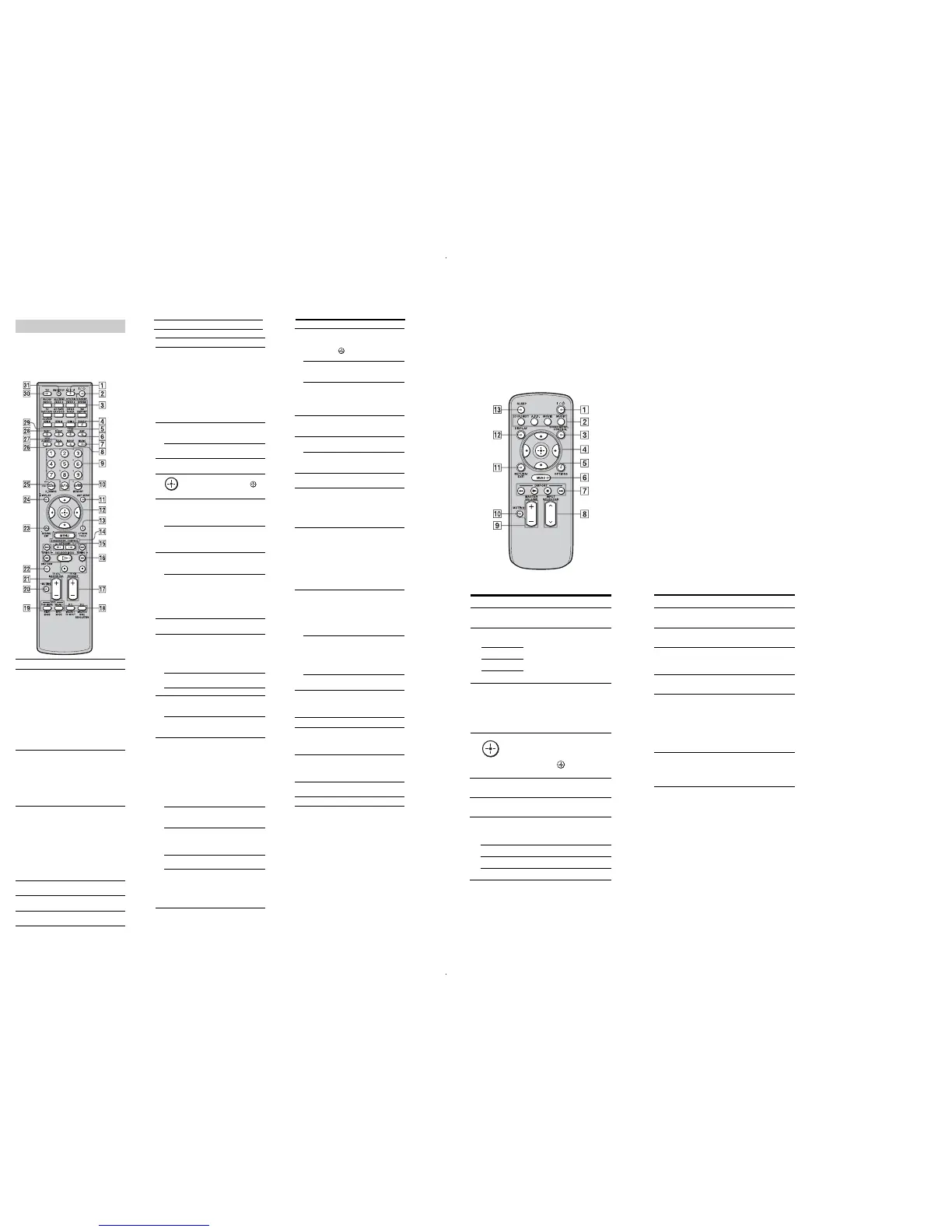
Yo u can use the supplied remote RM-AAL011
to operate the receiver and to control the Sony
audio/video components that the remote is
assigned to operate.
RM-AAL011
Remote commander
Name Function
C Input
buttons
Press one of the buttons to
select the component you want
to use. Press a pink-labeled
button after pressing SHIFT
(wk). When you press any of the
input buttons, the receiver turns
on. The buttons are factory
assigned to control Sony
components. You can program
the remote to control non-Sony
components following the steps
in “Programming the remote”.
D ZONE 2 Press to enable the zone 2
operation.
G MUSIC Press to select sound field.
H MOVIE Press to select sound field.
I Numeric
buttons
Press to
–preset/tune to preset stations.
–select track numbers of the
CD player, DVD player, Blu-
ray Disc Player or MD deck.
Press 0/10 to select track
number 10.
–select channel numbers of
the VCR or satellite tuner.
–After pressing TV (e;),
press the numeric buttons to
select the TV channels.
J ENTER Press to enter the value after
selecting a channel, disc or
track using the numeric buttons.
MEMORY Press to store a station during
tuner operation.
K AMP MENU Press to display the menu to
operate the receiver.
L
V/v/B/b
Press V/v/B/b to select the
menu items. Then press to
enter the selection.
M OPTIONS Press to display and select items
from option menus for receiver
and DVD player, Blu-ray Disc
Player.
TOOLS Press to display and select items
from the option menus for DVD
player or Blu-ray Disc Player,
etc.
N MENU Press to display the menu to
operate the audio/video
components.
SCREEN/
DSPL
CONTROL
Press SHIFT (wk), then press
MENU to switch the display
mode of the menu between
SCREEN (to display the menu
on the TV screen) and DSPL (to
display the menu in the display
window).
O CATEGORY
+/–
Press to select the category for
satellite tuner.
Name Function
P m/M
a)
x
a)
X
a)
H
a) b)
./>
a)
Press to operate the DVD
player, Blu-ray Disc Player, CD
player, MD deck, tape deck, or
component connected to the
DIGITAL MEDIA PORT
adapter etc.
CATEGORY
MODE
Press to select the category
mode for satellite tuner.
TUNING +/– Press to select station.
Q PRESET
+
b)
/–
Press to register FM/AM/
satellite tuner stations or to
select preset stations.
TV CH +/– Press TV (e;), then press TV
CH +/– to operate the TV,
satellite tuner, VCR, etc.
R F1/F2 Press TV (e;), then press F1 or
F2 to select a component to
operate.
• HDD recorder
F1: HDD
F2: DVD player, Blu-ray Disc
Player
•DVD/VHS combo player
F1: DVD player, Blu-ray Disc
Player
F2: VHS
MACRO1,
MACRO2
Press AMP (6), then press
MACRO1 or MACRO2 to set
up the macro function.
TV/INPUT Press TV/INPUT and TV (e;)
at the same time to select the
input signal (TV input or video
input).
a)
See the table for information on the buttons that
you can use to control each component.
b)
The tactile dot is attached to these buttons (H,
PRESET+). Use as a mark of operation.
Notes
•Some functions explained in this section may not
work depending on the model.
•The above explanation is intended to serve as an
example only. Therefore, depending on the
component, the above operation may not be
possible or may operate differently than described.
S DVD/
TOP MENU,
MENU
Press to display the menus of
the DVD player on the TV
screen. Then use V/v/B/b and
to perform a menu
operations.
NIGHT
MODE
Press AMP (6), then press
NIGHT MODE to activate the
NIGHT MODE function.
INPUT
MODE
Press AMP (6), then press
INPUT MODE to select the
input mode when the same
components are connected to
both digital and analog jacks.
T MUTING Press to turn off the sound
temporarily. Press the button
again to restore the sound.
U MASTER
VOL +/–
Press to adjust the volume level
of all speakers at the same time.
TV VOL +/– Press TV (e;), then press TV
VOL +/– to adjust the volume
level of the TV.
V DISC SKIP Press to skip a disc when using
a multi-disc changer.
W RETURN/
EXIT O
Press to return to the previous
menu or exit the menu while the
menu or on-screen guide of the
VCR, DVD player, or satellite
tuner is displayed on the TV
screen.
X DISPLAY Press to select information
displayed in the display
window, TV screen of the VCR,
satellite tuner, CD player, DVD
player, Blu-ray Disc Player, or
MD deck.
Note
In the SCREEN mode, press the
button to display the menu on
the TV screen.
Y CLEAR Press to
–clear a mistake when you
press the incorrect numeric
button.
–return to continuous
playback, etc. of the satellite
tuner or DVD player.
>10 Press to select
–track numbers over 10 of the
VCR, satellite tuner, CD
player or MD deck.
–channel numbers of the
Digital CATV terminal.
D.TUNING Press to enter direct tuning
mode.
Z 2CH/
A.DIRECT
Press to select sound field or to
switch the audio
of the selected input to analog
signal without any adjustment.
wj A.F.D. Press to select sound field.
wk SHIFT Press to light up the button. It
changes the remote button
function to activate the buttons
with pink printing.
wl SLEEP Press to activate the sleep timer
function and the duration which
the receiver turns off
automatically.
e; TV Press to enable the TV
operation.
ea RM SET UP Press to set up the remote.
Name Function
A AV ?/1 (on/
standby)
Press to turn on or off the audio/
video components that the
remote is assigned to operate.
If you press the ?/1 (B) at the
same time, it will turn off the
receiver and other Sony
components (SYSTEM
STANDBY).
Note
The function of the AV ?/1
switch changes automatically
each time you press the input
button (C).
B ?/1 (on/
standby)
Press to turn the receiver on or
off.
If ZONE 2 is selected, only the
main receiver is turned on or off
with this button. To turn off all
components including an
amplifier in zone 2, press ?/1
and AV ?/1 (A) at the same
time (SYSTEM STANDBY).
F AMP Press to enable the receiver
operation.
E TEST TONE Press to output the test tone
from each speaker.
WIDE Press repeatedly to select the
wide picture mode.
RESOLUTION
Press SHIFT (wk) then press
RESOLUTION repeatedly to
change the resolution of signals
output from the HDMI OUT or
COMPONENT VIDEO
MONITOR OUT jack.

















 To Next Page