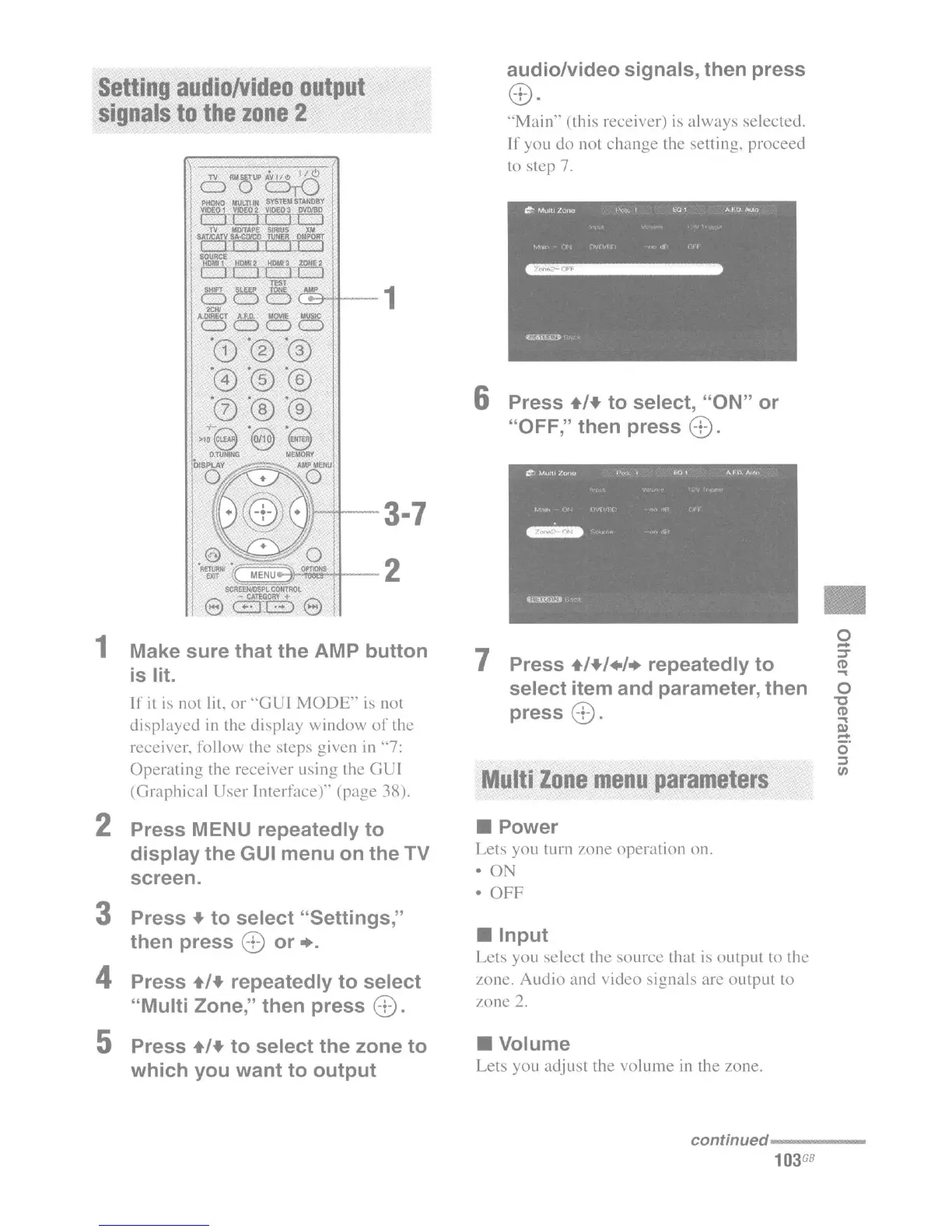
audio/video signals, then press
G
'0:J •
6 Press +/+ to select, "ON" or
"OFF," then press
8 .
o
-
'::J'
(l)
...
o
"0
(l)
...
III
-
o'
::I
VI
•
•
Input
Lets you select the
source
that is output to the
zone.
Audio
and video signals are
output
to
zone
2.
Multi
Zone
menu
parameters
• Volume
Lets you adjust the
volume
in
the zone.
"Main"
(this receiver) is
always
selected.
If
you
do
not
change
the setting, proceed
to step
7.
• Power
Lets you turn zone
operation
on.
• ON
• OFF
7 Press +/+/+/+ repeatedly to
select item and parameter, then
press
8.
Setting
audio/Video
output
signals
to
the
zone
2
e
1 Make sure that the AMP button
is
lit.
If
it is not lit.
or
"'GUI
MODE"
is not
displayed
in the display
window
of
the
receiver, follow the steps given in
"'7:
Operating
the receiver using the
GUI
(Graphical
User
Interface)"
(page
38).
2 Press MENU repeatedly to
display the GUI menu on the TV
screen.
3 Press + to select "Settings,"
then press
8 or +.
4 Press +/+ repeatedly to select
"Multi Zone," then press
8.
5 Press +/+ to select the zone to
which you want to output
continued-----
103
GB

















 To Next Page