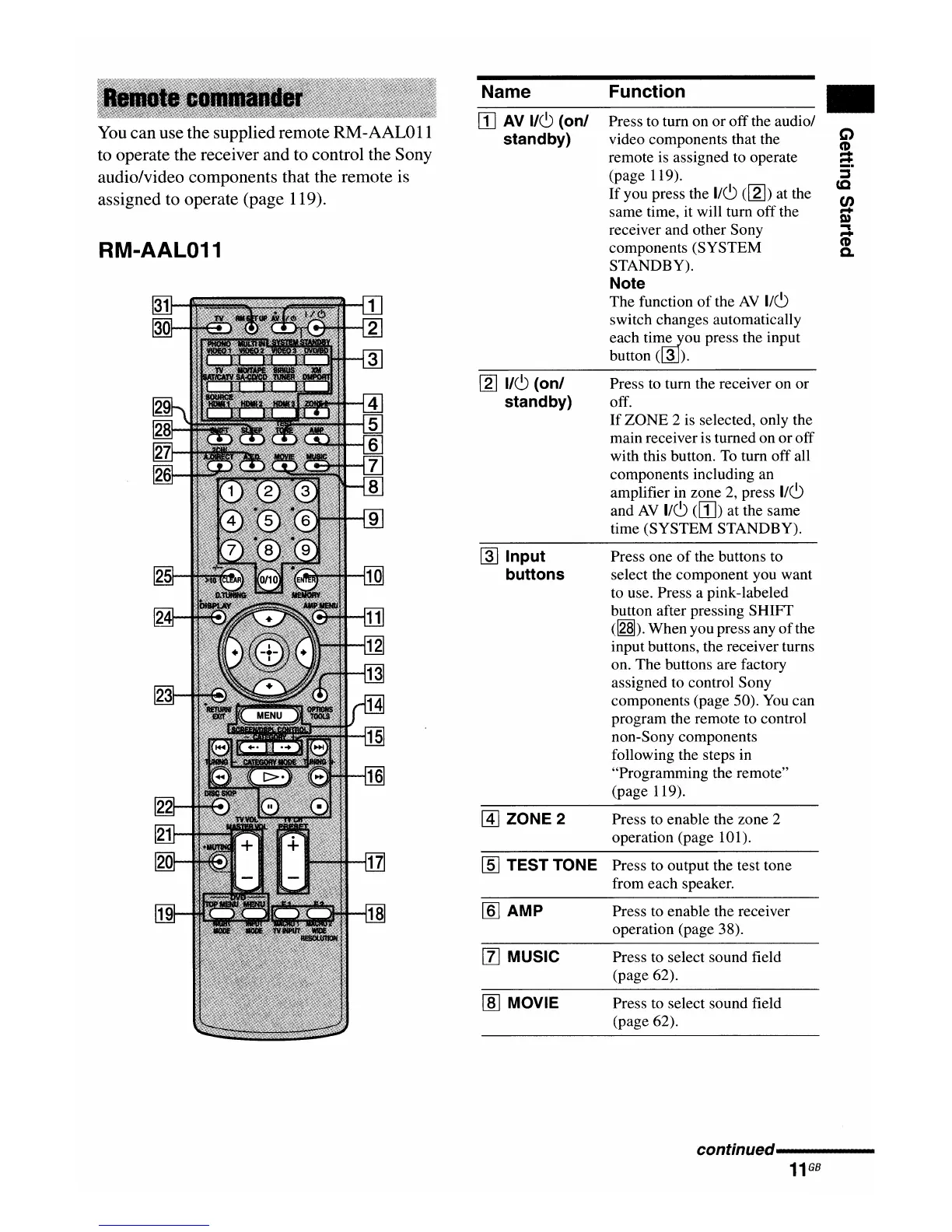
You
canuse the supplied remote RM-AAL011
to operate the receiver and to control the Sony
audio/video components that the remote is
assigned to operate (page 119).
RM-AAL011
Name
W
AV
1/(9
(onl
standby)
[2]
1/(9
(onl
standby)
rnJ
Input
buttons
[1] ZONE 2
[§]
TEST TONE
[§] AMP
[l]
MUSIC
[ID
MOVIE
Function
Press to turn on
or
offthe audio/
video components that the
remote is assigned to operate
(page 119).
If
you press the
1/(9
([2]) at the
same time, it will tum off the
receiver and other Sony
components (SYSTEM
STANDBY).
Note
The function
of
the
AV
1/(9
switch changes automatically
each
tim~ou
press the input
button
(~).
Press to tum the receiver on or
off.
If
ZONE 2 is selected, only the
main receiver is turned on
or
off
with this button.
To
tum off all
components including an
amplifier in zone
2,
press
1/(9
and
AV
1/(9
(W)
at the same
time (SYSTEM STANDBY).
Press one
of
the buttons to
select the component you want
to use. Press a pink-labeled
button after pressing SHIFT
(~).
When you press any
of
the
input buttons, the receiver turns
on. The buttons are factory
assigned to control Sony
components (page 50).
You
can
program the remote to control
non-Sony components
following the steps in
"Programming the remote"
(page 119).
Press to enable the zone 2
operation (page 101).
Press to output the test tone
from each speaker.
Press to enable the receiver
operation (page 38).
Press to select sound field
(page 62).
Press to select sound field
(page 62).
..
C)
CD
...
~
:::J
(Q
en
...
Q)
~
...
CD
Co
conunued----------
11
GB

















 To Next Page