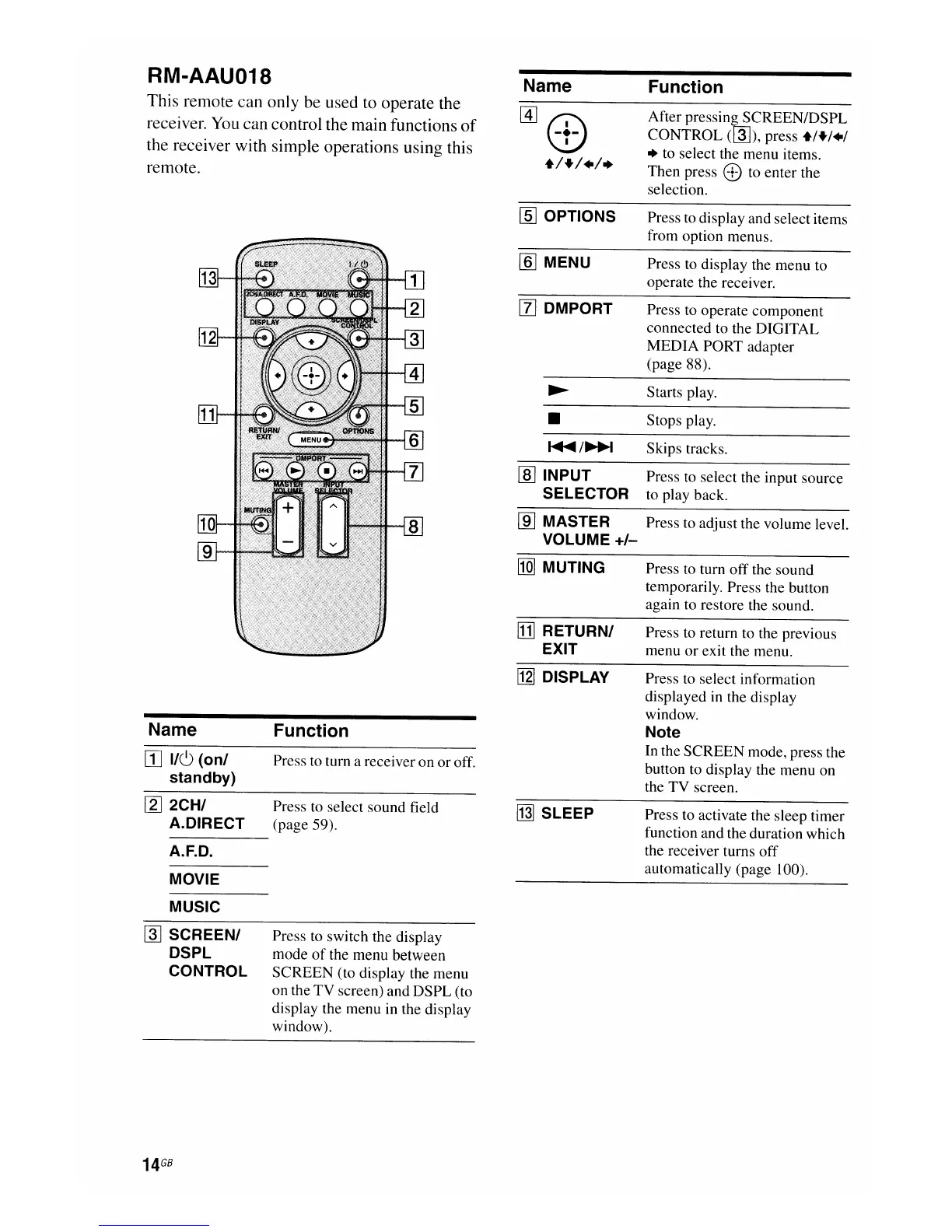
RM-AAU018
This remote can only be used to operate the
receiver. You can control the main functions
of
the receiver with simple operations using this
remote.
Name
[1]8:)
+1+1+1.
Function
After
pressin~CREEN/DSPL
CONTROL
(@J),
press
+/+/+/
• to select the menu items.
Then press
8 to enter the
selection.
~
Starts play.
~
/~
Skips tracks.
• Stops play.
Press to return to the previous
menu
or
exit the menu.
Press to turn off the sound
temporarily. Press the button
again to restore the sound.
Press to display the menu to
operate the receiver.
Press to operate component
connected to the DIGITAL
MEDIA PORT adapter
(page 88).
Press to display and select items
from option menus.
rID
INPUT Press to select the input source
SELECTOR to play back.
ffQ]
MUTING
ffi] OPTIONS
[ID
MASTER Press to adjust the volume level.
VOLUME +1-
ITIJ
RETURNI
EXIT
[1] DMPORT
[§]MENU
Name
rn
IIC)
(onl
standby)
Function
Press to turn a receiver on or off.
[12J
DISPLAY
Press to select information
displayed in the display
window.
Note
In the SCREEN mode, press the
button to display the menu on
the TV screen.
[2]
2CHI
A.DIRECT
A.F.D.
MOVIE
Press to select sound field
(page 59).
~
SLEEP
Press to activate the sleep timer
function and the duration which
the receiver turns
off
automatically (page 100).
MUSIC
~
SCREENI
DSPL
CONTROL
Press to switch the display
mode
of
the menu between
SCREEN (to display the menu
on the
TV
screen) and DSPL (to
display the menu in the display
window).
14
GB

















 To Next Page