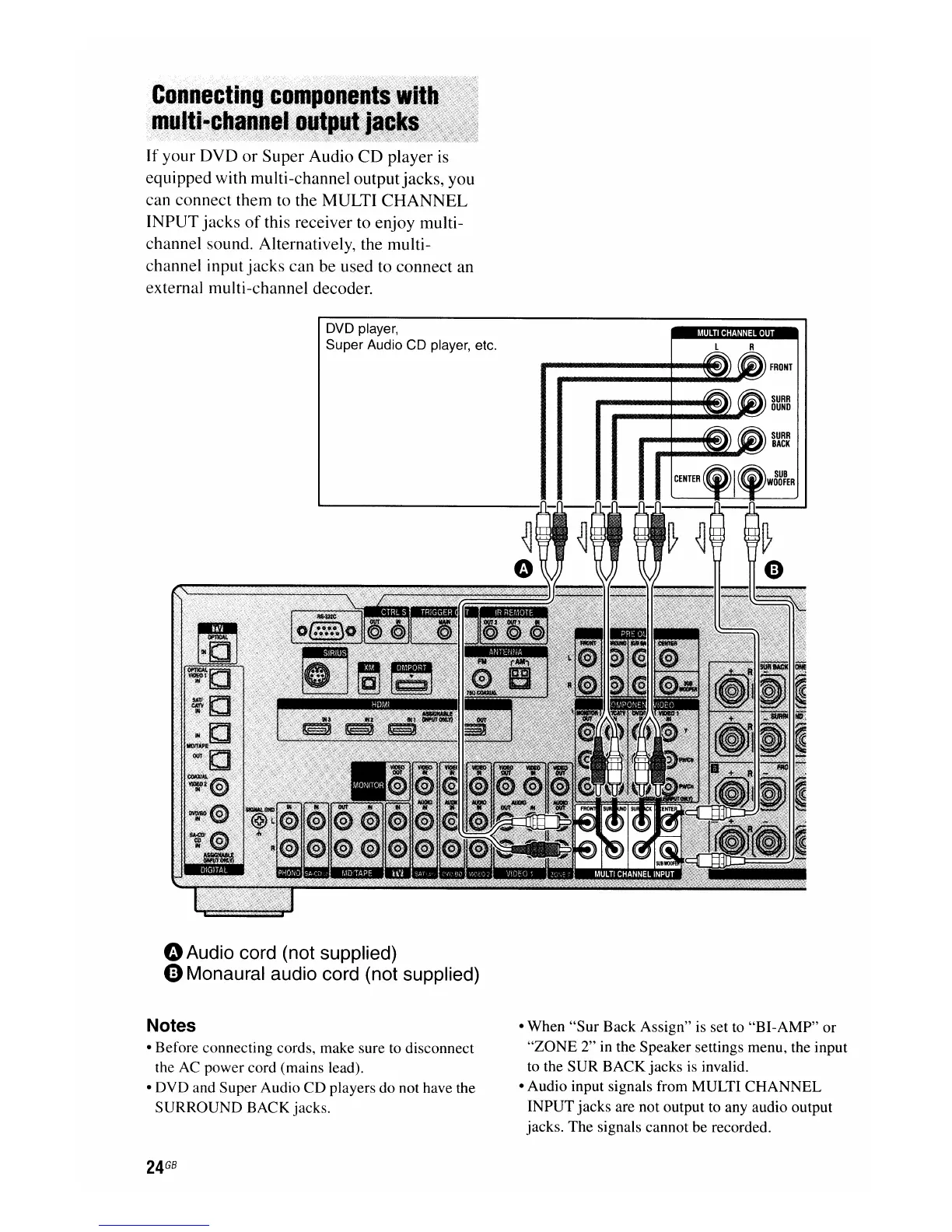
If
your
DVD
or
Super Audio
CD
player is
equipped with multi-channel outputjacks, you
can connect them to the MULTI
CHANNEL
INPUT
jacks
of
this receiver to enjoy multi-
channel sound. Alternatively, the multi-
channel input
jacks
can
be used to connect an
external multi-channel decoder.
DVD player,
Super Audio CD player, etc.
oAudio cord (not supplied)
oMonaural audio cord (not supplied)
Notes
• Before connecting cords, make sure to disconnect
the AC power cord (mains lead).
• DVD and Super Audio
CD
players do not have the
SURROUND BACK jacks.
24
GB
• When
"Sur
Back Assign" is set to "BI-AMP"
or
"ZONE
2" in the Speaker settings menu, the input
to the SUR BACK jacks is invalid.
• Audio input signals from MULTI CHANNEL
INPUT jacks are not output to any audio output
jacks. The signals cannot be recorded.

















 To Next Page