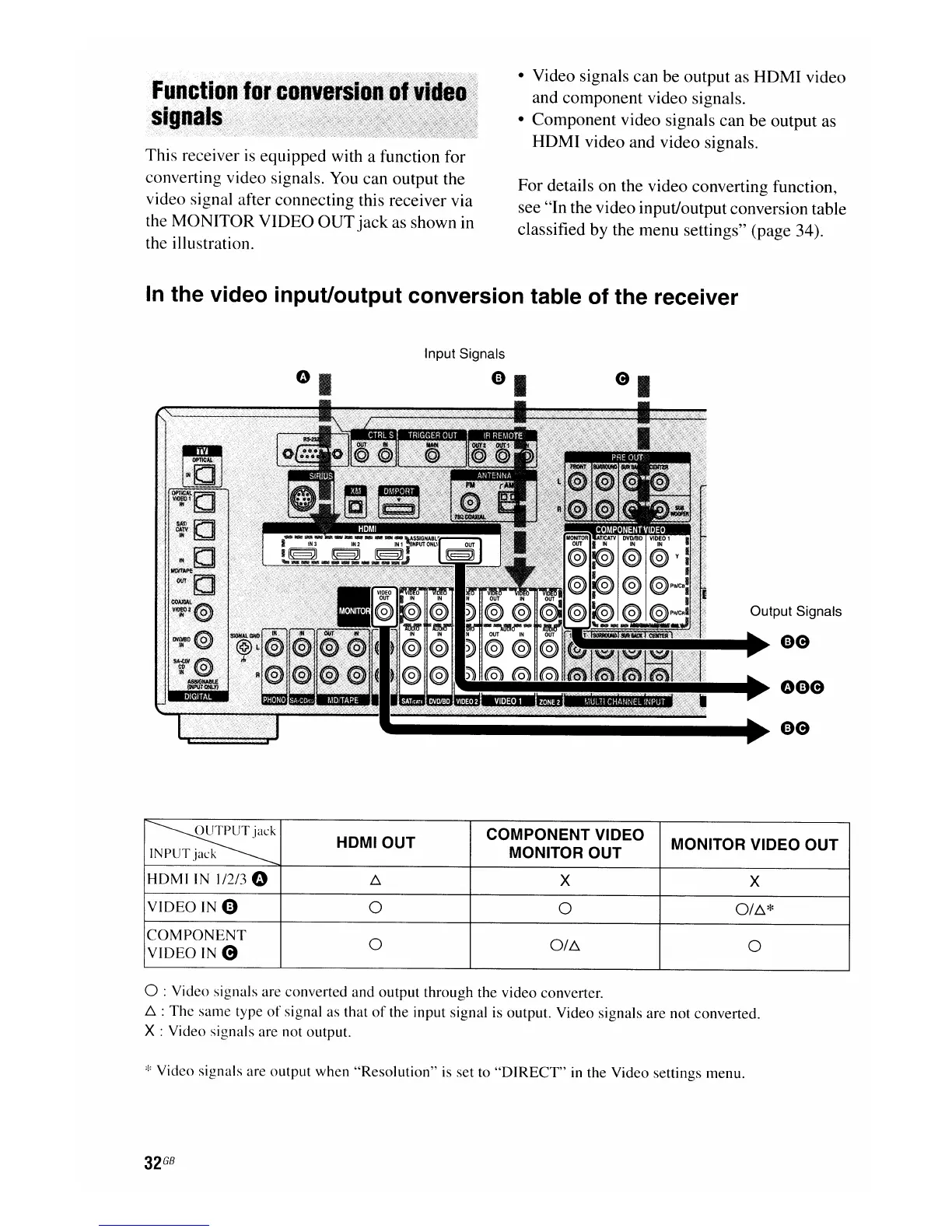
This receiver
is
equipped with a function for
converting video signals. You can output the
video signal after connecting this receiver via
the MONITOR VIDEO
OUT
jack
as shown in
the illustration.
• Video signals can be output as
HDMI
video
and component video signals.
• Component video signals can be output as
HDMI
video and video signals.
For details on the video converting function,
see "In the video input/output conversion table
classified by the menu settings" (page 34).
In
the video input/output conversion table of the receiver
Input Signals
Output Signals
oee
~
HDMIOUT
COMPONENT VIDEO
MONITOR VIDEO OUT
INPUT
jack
MONITOR OUT
HDMI
IN 1/2/3 0
6.
X
X
VIDEO
IN
4)
0 0
0/6.*
COMPONENT
0
0/6.
0
VIDEO
IN e
o :Video signals are converted
and
output
through
the video converter.
6.
:
The
same
type
of
signal as that
of
the input signal is output. Video signals are not converted.
X : Video signals are not output.
:1:
Video signals are
output
when
"Resolution"
is set to
"DIRECT"
in the Video settings menu.
32
GB

















 To Next Page