EasyManua.ls Logo

Sony STR-DA3300ES - Page 70

Sony STR-DA3300ES
162 pages
Print Icon
To Next Page IconTo Next Page
To Previous Page IconTo Previous Page
Loading...
ORUOlW~
PHQNO
MULTIIH
SYSTEM
STAHDBY
VIDEO
1
VIDEO
2
VIDEO
3
SfflI8D.
I
II
II
IL-J
Making
settings
with
the
Speaker
Pattern
menu
immediate
lert
and
right
of
the
seating
position. the
surround
effects
hecome
unclear
unless
set to
··SIDE
..
·
Nevertheless.
each
listening
environment
has
many
variables.
such
as wall reflections. and
you
may
ohtain
beller
results using
"BEHD"
if
your
speakers
are
located
high
above
the
seating
position. even if
they are locatcd to the i
mmcdiate
left and right.
Therefore.
although
it
may
result in a
selling
contrary
to the
above
explanation.
we
recommend
that you play
back
multi-channel
surround
encoded
software
and select the
selling
that
providcs
a
good
sense
of
spaciousness
and that hest
succeeds
in
forming
a
cohesive
space
between
the
surround
sound
from the
surround
speakers
and
the
sound
of
the front
speakers.
If
you
are
not
sure
which
sounds
best. select
"BEHD"
and
then use the
speaker
distance
parameter
and
speaker
level
adjustments
to
obtain
proper
balance.
TV
MDffAPE
SIRIUS
XM
$AT/CATV
SA-eOlCD
lUliER
OMPORT
I
II
I I I I I
SOURCE
IiDUlI
HDMt2
HOMl3
ZONE
2
, I I
II
II
I
TEST
SlilfT
SLEEP
TOHE
~
1
C) C)
C)L!:
~:H'I--
"""
0000
o 0
~Drf0i
~~~
100' 120'
~
Tip
Surround
speaker
position is
designed
specifically
for
implementation
of
the
Cinema
Studio
EX
modes.
For
other
sound
fields.
speaker
position
is not
so
critical.
Thm,e
sound
lieIds
were
designed
under
the
premise
that the
surround
speakers
would
he located
behind
the
seating
position. but
presentation
remains
fairly
consistent
even with the
surround
speakers
positioned
at a
rather
wide
angle. However.
if
the
speakers
are
pointing
toward the
listcner
from the
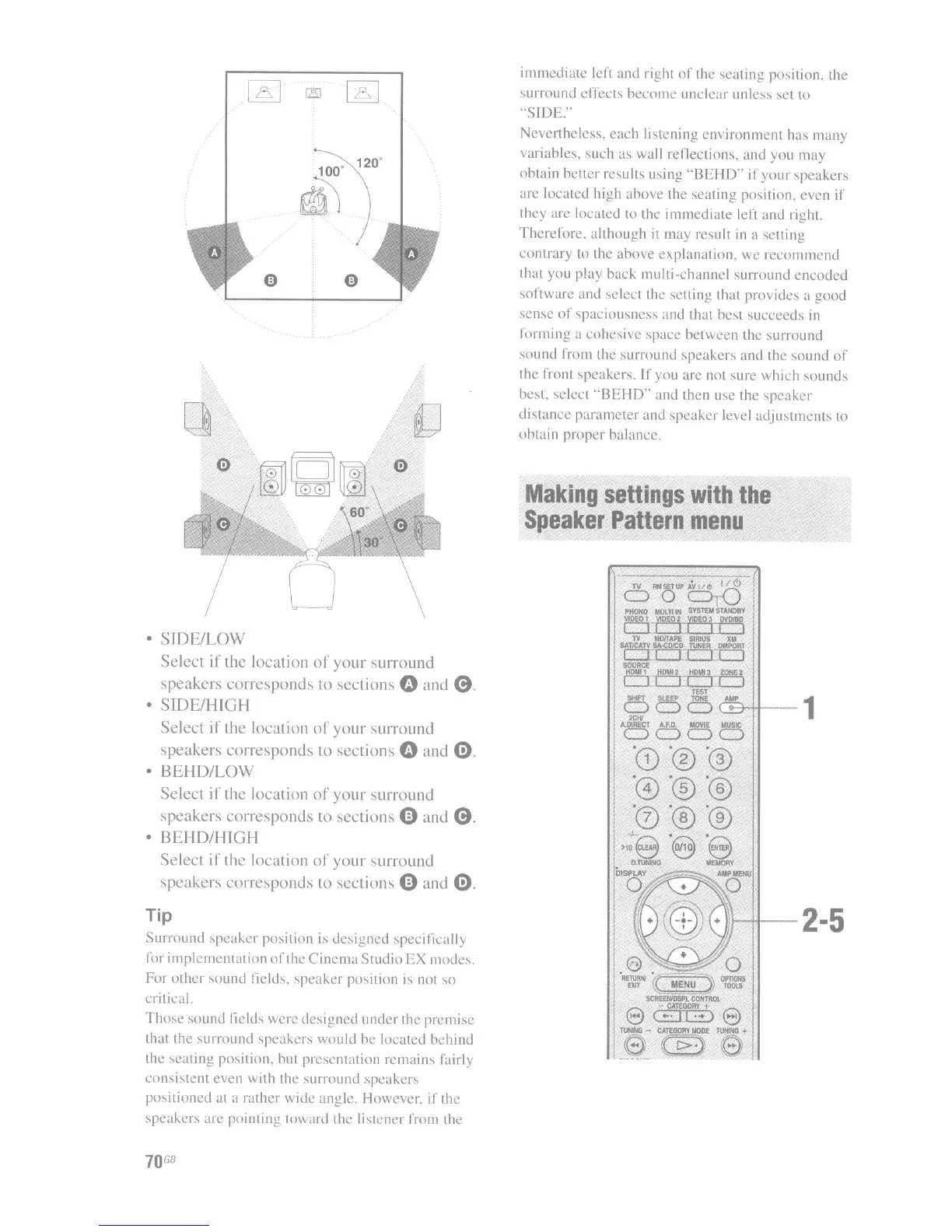
SIDE/LOW
Select if the location
of
your
surround
speakers corresponds to sections
0 and
0.
SIDE/HIGH
Select
if
the location
of
your
surround
speakers corresponds to sections
0 and
0.
BEHD/LOW
Select
i
I'
the location
of
your surround
speakers corresponds to sections
0 and
0.
BEHD/HIGH
Select if the location
of
your
surround
speakers
corresponds
to sections 0 and
0.
70
GB

Table of Contents

Other manuals for Sony STR-DA3300ES

Related product manuals