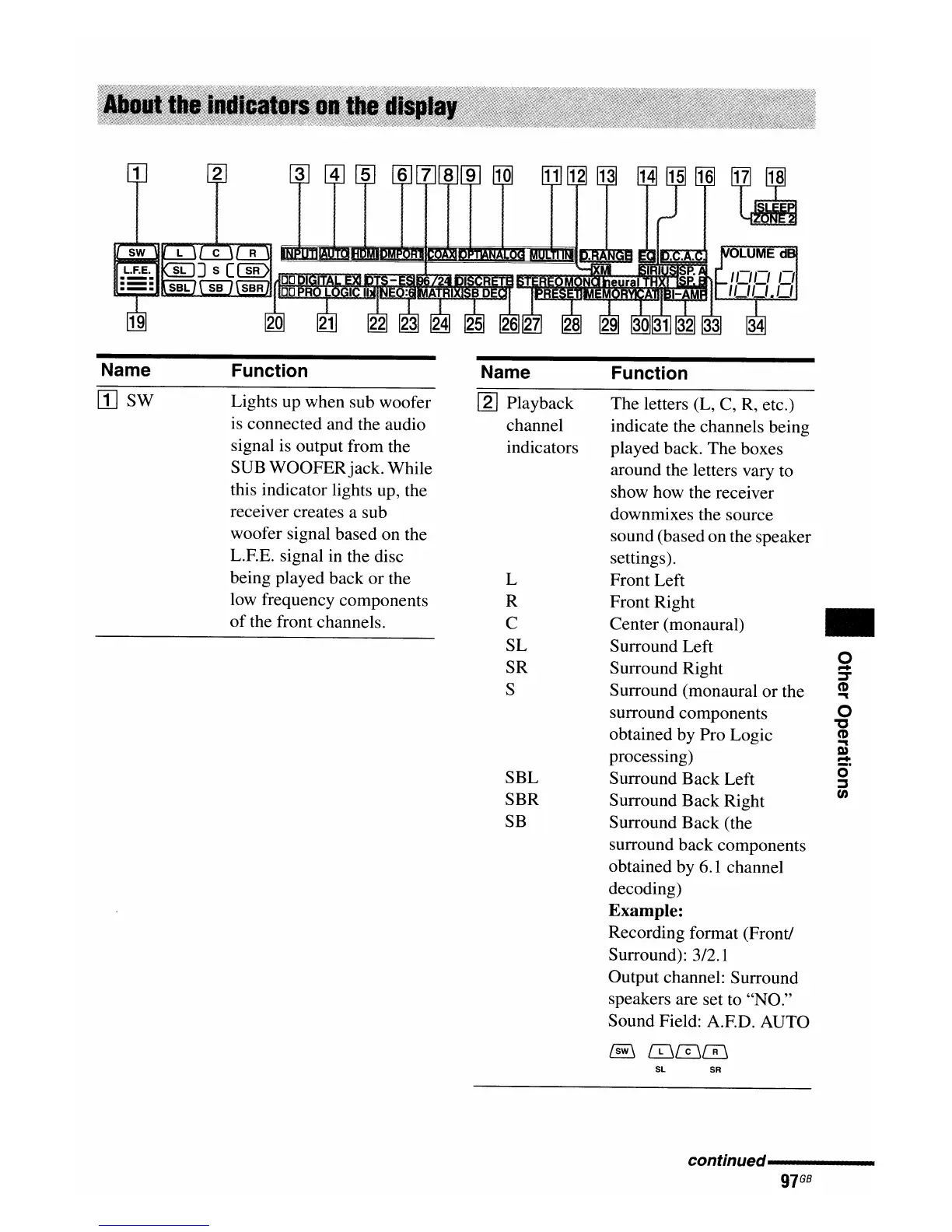
Name
[I]
SW
Function
Lights up when sub woofer
is connected and the audio
signal is output from the
SUB WOOFERjack. While
this indicator lights up, the
receiver creates a sub
woofer signal based on the
L.F.E. signal in the disc
being played back
or
the
low frequency components
of
the front channels.
Name
[2] Playback
channel
indicators
L
R
C
SL
SR
S
SBL
SBR
SB
Function
The letters (L, C, R, etc.)
indicate the channels being
played back. The boxes
around the letters vary to
show how the receiver
downmixes the source
sound (based on the speaker
settings).
Front Left
Front Right
Center (monaural)
Surround Left
Surround Right
Surround (monaural
or
the
surround components
obtained by Pro Logic
processing)
Surround Back Left
Surround Back Right
Surround Back (the
surround back components
obtained by 6.1 channel
decoding)
Example:
Recording format (Front!
Surround): 3/2.1
Output channel: Surround
speakers are set to "NO."
Sound Field: A.F.D. AUTO
@
[£j[IjeiJ
SL
SR
..
o
...
:::r
CD
'""
o
"'C
CD
'""
Q)
...
o·
:::J
en
conHnued----------
97
GB

















 To Next Page