Installation
12 (GB) Installation
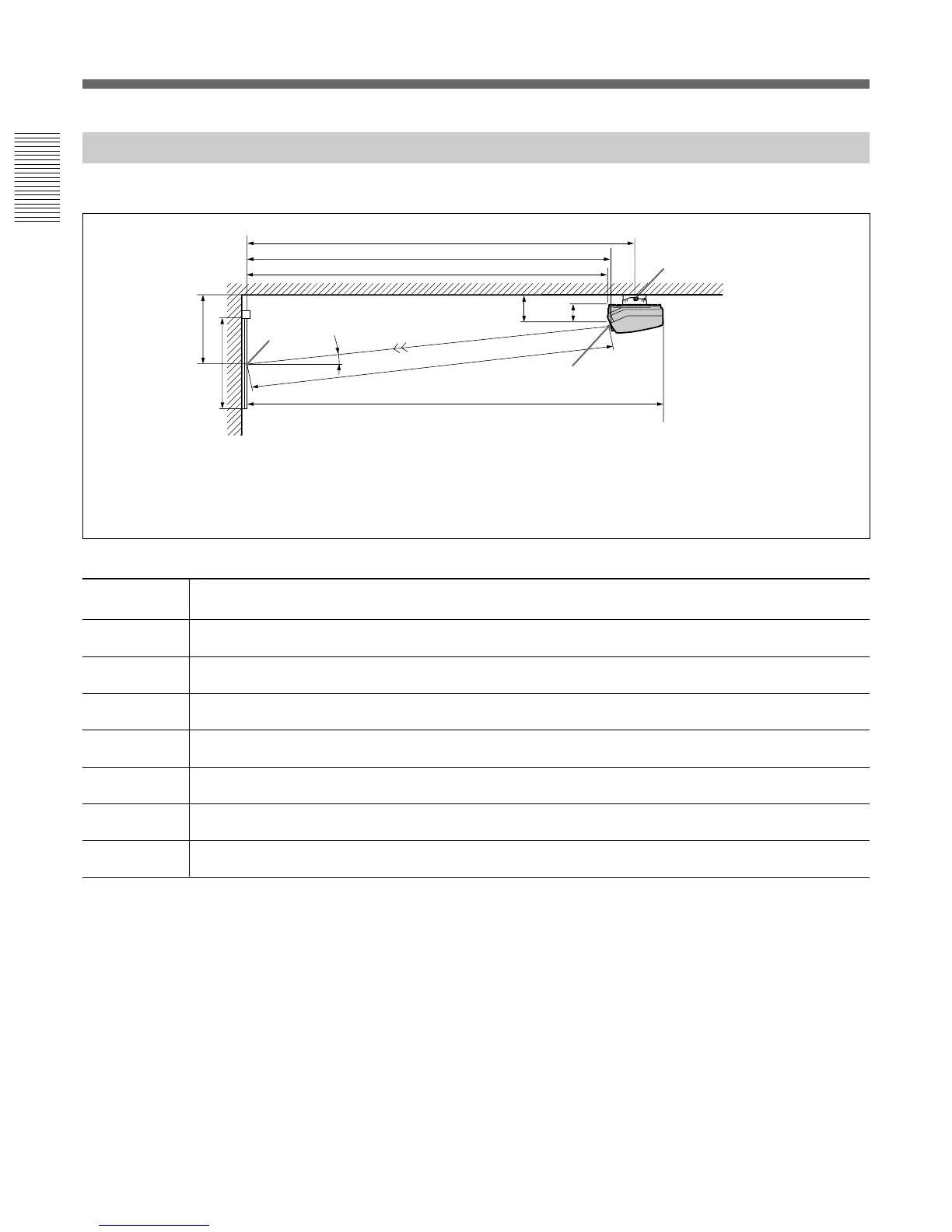
Ceiling Installation Using Front Projection Flat Screen
Use the PSS-70 Projector Suspension Support (not supplied).
E: Horizontal distance between the center of the screen and the center of the green lens
Tolerances
B: ±5%
Other measurements: 0% to +5%
Unit:mm (inches)
60 70 80 90 100 120 150 180 200 250
A (Vsize) 914 1067 1219 1372 1524 1829 2286 2743 3048 3810
(36) (42) (48) (54) (60) (72) (90) (108) (120) (150)
B (Hcent) 825 892 960 1027 1094 1229 1435 1640 1777 2120
(32
1
/2) (35
1
/8) (37
7
/8) (40
1
/2) (43
1
/8) (48
3
/8) (56
1
/2) (64
5
/8) (70) (83
1
/2)
D (TD) 1956 2240 2529 2816 3102 3673 4551 5425 6012 7466
(77) (88
1
/4) (99
5
/8) (110
7
/8) (122
1
/4) (144
5
/8) (179
1
/4) (213
5
/8) (236
3
/4) (294)
E (Xlens) 1902 2179 2459 2738 3016 3571 4424 5274 5844 7257
(74
7
/8) (85
7
/8) (96
7
/8) (107
7
/8) (118
7
/8) (140
5
/8) (174
1
/4) (207
5
/8) (230
1
/8) (285
3
/4)
F’ (Lpss) 2166 2442 2723 3001 3280 3835 4688 5537 6108 7521
(85
3
/8) (96
1
/4) (107
1
/4) (118
1
/4) (129
1
/4) (151) (184
5
/8) (218
1
/8) (240
1
/2) (296
1
/8)
G (Lmax) 2535 2812 3092 3371 3649 4204 5057 5907 6477 7890
(99
7
/8) (110
3
/4) (121
3
/4) (132
3
/4) (143
3
/4) (165
5
/8) (199
1
/8) (232
5
/8) (255
1
/8) (310
3
/4)
H (Lfront) 1864 2141 2421 2700 2978 3533 4386 5236 5806 7219
(73
1
/2) (84
3
/8) (95
3
/8) (106
3
/8) (117
3
/8) (139
1
/8) (172
3
/4) (206
1
/4) (228
5
/8) (284
1
/4)
Necessary parts modifications
Changing the polarity used for “Ceiling installation, front projection”
For details, see “Changing the Polarity” on page 20 (GB).
D
G
B
A
F’
Center of
the screen
Center of the green lens
Wall
Rotation axis of
the PSS-70
Ceiling
E
H
13.5˚
369(14
5
/8)
254(10)
Screen size
(inches)
Screen with 4:3 aspect ratio
Installation Diagrams



 To Next Page