Installation
14 (GB) Installation
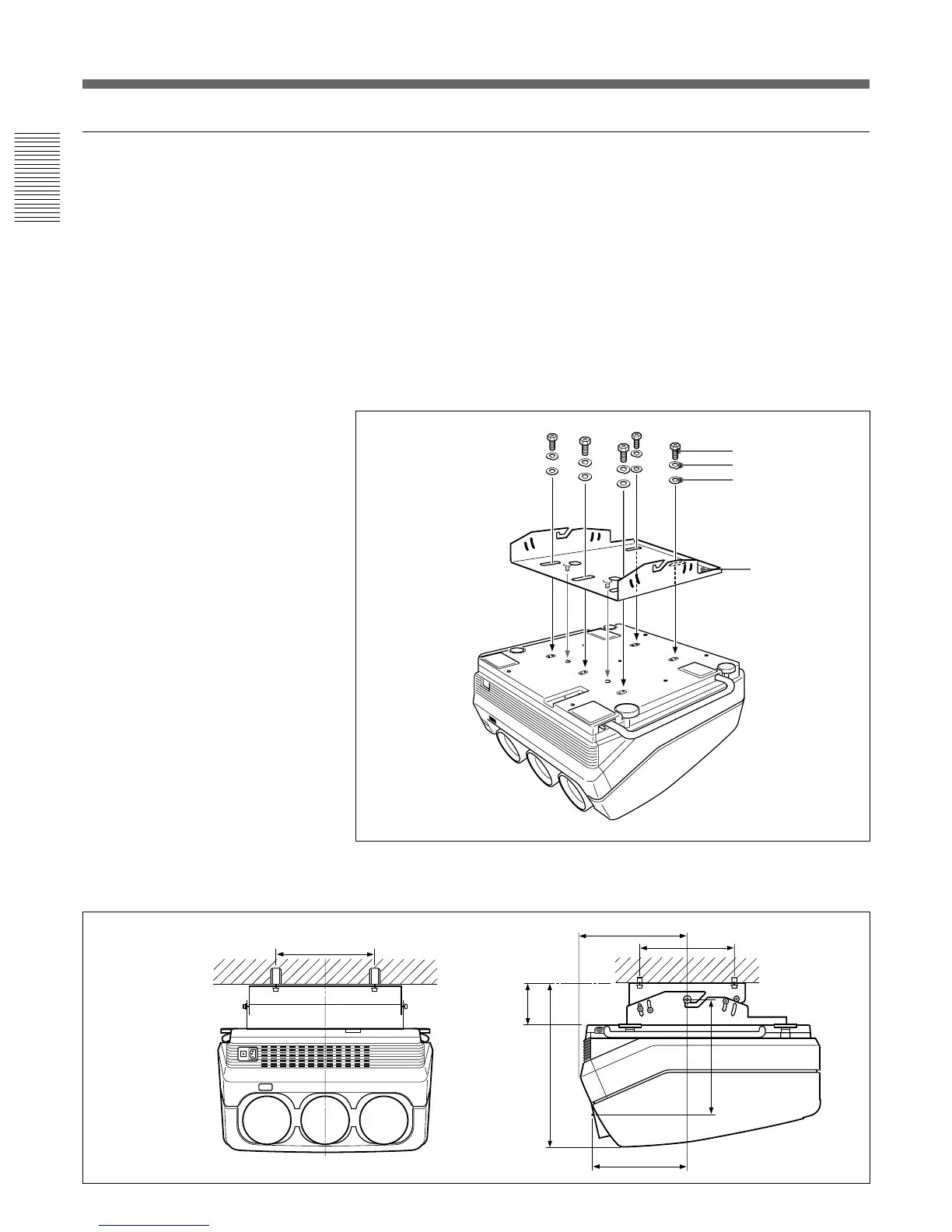
Attaching the PSS-70 Projector Suspension Support
Attach the projector mounting bracket to the bottom surface of the
projector.
Use five each of the M8×20 bolts, M8 washers and spring washers, all of
which are supplied with the PSS-70.
1 Align the two projections on the projector mounting bracket with the
receptacles on the bottom surface of the projector.
2 Fasten the five bolts and washers to fix the mounting bracket to the
five holes for attaching the PSS-70 on the bottom surface of the
projector.
For attaching the PSS-70 to the ceiling, refer to the Installation Manual of the
PSS-70 Projector Suspension Support.
M8×20 bolt
Spring washer
M8 washer
Projector
mounting
bracket
Installation Diagrams
Installation dimensions
263.8 (10
3
/8)
114.8 (14
17
/
32
)
254 (10)
254
(10)
301.8 (11
7
/8)
322.5
(12
11
/
16
)
457.4 (18)



 To Next Page